

Clinked has built a strong reputation as a secure, white-label client portal solution for organizations that need structured document sharing and collaboration tools.
In an era where collaboration tools have become increasingly essential for remote work (duh), Clinked serves as a centralized hub for document management, secure file sharing, and controlled access, particularly in industries like legal and healthcare.
Mostly used by accounting firms, legal practices, financial institutions, and even government agencies, Clinked offers all the essentials for secure client communication: file sharing, granular permissions, audit trails, two-factor authentication, custom branding, you name it.
Data security is clearly a top priority for the industries it serves, and Clinked offers a range of features that address compliance and access control needs.
As a platform that provides structured client workspaces, it also allows businesses to create controlled environments for client communication and client management.
Users clearly appreciate what it does well in those areas.
On G2, Clinked holds an impressive 4.8-star rating, with customers mostly praising its easy and secure file sharing.
One reviewer described it as:
“The platform helps present our agency in a polished, organized way while keeping sensitive information accessible only to the right stakeholders.”
But despite its strengths, Clinked isn’t the right fit for everyone. Obviously, otherwise we wouldn’t be writing this article about the top Clinked alternatives. 🤪
Why Businesses Look for Clinked Alternatives? Our Thoughts
Let’s dive a little deeper into Clinked’s cons, especially given us testing and reviewing the platform beforehand.
In our opinion, besides commonly mentioned limitations in customization options, lack of essential features, or even a steep learning curve (all on G2), finding the best fit for your specific business needs often means looking beyond what Clinked provides, especially when it comes to ease of use and a modern user interface.
But one major drawback of Clinked to highlight specifically may actually be the price.
Because it’s pretty dang expensive, especially when compared with similar platforms (which you’ll see in a sec).
Clinked’s Standard plan now starts at $299 per month, Premium at $599 per month, and that’s not even the highest-tier plan. Simple features, like role-based permissions or the possibility to sign NDAs (crucial for the industry Clinked targets) is only available from the VDR plan and up ($719 per month!).
This means features that help with basic workflow management and task management—things you’d expect from any modern management tool—are locked behind premium tiers, making affordable pricing difficult to justify for freelancers and small agencies.
Absolute pinnacle is reached with the Enterprise plan that mostly differs in the number of members, aka clients, it allows you to invite and collaborate with on the platform (1000). Custom price, but still limitations are imposed.
In our opinion, the second major point that is somewhat mentioned across G2 reviews, that could be major for users looking to switch from Clinked is its…unintuitive and dated-looking UI.
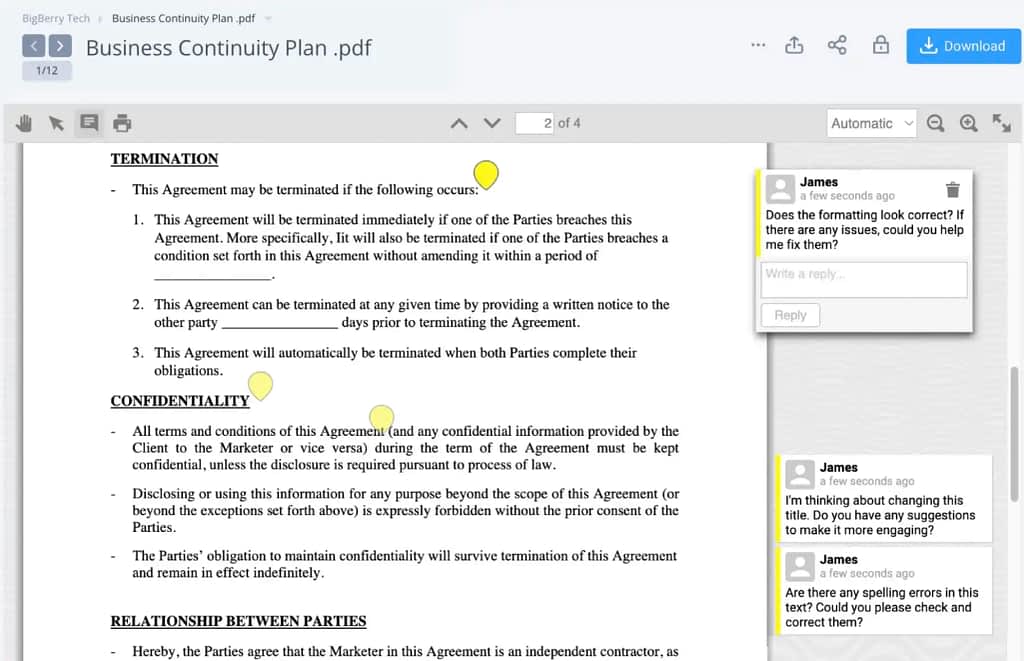
Some users mention it saying they struggled to learn the tool at first, saying things like:
“I think the learning curve was a bit steep for some of our team members, and it took a little extra time for them to get comfortable with the platform.” G2 review
And it can definitely be connected with what the tool looks like and how easy (or difficult) it is to therefore operate.
Top 3 Clinked Alternatives: Table Overview
So, what we propose is three clinked alternative options.
Whether you’re looking for a replacement for clinked, a free client portal, or a fully customizable customer portal that fits your business needs, explore top picks below or find the perfect match in our breakdown:
- A complete client portal with billing and service delivery tools that’s secure, white-label, way cheaper, and way less limited. A comprehensive solution with automation features, onboarding workflows, and branded client portals built in too.
- An alternative for those who focus on secure document sharing only.
- A fully customizable portal you can build without coding that bases the app building on your existing databases, like Google Sheets or Airtable.
Compare in the table below for an easy overview, or dive right into the detailed comparison after it.
| Category | Clinked | Zendo | Notion | Softr |
|---|---|---|---|---|
| Core idea | Fixed, secure client portal | All-in-one client portal + service delivery system | DIY workspace for building your own portal | No-code portal builder on top of databases |
| Setup approach | Pre-built structure | Pre-built but highly customizable portal | Fully manual build or customized templates | AI-assisted + database-driven setup |
| Ease of setup | Medium (some learning curve) | Easy(structured out of the box) | Easy-medium(lots of manual building) | Easy–medium(AI helps, but logic gets complex later) |
| Best for | Secure document sharing in structured orgs | Agencies selling + delivering services end-to-end | Teams that want full DIY flexibility | Teams already using structured data tools |
| Real-time chat | ❌ | ✅ | ❌ | ❌ |
| File sharing | Strong, secure | Strong + contextual in chat | Strong, page-based | Strong via connected databases/tools |
| External integrations | Limited / via Zapier | Native + embedded apps (no Zapier needed for many cases) | Strong ecosystem but manual setup | Strong (Airtable, Notion, APIs, SQL, etc.) |
| UI & design | Functional but dated | Modern, clean, fast | Clean but utilitarian | Very modern, polished, app-like |
| Cost (starting from) | Starting from $299 | $0 | $0 | $49/month |
| Unlimited customers | ❌ | ✅ (all plans) | ⚠️ (technically yes via guests, manual management) | ⚠️ (limited by app user tiers, e.g. ~10–500 depending on the plan) |
1. Zendo
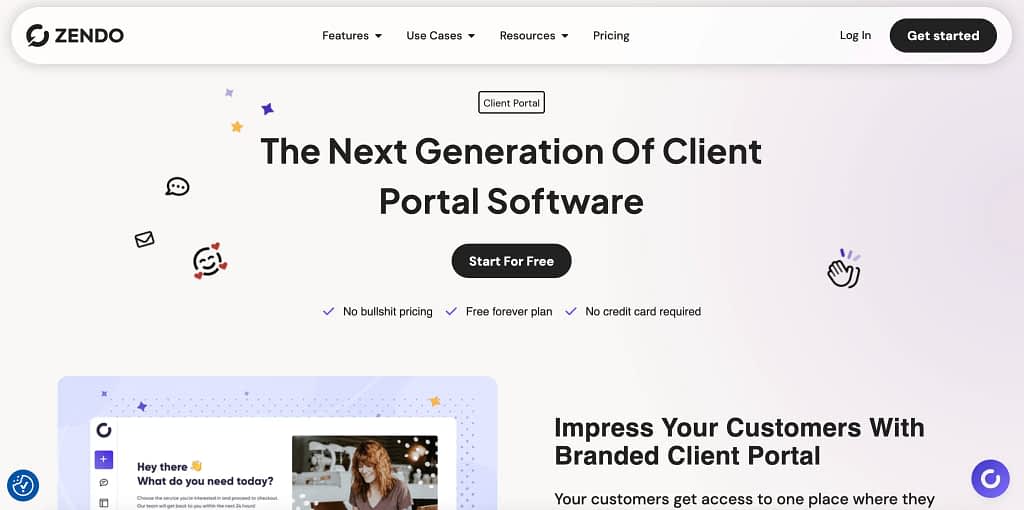
Zendo, the first alternative to Clinked on our list, is a client portal platform that’s fully customizable with many white-label options, advanced collaboration features, complete data security, all for a fraction of the pricing Clinked requires.
It’s a feature-rich, comprehensive collaboration platform and arguably the best fit for agencies that want to streamline their entire service delivery.
Which is why (although we’re a little biased being from the Zendo team 😉), we’ve put this particular platform as the number one Clinked alternative.
Let’s dive into some more details, though.
The Price Difference
Starting with the biggest difference between the two: pricing.
For many businesses, pricing is the main reason to look beyond Clinked.
Because Clinked in terms of raw cost simply doesn’t compete with modern platforms designed to enhance client experiences at affordable pricing. When you integrate billing, onboarding, and client communication into one tool, the value gap widens even further.
The Standard plan starts at $299/month and includes up to 100 members and 1 TB of storage. If you need more advanced permissions, enforced two-factor authentication, or role-based access controls, you’ll need the Premium plan at $599/month.*
Update: Clinked recently added a new Start Up plan at $11/user/month. It’s slightly more flexible than the fixed Standard plan, but costs still climb quickly as your customer base grows.
In turn, Zendo’s pricing starts with a totally free plan (Essential) that comes with no time limits, many client portal features, and even then: unlimited clients and requests.
Paid plans begin at:
- Core: $29/month
- Pro: $59/month
- Agency: $99/month
With these, you get access to its many white label tools, custom order forms, Storefront, quotes and invoices, 5 TB of storage (Agency plan), the possibility to connect external apps, and more.
Even Zendo’s most advanced Agency plan at $99/month costs $200 less per month than Clinked’s entry-level plan.
This makes Zendo an obvious contender among customizable client portals, especially so for teams that want to manage projects, collaborate with clients, and handle billing without a steep learning curve or an enterprise price tag.
But the pricing gap becomes even more striking when you compare features.
Clinked focuses on:
- Secure document sharing
- Audit trails
- Permission controls
- Team collaboration
Zendo includes all of the ‘client portal’ and collaboration essentials above, plus everything you’d ever need for selling and delivering services online, plus a set of features useful in organizing how your business works day-to-day.
Unlimited Customers
Clinked’s Standard plan includes up to 100 members.
For many agencies, this becomes restrictive as the business grows.
All Zendo plans include unlimited clients and requests, meaning your monthly cost does not increase as your customer base grows, making pricing much more predictable.
This is especially valuable for businesses with:
- Many active clients
- Large customer bases
- Productized service models
Customize Fully
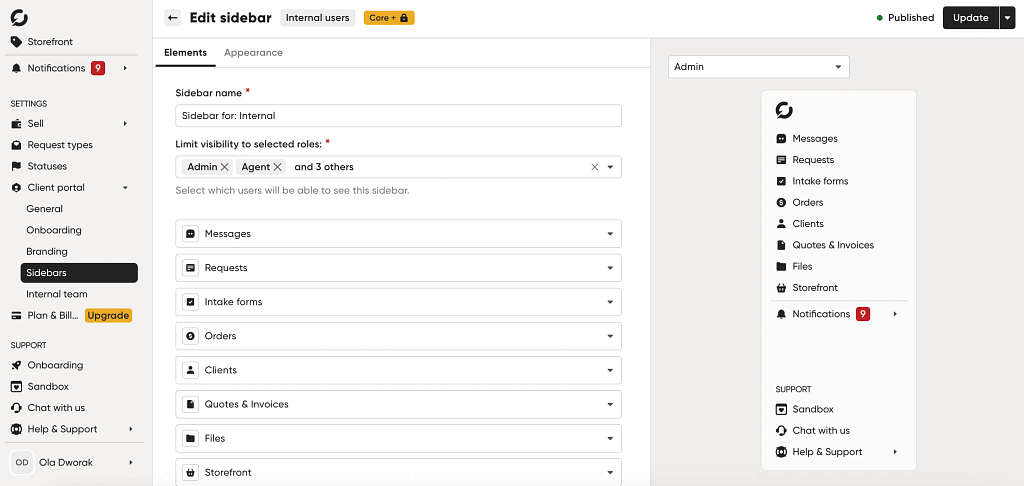
A white-label brand experience should feel like an extension of your own business, of course. The ability to tailor every element—from colors to sidebar sections—is what separates a true white-label portal from one that merely slaps your logo on a fixed template.
Both Clinked and Zendo’s white label features let you customize your portal with your branding, but the level of flexibility they offer is very different.
Clinked offers more customization than many traditional client portals. You can upload your logo, connect a custom domain, change terminology, and configure dashboard widgets to control what appears on the homepage.
However, not every user is satisfied with their customization options.
For a platform built around serving enterprise clients in compliance-heavy sectors, the relatively limited ability to tailor the user-friendly interface is a recurring frustration.
Limited customization is quite frequently mentioned throughout Clinked’s G2 reviews, with users saying things like:
- “While Clinked is strong as a client portal, some advanced customization options and integrations are more limited compared to larger enterprise platforms.” G2 review
- “It would be better to have more design options.” G2 review
- “While the current setup is functional, more flexibility in personalizing the workspace for individual users would be helpful.” G2 review
Zendo takes customization a step further.
Instead of simply rearranging widgets within a fixed layout, Zendo lets you design the entire client experience.
When setting up your workspace, you’re not just deciding which logo to display.
You’re designing the actual client experience, from the external apps connected to the colors of the buttons.
Re-Design The Customer Experience From The Ground Up

At the center of that experience is Zendo’s sidebar customization. This is where you choose what clients see when they log in and how they move through the portal.
You can add sections for files, chat, invoices, services, onboarding forms, and custom pages. You can also embed tools like Figma, Google Sheets, Calendly, or Loom directly inside the portal.
Each section can be renamed, reordered, assigned a custom icon, and shown or hidden depending on the client.
What makes this especially powerful is that the setup doesn’t have to be the same for everyone.
A new client who just purchased a service might land in a streamlined onboarding portal with a welcome message, intake form, and kickoff scheduler.
A long-term retainer client might see project requests, shared files, invoices, and a real-time chat. A design client could have Figma prototypes and feedback pages embedded directly into their workspace.
Build Individual Notification Systems Too
Notifications are one of those features you only notice when they become annoying.
And for some Clinked users, that seems to be exactly the issue.
As one G2 reviewer noted:
“I believe the notification system could be more customizable, allowing for better control over which updates are prioritized, which would help in managing large, complex projects more effectively.”
Zendo gives you much more flexibility in this realm too.
You can configure notification preferences separately for internal teammates and clients, with more than a dozen notification types available for each delivery channel.
Notifications can be sent via email, in-app alerts, and browser notifications, so users themselves can choose how they want to stay updated.
Zendo also supports email replies, which means clients can respond directly from their inbox without logging into the portal. Quotes and invoices are automatically delivered as PDF attachments, keeping billing communication consistent and professional.
The result is a notification system that adapts to your and your customers’ individual workflows rather than interrupting them all.
Connect External Apps (No Need for Zapier)
Clinked lets you connect with external apps…with Zapier, though.
Which acts as the bridge between Clinked and other tools like Google Sheets, QuickBooks, Typeform, Zoom, and more.
That means you can absolutely automate workflows, but you’re relying on an extra layer in between, which can add complexity, setup time, and cost depending on your Zapier plan.
Zendo takes a more direct approach.
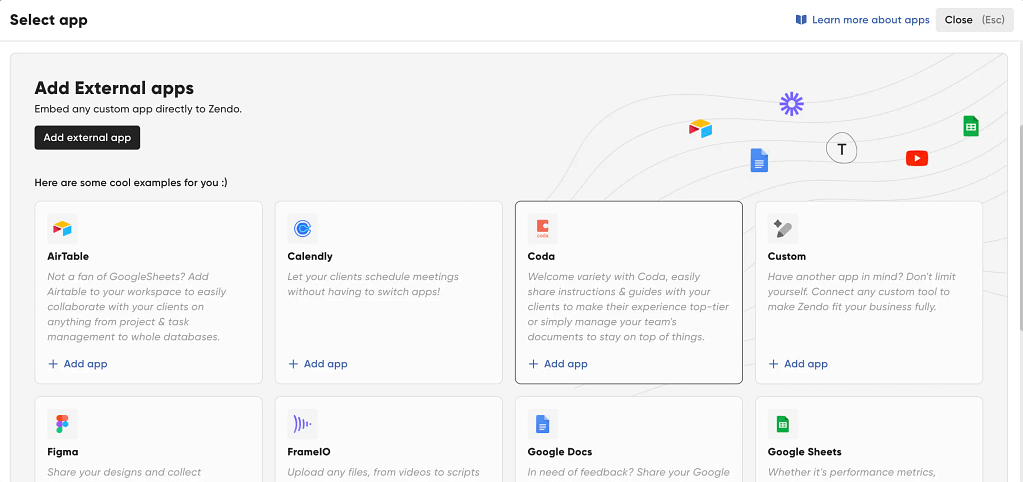
Instead of requiring Zapier for most use cases, it allows you to embed external apps directly inside the client portal.
Tools like Figma, Google Docs, Airtable, Calendly, Notion-style documents, videos, and forms can be added as native sidebar elements using simple links or iFrames.
Modern Interface, Easy Set Up
Now, let’s talk shallow stuff, which for SaaS tools is actually quite important, hindering (or not) the user experience: the interface.
For Clinked, you’ll definitely noticed that the interface is pretty outdated, like these users did on G2:
- “The interface looks a bit outdated, but it’s clean and simple enough to understand and still looks professional so it’s no big deal.” G2 review
- “The design of this product is very outdated. I think the team should work hard to improve the overall UI. Sometimes, I also feel the servers are a bit slow while trying to upload big files.” G2 review
Zendo was designed specifically for modern service businesses, and it shows.
The interface is cleaner, easier to navigate, and faster to configure.
Instead of a widget-heavy, enterprise-style layout, it focuses on a cleaner structure that prioritizes speed of setup and ease of navigation with a brilliantly designed UI.
Which all leads to a nicer user experience in the end and a client portal you’re not ashamed to share with the customer.
Organize Your Work and Collaborate
Instead of relying on scattered email threads, tickets, or external messaging tools, Zendo brings communication directly into the same place where work actually happens.
Real-Time Chat
Clients and teams interact through a real-time chat built around individual requests, which keeps every conversation tied to context while ensuring secure messaging. No switching tabs, no lost threads, and no “reply-all” chaos.
This is something Clinked users mention as needing a bit improvement, like this user on G2 saying:
“Chat feature has some room for improvement. For example, there is no search function.”
Or this one:
“The chat feature is somewhat basic and could be improved by adding visual sharing capabilities.” G2 review
With Zendo, chat is the absolute center of the whole collaboration. You can truly chat in real time, all without the delays or need for refreshing the page, which many client portal platforms require.
Built-in Context
What makes this setup more powerful than basic messaging, though, is how tightly it connects to your workflow.
You can assign multiple teammates to a single request, add internal private notes that are invisible to clients, and use statuses to show exactly where a task stands—all within the same conversation stream.
File sharing is built directly into this collaboration layer too.
Instead of uploading documents to a separate storage system and then linking them elsewhere, you can attach files straight to conversations or client requests. Collaborate on files and exchange ideas in a single chat.
Of course, if that’s not your preferred way of working, you can still upload assets, organize client-specific folders, and share updates in dedicated space for each customer or upload files as separate tabs with the Google Docs or Figma integration. 😉
Visualize The Work To Be Done Your Way
Now, instead of treating tasks as static items buried inside a request thread, Zendo lets you visualize work as a flow of cards moving through different stages.
Each status in the system effectively becomes a column in your Kanban-style workflow, so you can see exactly where every client request sits at a glance—whether it’s newly submitted, in progress, waiting on feedback, or completed.
If Kanban’s not doing it for you, you can view everything in a list of table formats too.
Sell if You Want To
Clinked is primarily a client portal for collaboration and secure information sharing, but it doesn’t extend into the actual commercial layer of service delivery.
In other words, you can manage clients and documents, but you still need separate tools to sell services, collect requirements, and handle billing workflows.
With Zendo, you can sell if you want to.
Zendo combines client portal functionality with a full service-selling system.
Instead of just organizing work, you can actively package and sell it in multiple formats—productized services, subscriptions, or fully custom offerings tailored per client.
Each service can be connected to structured order forms, intake flows, and even add-ons or quantity-based options, allowing clients to customize what they’re buying before work even begins.
Once an order is placed, Zendo can automatically generate quotes, trigger payment requests, and issue invoices without switching tools.
This creates a continuous flow from “client request” to “paid service” to “delivery,” all inside one system—something Clinked is not designed to handle natively.
Of course, if you want to use Zendo as just a client collaboration space, you still have all the tools you need.
But if you ever want to branch out…you can, under one SaaS bill.
2. Notion
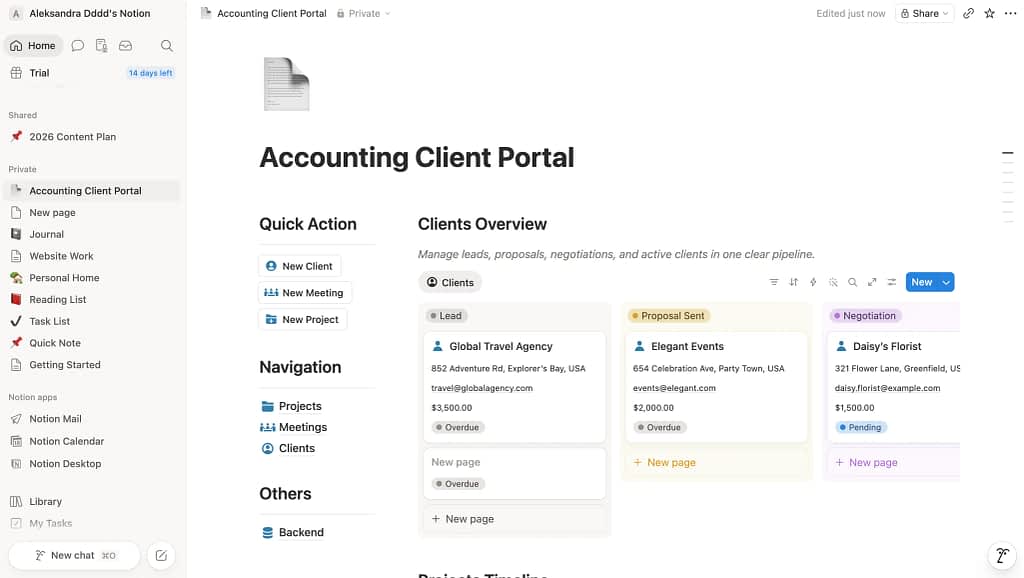
Notion is one of the most flexible tools you can use if you’re thinking about building a client portal—but it’s also the most “do-it-yourself” option on this list.
At its core, Notion is a powerful workspace for creating pages, databases, and connected systems. That means instead of getting a ready-made client portal, you’re essentially given building blocks and asked to design one yourself.
For some teams, that’s exactly the appeal.
You can create custom pages for each client, build databases for quotes, invoices, or project tracking, and organize everything into a structured workspace that feels like a full client portal.
One client might have a document hub, another a content calendar, another a project dashboard—all built from scratch using the same tools.
Customizable Pages With Easy Editing
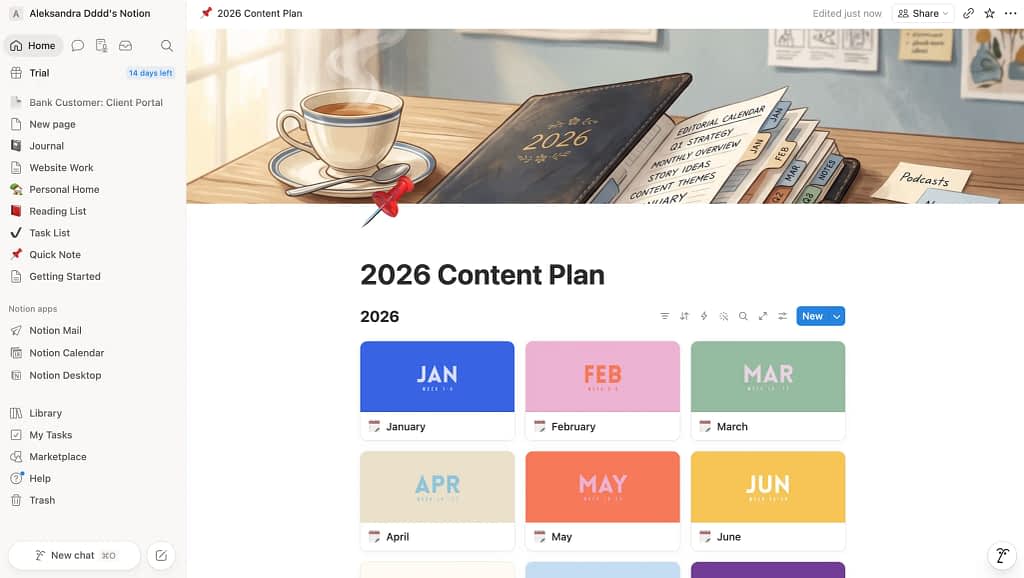
Notion customizable pages is the absolute core of this platform and this is where Notion really shines.
Creating new pages is fast and intuitive, and the drag-and-drop editor makes it easy to structure content exactly the way you want.
You can combine text, tables, databases, checklists, embedded videos, and forms into a polished client workspace without needing any technical skills.
Made a mistake?
Not to worry. You can easily move things around and drop them where they should actually live.
So this is the tool you’d use to build (quite literally) your own client portal, page by page.
Like a separate page for a table database for quotes and invoices for this client, a page for reviewing shared documents for a different client, a social media calendar for another.
You get it.
To make it a little bit easier, there are lots of templates available, so you don’t have to start from scratch always. But you still have to take the time to make these your own.
More advanced templates are of course locked behind a payment gate.
Easy Document Sharing
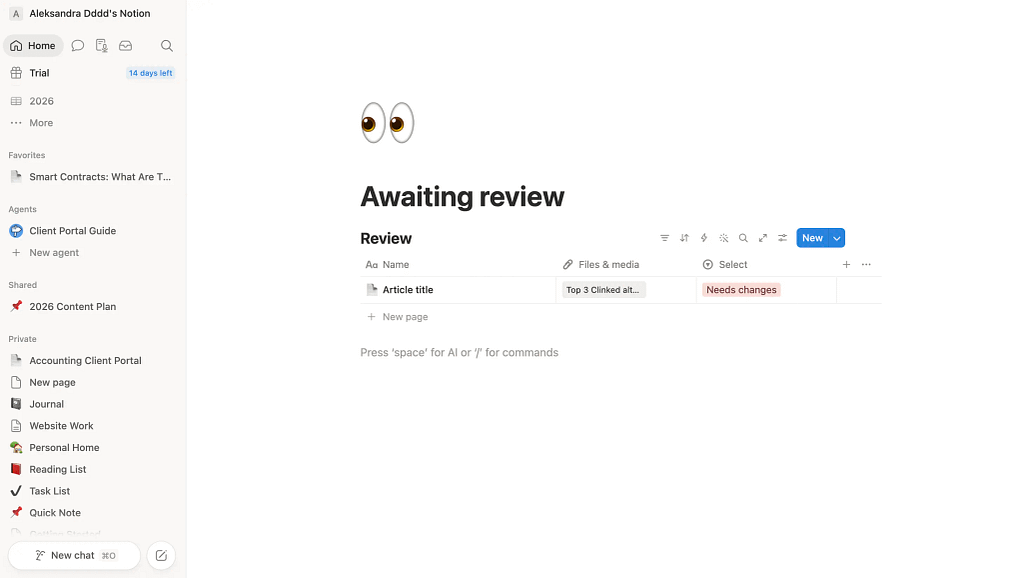
Notion makes sharing documents with clients incredibly simple.
You can invite clients as guests and control exactly what they can view, comment on, or edit.
Sharing a project brief, SOP, onboarding checklist, or meeting notes takes just a few clicks. Since everything lives in one connected workspace, clients can easily navigate between pages and always access the latest version of your documents.
For businesses that primarily need a secure and organized way to share information, Notion covers the essentials extremely well.
Lots of Manual Work, Though
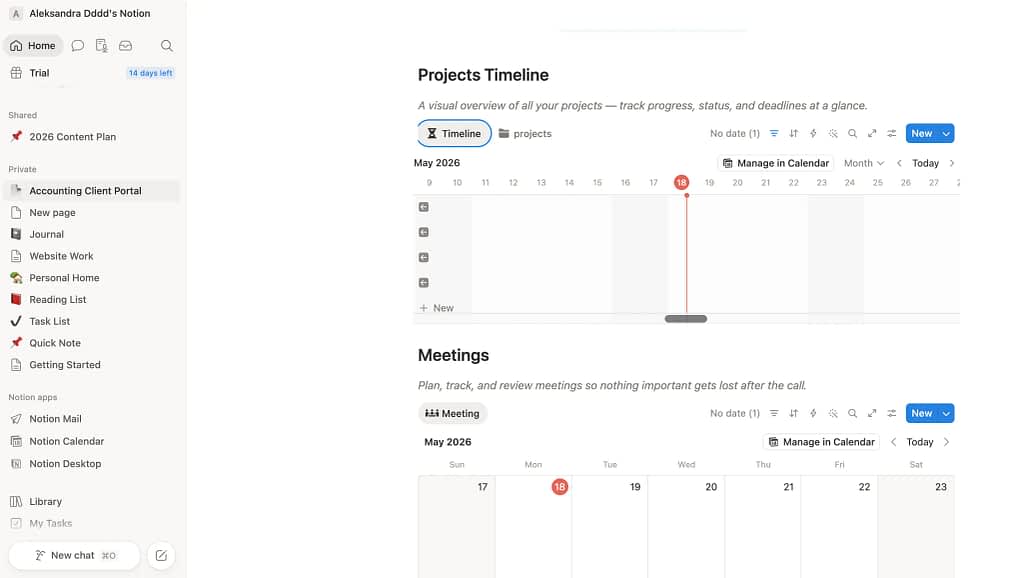
The tradeoff is that Notion is not a ready-made client portal.
You have to build the structure yourself, set up permissions, create navigation, and maintain the workspace over time.
As your client base grows, keeping everything organized can become a project of its own. You may find yourself spending a surprising amount of time creating pages, tweaking databases, and clicking through permission settings.
In other words, Notion gives you a highly flexible set of building blocks—but you’re the architect, builder, and maintenance crew.
If you enjoy designing systems, that can be fun. If not, well…you may look into something different.
Communication Through Comments Is…Not Exactly Real Time
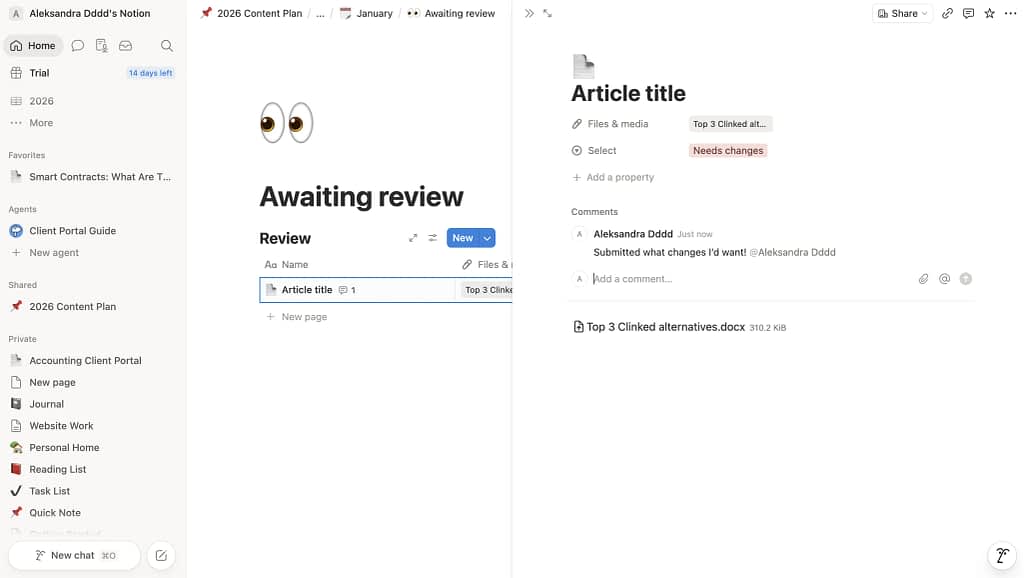
Notion was built for documents, not conversations.
Clients and team members can leave comments on pages, mention one another, and receive email notifications when something changes. That works well for occasional feedback, but it’s not the same as having a dedicated real-time chat.
There’s no centralized conversation thread tied to a client request, no read receipts, and no built-in way to manage back-and-forth communication the way you can in purpose-built client portal software.
As a result, discussions can become scattered across multiple pages and comment threads.
Notion AI Agents
Notion’s AI Agents are an interesting addition if you imagine turning Notion into a client portal, but they don’t really change its core structure.
In theory, you could use them to automatically answer client questions, generate status updates, route incoming requests into databases, or summarize project progress across pages and workspaces.
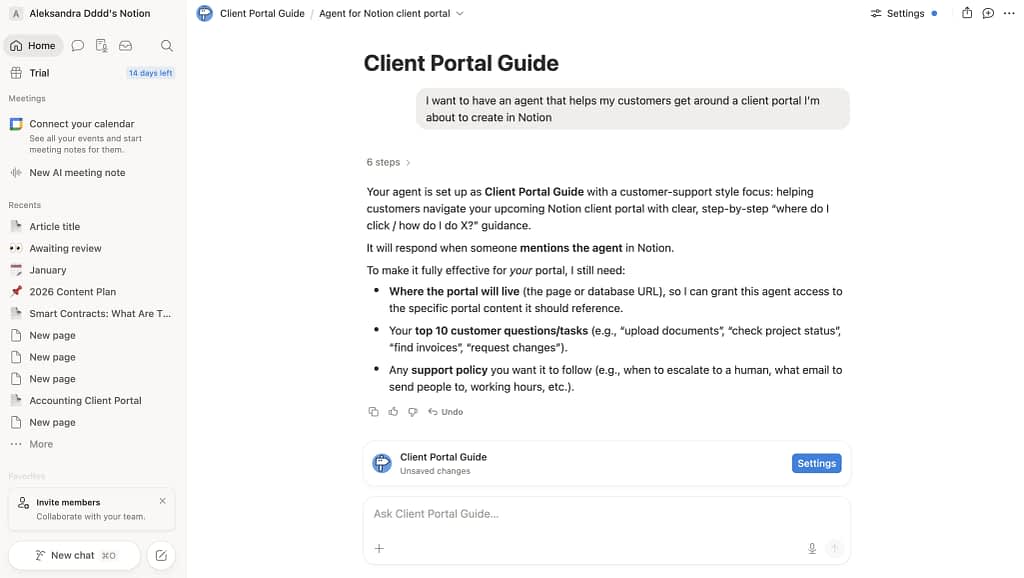
For instance, you can set up a customer support agent that will help your customers navigate the client portal you’ve set up in Notion.
“Your agent is set up as Client Portal Guide with a customer-support style focus: helping customers navigate your upcoming Notion client portal with clear, step-by-step “where do I click / how do I do X?” guidance.
It will respond when someone mentions the agent in Notion.”
That sounds powerful—and in some internal workflows it is—but it still operates on top of a system you’ve manually built.
The agents rely on your existing pages, databases, and permissions, so you still need to design the entire client portal structure first before they can “do” anything useful.
Much More Affordable
If your primary goal is to securely share documents with clients, Notion is dramatically more affordable than Clinked.
Clinked’s pricing starts at $299 per month, regardless of whether you need all of its enterprise-grade features. That includes 100 members and 1 TB of storage, which is useful for large organizations but often far more than smaller agencies and service businesses require.*
Update: Clinked recently added a new Start Up plan at $11/user/month. It’s slightly more flexible than the fixed Standard plan, but costs still climb quickly as your customer base grows.
Notion, by contrast, offers a generous free plan, while paid plans start at just €11.50 per user per month (around $13). Even Notion’s Business plan, which adds advanced permissions, audit logs, and SAML SSO, costs €23.50 per user per month.
For a small team of three to five people, Notion typically costs between $0 and $70 per month, making it anywhere from 4 to 20 times cheaper than Clinked, depending on your setup.
That means if you mainly need a secure place to share onboarding materials, SOPs, project updates, and internal documentation, Notion delivers the core functionality of Clinked at a fraction of the price.
Notion’s pricing is especially attractive if you work with many clients.
Unlike Clinked, which charges $299/month regardless of usage, Notion only charges for your internal team members. Clients can be invited as guests with view, comment, or edit permissions at no additional cost.
So even if you work with 50 clients, you might still pay as little as $10–$20 per month, making Notion dramatically cheaper than Clinked for businesses that primarily need secure document sharing.
3. Softr
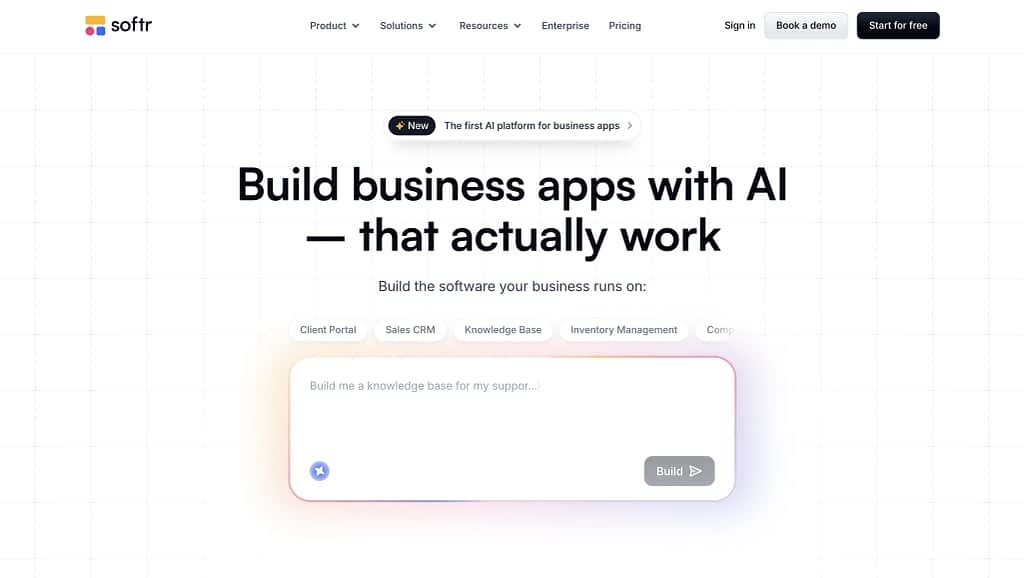
Softr sits in a very different category compared to traditional client portal tools—it’s less of a fixed system and more of a build-your-own layer on top of your existing data. You can go for virtually any system, from mobile apps that serve as a CRM or a client portal for your accounting firm.
If Clinked gives you a ready-made structure, Softr gives you the parts and asks you to assemble the system yourself, but in a much more modern and increasingly AI-assisted way.
You describe what you want to build in a short chat, answer a few guided questions, and the platform generates an initial working version of your app automatically.
It’s a noticeably smoother onboarding experience than most no-code tools, and it removes a lot of the initial friction that usually comes with building client portals from scratch.
Under the hood, Softr is heavily dependent on external data sources rather than being a standalone system.
It connects to tools like Airtable, Notion, Google Sheets, SmartSuite, Xano, Monday.com, and more advanced setups like Supabase, SQL databases, and REST APIs, with additional integrations such as HubSpot or ClickUp on higher-tier plans.
This is powerful if you already operate inside these ecosystems, because you can turn existing spreadsheets or databases into polished client portals without rebuilding everything.
But if you don’t…it can just as easily become another layer of complexity in your stack. Essentially, another system to maintain, sync, and manage rather than a true simplification.
See exactly how it compares below.
From Lego Blocks to AI Building The App
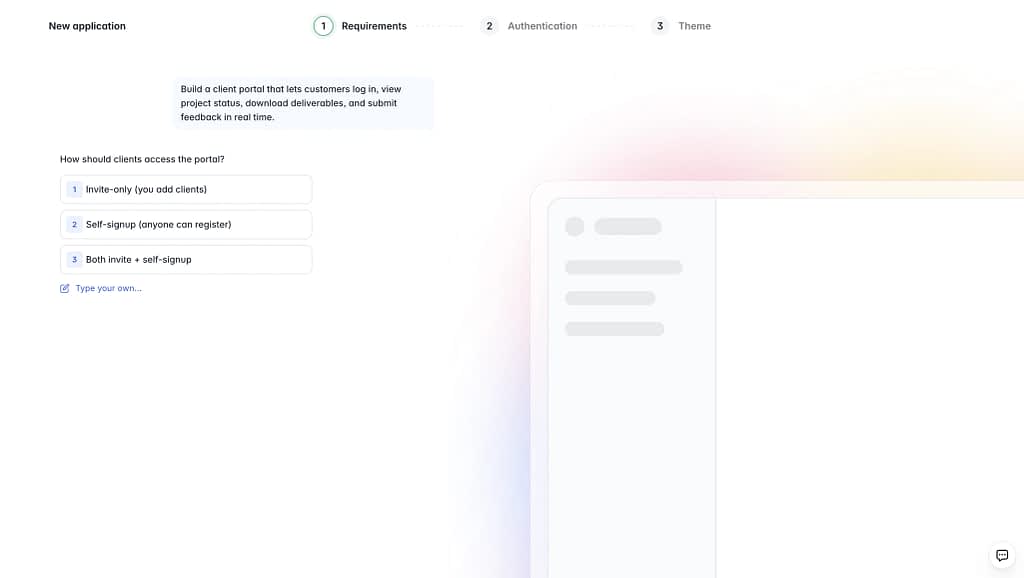
One of the biggest shifts in Softr is how you actually build the app itself.
Instead of starting from a blank canvas and manually assembling everything with blocks, the experience now begins directly from the homepage with an AI-driven setup flow.
You’re essentially guided through a short chat where the system asks a few simple questions about what you’re trying to build, and then generates a working app structure for you automatically.
Just some time back, building the client portal with Softr was like “building Lego pieces”, now it’s more like describing what you want and watching the first version of it appear.
Kudos to the Softr team because that was extremely easy to get started.
What stands out is how polished the initial output already is too.
The login pages, dashboards, and client-facing screens don’t feel like raw scaffolds—they look like real products from the start.
In our case, everything was pre-filled with dummy data, which actually made it easier to understand how the structure works without needing to connect real datasets immediately. It lowers the barrier quite a bit compared to traditional no-code builders where you’re often staring at empty components.
There’s also a strong focus on responsiveness and previewing. You can instantly switch between desktop and mobile views, which makes it easy to see how the client experience will actually feel across devices.
You can also scan a QR code or share a link with yourself via email to test the app you’ve built directly on your device! Super cool.
Based On External Databases
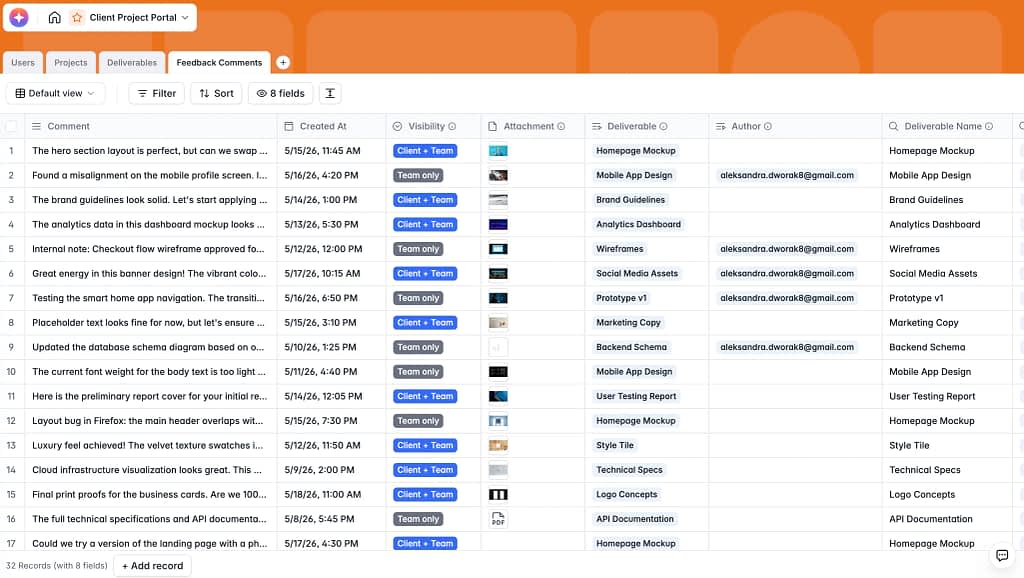
Softr doesn’t really function as a standalone system—it sits on top of other tools you’re already using.
It connects to platforms like Airtable, Notion, Google Sheets, SmartSuite, Xano, and Monday.com, and can also work with more advanced setups like SQL databases, REST APIs, and Supabase. On higher-tier plans, you’ll also find integrations with tools like HubSpot, ClickUp, Coda, and BigQuery.
This setup is great if you already live inside these ecosystems.
For example, if your client data is already structured in Airtable or your project tracking happens in Google Sheets, Softr can turn that into a clean, client-facing portal without much duplication.
But if you’re not already using these tools, it can quickly become another layer in your stack rather than a simplification. Instead of replacing systems, Softr often adds one more piece to manage—another interface, another data source, another place where things can break or need syncing.
So while the integrations are powerful, they really shine in existing “data-heavy” setups. For everyone else, they can feel like extra complexity on top of an already fragmented workflow.
Google Sheets On Steroids
At its core, Softr feels like project management taken to what might be its final evolution form—almost like Google Sheets on steroids.
You’re no longer just looking at rows, columns, and basic dashboards; instead, you’re building fully interactive client-facing systems that sit on top of structured data and turn it into something that looks and behaves like a real application.
But the tradeoff is that collaboration with customers still isn’t truly “native” in the way purpose-built client portal tools handle it.
There’s no real-time chat layer, no unified conversation thread tied to a request, and no natural back-and-forth flow with clients. You can stretch it beyond the typical “database prison” by building workflows, interfaces, and logic on top—but that comes with effort.
A lot of the real power only appears after you invest time into setting everything up properly.
And even then, it doesn’t always feel fully complete in the way an out-of-the-box client portal does.
Workflows That Aren’t Opening Up That Easily
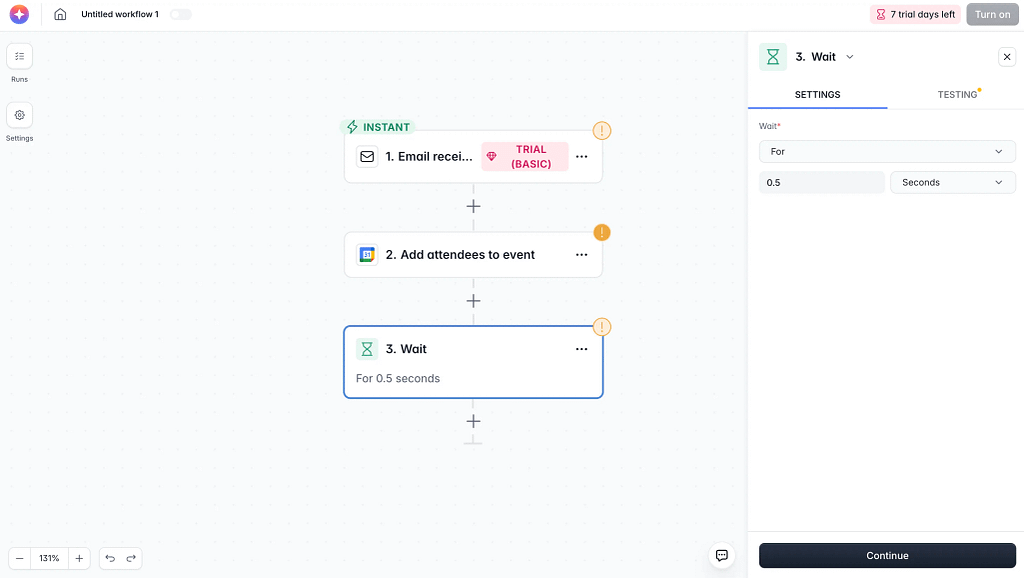
The Workflows section in Softr looks very clean and modern at first glance, almost deceptively simple given how much it claims to handle.
The visual builder, drag-and-drop blocks, and neatly structured interface give the impression that you’re about to assemble fairly complex automations without much friction.
And for basic use cases—like sending notifications, updating records, or triggering simple actions—it actually feels very intuitive.
Where things get a bit less straightforward is when you try to build anything more advanced.
Once you move beyond simple linear flows, the logic starts to feel less immediately obvious than the UI suggests.
Branching, conditions, loops, and multi-step dependencies are all there, but mentally mapping them into a coherent system takes more effort than expected.
It’s powerful, but not always self-explanatory in our opinion.
Cheaper Than Clinked, But Limits Customers Too
Softr’s pricing looks simple at first glance, but in practice a lot of the “real” functionality only becomes available once you move into higher tiers. The Free plan is fine for experimenting, but it’s tightly constrained—10 app users, 5,000 database records, limited workflows.
That’s usually enough to test ideas, but not to run anything client-facing at scale.
The jump to Basic ($49/month) starts unlocking more serious usage, but even here you’re still dealing with relatively small limits and a fairly narrow feature set.
Things like larger user bases, more advanced workflows, and meaningful scalability only really open up in the Professional and Business tiers ($139 and $269/month), where you also start getting access to more data sources like monday.com, Supabase, ClickUp, and various databases and APIs.
The catch is that some of the more “complete” portal-building capabilities—higher user limits, advanced permissions, heavier automation, and broader integrations—are gated behind those higher plans.
Clinked gives you ~100 members at ~$299/month, while Softr gives you up to ~100 users at ~$139/month (Professional) or ~500 users at $269/month (Business), depending on how you structure it.*
Update: Clinked recently added a new Start Up plan at $11/user/month. It’s slightly more flexible than the fixed Standard plan, but costs still climb quickly as your customer base grows.
The key difference is not cost per se, but how that cost is distributed—Clinked charges for a finished, opinionated, but old-fashioned system, while Softr charges for a flexible build layer where scalability comes from your own setup rather than predefined portal structure in a more modern way.
Why Choose Clinked, When You Can…
Why pay $299/month for a file-sharing portal when you can:
- run your entire client experience in Zendo,
- share documents through Notion for a fraction of the cost,
- or build a custom portal in Softr?
Clinked is a strong, security-focused client portal built for structured document sharing, compliance-heavy workflows, and controlled collaboration. It’s trusted by industries like legal, finance, and government—but that structure comes at a cost: high pricing, limited flexibility, and a dated user experience.
For teams looking for more modern or cost-effective alternatives, three clear options stand out.
Zendo is the closest “upgrade” to Clinked, combining client portal functionality with service delivery, billing, and real-time collaboration. It’s built for businesses that don’t just want to share files, but actively manage and sell services end-to-end in one system.
Notion takes the opposite approach: extreme flexibility at a very low cost. It’s ideal for document sharing and lightweight client workspaces, but requires significant manual setup and doesn’t offer native real-time collaboration.
Softr sits in between as a modern no-code app builder. It’s best for teams that already use structured data tools like Airtable or Google Sheets and want to turn them into polished client-facing portals. It’s powerful, but quickly becomes complex once workflows and logic scale.
Overall, the tradeoff is clear: Clinked gives you a finished system, while its alternatives give you either more power, more flexibility, or both—at the cost of setup effort and configuration.
FAQ
What Is The Best Clinked Alternative Overall?
It depends on your use case. Zendo is best for agencies and service businesses that want an all-in-one system (clients, delivery, billing). Notion is best for simple document sharing and internal collaboration. Softr is best for building custom client portals on top of existing databases.
Is Clinked Worth The Price?
Clinked is worth it if you specifically need a secure, structured, compliance-friendly client portal. However, compared to newer tools, its pricing can feel high—especially when you don’t need enterprise-grade controls or fixed portal structure.
Which Tool Is Easiest To Set Up?
Zendo is the easiest if you want a ready-made client portal experience. Softr is easy at the start thanks to AI setup, but becomes more complex when building workflows. Notion is simple to start but time-consuming to structure properly.
Which Tool Is Best For Scaling Client Work?
Zendo and Softr scale best, but in different ways: Zendo scales operationally (clients, workflows, delivery all in one system), while Softr scales structurally (you design the system as your data grows)
Do These Tools Support Real Client Collaboration?
Support varies significantly between tools. Zendo offers real-time chat that is directly tied to requests and workflows, making collaboration more immediate and contextual. Notion relies on comments and mentions, which are useful but not real-time. Softr does not include native chat and would require external tools or custom setup. Clinked provides basic collaboration features, but it is not designed around real-time communication.
How Hard Is It To Move From Clinked To Another Platform?
The difficulty depends on how deeply you use Clinked. If you mainly use it for file sharing, migration is relatively simple and mostly involves exporting and reorganizing files in the new system. If you rely heavily on structured portals, permissions, and workflows, migration becomes more complex because you will likely need to rebuild your setup rather than simply transfer data. In most cases, the real effort is in redesigning your workflow rather than moving files.
What’s The Difference Between a Client Portal Builder And a Client Portal Tool?
A client portal tool like Clinked provides a ready-made system with a fixed structure that you adapt your workflow to. A client portal builder like Softr or partially Notion and Zendo provides building blocks or flexible frameworks that allow you to design the portal around your own workflow. In simple terms, a tool is faster to start with but more rigid, while a builder is more flexible but requires more setup and design work.
Do I Need Zapier Or Extra Tools With These Alternatives?
It depends on the platform and how complex your setup is. Clinked often relies on Zapier for integrations with external tools. Softr frequently works alongside systems like Airtable, Google Sheets, or APIs and may require Zapier depending on your automation needs. Notion can function without Zapier for most basic use cases, but may need it for advanced automation. Zendo includes more built-in automation and integrations, which reduces the need for additional tools in many workflows.