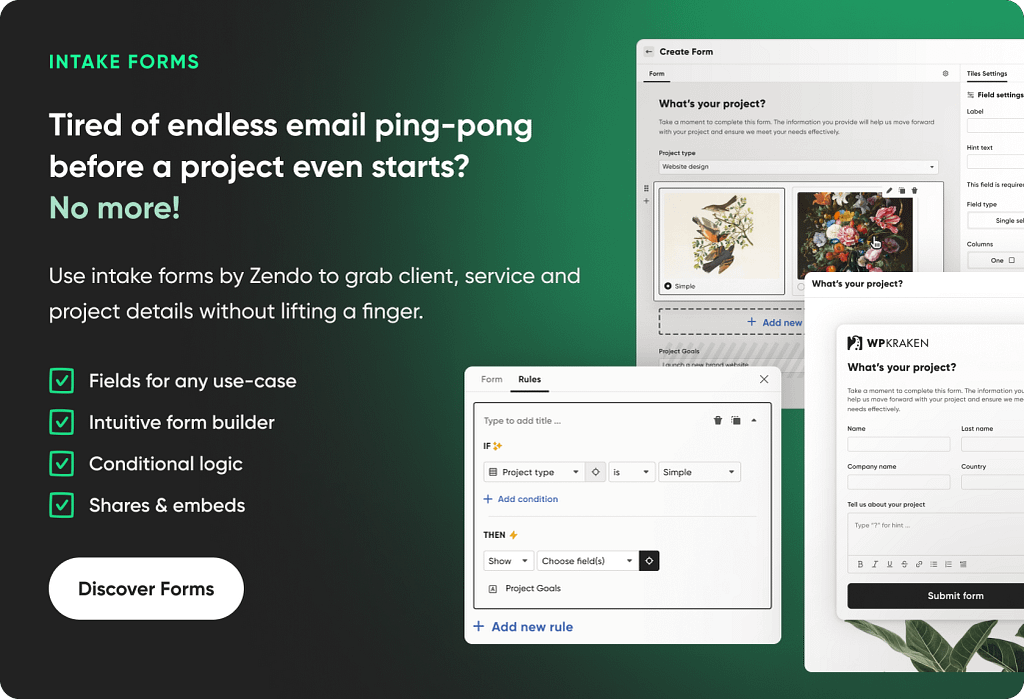
Does your work as an accountant feel like running in cycles?
Repeating the same yet necessary tasks over and over again, hunting down the missing files, and camping in the email inbox, which is constantly being flooded with messages?
If only these things could be automated! And… Wait a moment — they can!
Honestly, no surprise here. By 2030, workflow automation market is expected to generate over $80 billion in revenue, mostly via software solutions delivered (Emergen Research, 2022). Client portals won’t be left out of this.
But… which platform may turn out to be a bullseye for your business?
In this post we’ll take into examination the best client portal solutions for accountants to higlight their key features, use cases, advantages and disadvantages, and prices of course.
No time for a deep dive? Just take a look at the table summarizing our review:
| Target Group | Free Plan | Lowest Price | Strength | Weakness | |
|---|---|---|---|---|---|
| TaxDome | Medium to big companies | ❌ | $700 per year with a 3-year commitment | All-in-one practice management | Steep learning curveMinimum 1 year commitment |
| Zendo | Small to medium companies | ✔️ | Free | Strong service selling and payments features | Tax System will appear in the 3.0 version |
| Canopy | Small to large companies | ❌ | $150 per month | +150 templates for workflow automation | Pricing quickly adds up |
| Liscio | Small to large companies | ❌ | $20 per user per month | Client communication and easy file requests | Weak project management; limited workflow automation |
Key Features of Client Portal Software for Accountants
The most important features for client portal platforms for accountants comprise client and document management, payment modules, and creating automated workflows. Let’s take all of these under closer examination.
Client Management
It goes without saying that accountants’ work revolves all around clients. And with the average accounting firm handling anywhere from 20 to 150 of them, flawlessly managing client requests and ensuring excellent client experience becomes a must.
And it’s not just about collecting client information in one place and keeping it organized; it’s about guiding potential prospects-turned-clients through the entire journey. From onboarding and signing documents to sharing files, managing communication, and tracking progress — a Client Portal helps streamline every touchpoint. In other words, it turns a messy, fragmented process into a structured, professional experience that builds trust and saves time for both the accountant and the client.
Document Management
Part of that professional experience is having a single source of truth for all data. Instead of searching through different places to find the missing documents — like in your email inbox, Google Drive, or AirTable — you can count on one platform to collect and store them all. Moreover, it makes it easier to spot duplicates or outdated files that should have been deleted a long time ago.
But things can still get messy when you’re stuck in a merry-go-round of file sharing with your teammates and clients, especially if there are multiple versions of the same file floating around. So even if you have your own dedicated space for documents, all it takes is one person in a rush who forgot to upload the new version to disturb the system.
That’s why it’s so important to ensure that everyone, including clients, has access to the same space. Of course, clients should only see the data pertaining to them, but for everyone else, everything should be fair game. This turns out to be especially useful when one of the accountants goes on a holiday or an unexpected sick leave, and the rest have to scramble to pick up the slack. Where did that accountant store their documents? The folder is password-protected — does anyone know what the password could be?
Unless dealing with bank-level security, transparency makes collaboration so much easier.
Payments
Payments are always a sore point in any business. From missing quotes to unpaid invoices, they create stress for both the team and the clients, not to mention the disrupted cash flow.
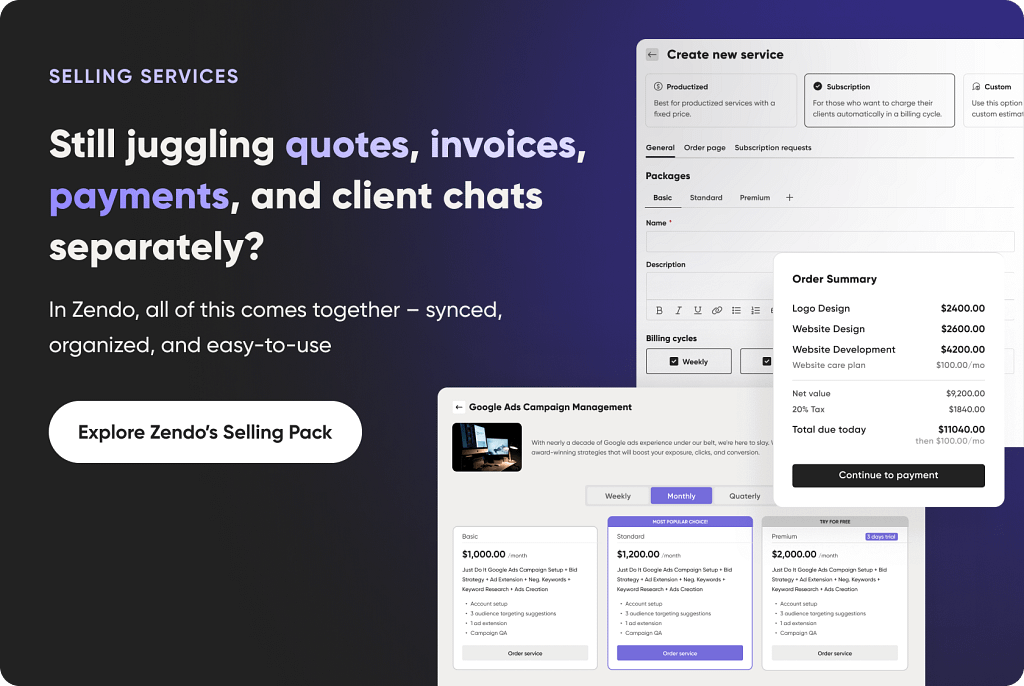
Good client portals for accounting professionals should take care of that as well, thanks to automatically generated quotes, invoices, and email reminders on top of it. Moreover, some software will also have a self-checkout, so that clients can submit new requests and pay for them at once without you having to lift a finger.
The cherry on top? Different currencies, various payment methods, and dynamic pricing for transparency.
Tax Resolution
Taxes and accountants go hand in hand — so of course, a proper client portal should help with the tax resolution process on several levels, from secure document management and keeping deadlines in check to pre-made forms and automated calculations.
It should also work as a central place for communication, where clients can see exactly what’s happening. Instead of chasing updates or worrying about missed steps, they get clarity through e-signatures, task lists, and real-time progress tracking — making the whole process feel a lot more manageable and less stressful.
Automated Workflows
Last but not least, the point of investing in a Client Portal is to reduce the manual work accountants have to do. It’s time to say goodbye to manual updates, writing emails by hands, and exchanging files back-and-forth — everything can be automated away through workflows, where one action triggers another.
For example, when a client signs a document, they immediately get a confirmation message that also informs them of the next steps. Or, when a payment was made, the status of the client request changes from “waiting for payment” to “in progress”, kickstarting the project with a bang.
💡 Research and Markets projects the global accounting software market will reach over $735 billion by 2025.
What Are Key Benefits of Using a Client Portal?
With all these features set in place, what benefits can you expect from such a solution?
1. Intense Client Collaboration
You turn client interactions into client collaboration, meaning your clients become active participants in their own projects. They can make their own payments, order new services or submit new requests, share files, accept or reject proposals, fill out questionnaires or forms, as well as get in touch with the people responsible for their project directly on the platform.
💡 Experience isn’t secondary — 80% of customers weigh it equally with products and services (Salesforce, What Are Customer Expectations, and How Have They Changed?).
2. Centralized Hub
We can talk about fancy features like AI workflow management or email generation all day long, but if there are cracks in the foundation, they won’t make much of a difference. What truly matters is having one central space for everything related to your business — that should be the core.
What happens when you keep using several apps at once to manage your business?
- You lose control over your data, leading to duplicates and outdated files.
- Your team members have to constantly ask each other where to find the missing information.
- Everyone loses time trying to find that one file they swore was just uploaded last week.
The more complex the system, the harder it will be to manage, especially as your business grows and more accountants join your practice.
3. Improved Teamwork
Often enough, when one accountant leaves — be it permanently or temporarily, like on vacation — they take away all the knowledge with them. It may include past conversations and where they happened (Messenger, email, WhatsApp), who are the primary and secondary contacts, which files are actually correct and which have been rejected.
As long as that accountant took care to document it all, passing a client to another teammate isn’t difficult. But what are the chances of that?
Usually, teammates scramble to figure out how to proceed and what’s already been done, leading to chaos. The accountant may have left some instructions, but not everything was spelled out — some things might have been considered ‘obvious’. In the end, the teammates are stressed out, the leaving accountant gets too many frantic calls, and it all impacts the client.
But a client portal, where all conversations are stored on top of all files and other data, everyone can quickly get up to speed on any matter.
4. Professional Look
In such a competitive field like accounting, anything can — and should be — turned into an advantage. And that also includes the way you present your accounting firm, from your website to your email footer.
Giving your clients access to the customizable client portal can be your strong selling point. You can easily promise steady and transparent communication, top-notch support, access to all their data, and a quick way of submitting new requests and paying for them at once. It’s a powerful one-stop shop that proves you’re not some second-rate amateur fresh out of college, but a knowledgeable, resourceful professional with the right tools to deliver the best possible service.
💡 Research from Sage reveals that 82% of accounting firms see a significant increase in client expectations for broader services and better experiences across different channels (compared to five years ago).
Save Time
Taking all of the above into consideration, it’s clear that the main benefit of having a client hub is saving time. While setting up such software and learning how it works may require some effort, it quickly pays off due to such essential features as workflows, automated reminders, project & task management, document sharing, and client communications.
If you want your business to basically run itself, a client portal or another practice management software is a must.
4 Best Client Portal Solutions for Accountants
TaxDome: Difficult, But Worth It
TaxDome is a powerful, feature-rich accounting practice management tool that offers quite a lot — but for a price. It’s not only quite expensive, with its lowest plan costing $700 per year with a 3-years commitment, it can be also overwhelming and therefore, difficult to learn. Some reviewers at SoftwareAdvice even mention hiring people to set it up for them.
Still, it’s a good software to consider if it checks off all your boxes.
What can you expect for such a price?
For project management, you’ll find a pipeline to keep track of what’s happening in your business. To start, you can browse the marketplace to find a pipeline that will fit your needs best; some of them already come with templates for automated emails. Then, you can spice them up with dependencies and conditional logic, so that the workflow can change depending on circumstances; for example, if your client submits all the necessary documents, the request will move to a different stage on its own (like from “Preparation” to “In review”).
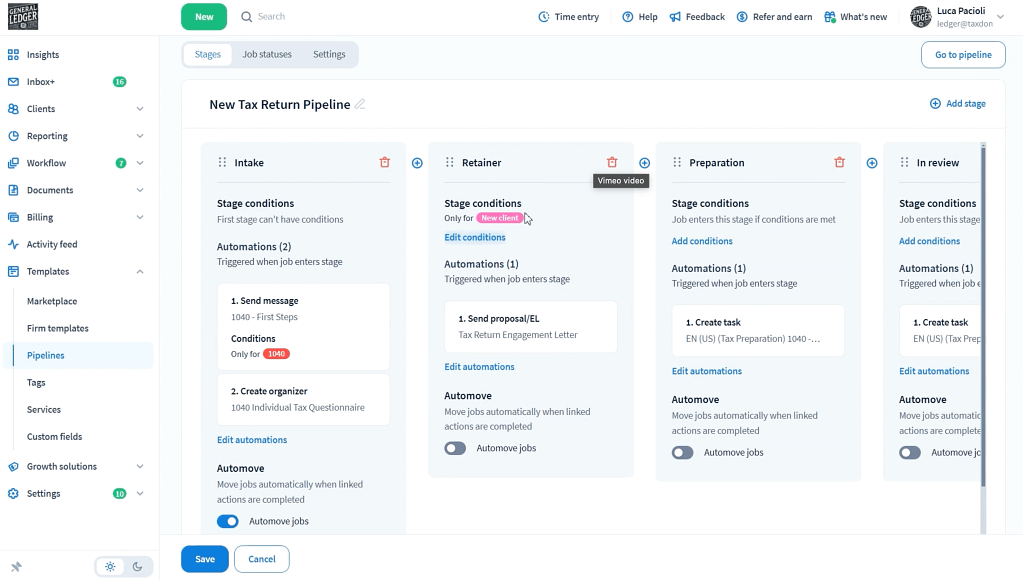
Additionally, you can set up job recurrences. If any of your clients request the same things on a weekly, biweekly, monthly, quarterly, or annual basis, you don’t have to note it down in your notebook — TaxDome can create these tasks for you, so that you never forget about it. You can also decide how many times it should be repeated or during which period, so that you don’t charge your clients accidentally.
Other features of TaxDome are real-time chat, which includes 60 days of chat history, simplified client onboarding through intake forms, integrations with client general ledgers, and AI powered reporting, among others.
All in all, TaxDome is a great choice for big companies that need a huge variety of features and don’t mind the steep learning curve and a not-so-easy setup. And the hefty price, of course.
Zendo: Affordable, Yet Powerful
Zendo isn’t just an accounting software — it serves many professionals, from graphic designers and developers to video creators and marketing agencies. It’s a universal tool that strays from the industry-specific mold and instead, focuses on solving the core challenges every service-based business faces: managing clients, streamlining workflows, and getting paid on time.
This client portal focuses on two things: empowering clients and improving teamwork. How? By making chat the center of operations.
Usually, an average cloud document management system focuses on project and task management, forcing businesses to keep chatting via email or use an in-built feature that simply aggregates all the email messages. But these solutions aren’t built with healthy, transparent communication in mind. And it shows.
In Zendo, each submitted client request appears in the form of chat, so that accountants can talk to the client right away; for example, they can review the submitted form and discuss it. In the case of a custom request, the accountant can estimate the project and send a quote, which can be approved or rejected by the client. If it’s approved, the client can also pay for it immediately — with all these steps happening still in the chat.
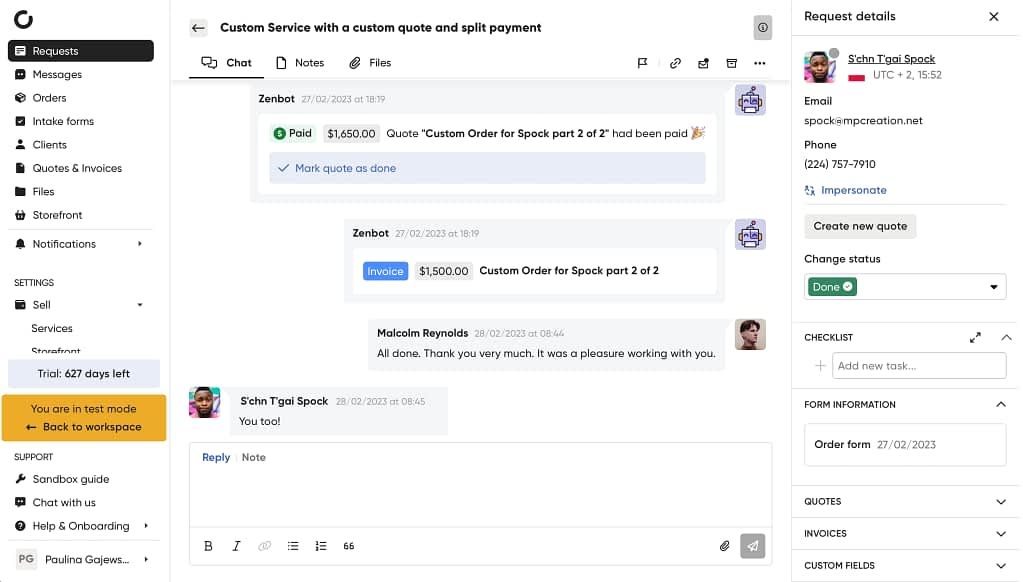
If the request was productized or a subscription, then the client could have paid for it upfront during the submission process. Thanks to a customizable Storefront, clients can browse through your offer, describe and customize their order, pick their add-ons, and pay for the service in no time at all. A decisive person can finalize their order in around 10 minutes.
When it comes to subscriptions, you can allow clients to pause them anytime they need to, so that they don’t have to resign from your services entirely if they don’t need them for a while — which is not only convenient for everyone, but it’s also a smart way of retaining client loyalty.
This can be turned into your unique selling point, proving your flexibility and client-first approach in a market where most providers lock people into long-term contracts.
And the cherry on top? Zendo is extremely affordable. Its basic plan is free, while its PRO and MAX plans cost $37 and $149 per month, respectively.
💡 In the new version of Zendo, 3.0, users can expect a big update and new features, including a reworked Tax System. Read more about the upcoming update in this article.
Canopy: Template Galore
Our next proposition is Canopy, a practice management software that focuses on simplifying client procedures by introducing bulk actions and automation. Its main features include client portal, document management, workflows, and time & billing. But it doesn’t have a typical project management feature — so don’t expect any Kanbans, boards, tables, or pipelines to give you the overview of all current projects at once.
Instead, Canopy is built around templates. You can build your own or access over 150 of them in Canopy’s library. The templates are used to apply automation rules to tasks, subtasks, and client requests, so that specific actions happen on their own once triggered. Templates also include client reminders, which can be scheduled on a fixed date, stay relative to another action, or be recurring.
On that note, tasks can also be recurring, so that you don’t have to create them from scratch every single time. Moreover, they can also be set up to be assigned automatically once specific conditions are met.
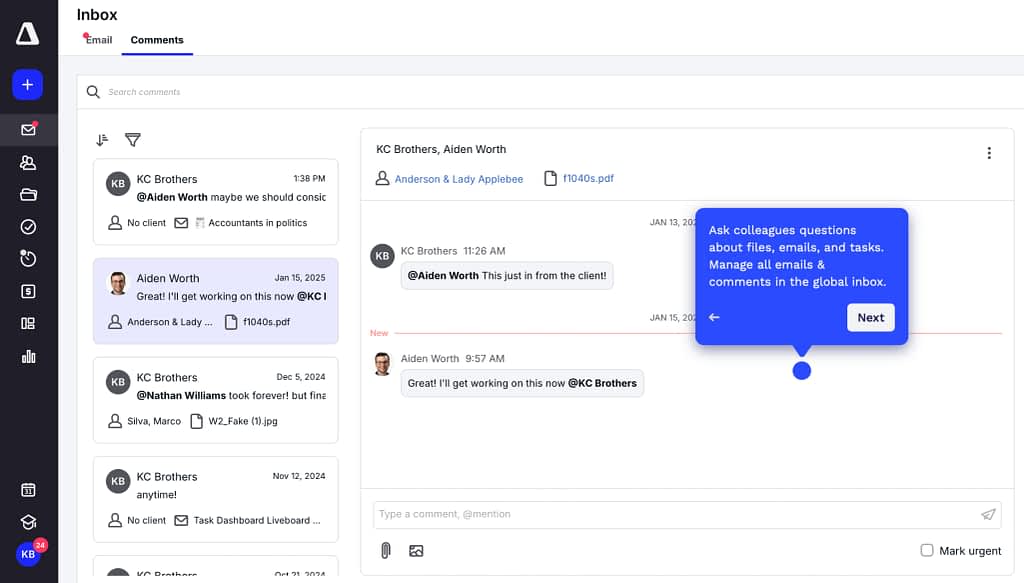
When it comes to communication, Canopy relies on emails, aggregating them. You can also use the feature to have the content of any message summed up thanks to AI, which can save some time on trying to decide on the priority of the message and who should be assigned to deal with it.
For payments, you can generate one-time and recurring invoices. Your clients can pay you directly from their client portal, which clearly lists all the invoices and the sum they still owe you. Clients can pay using credit cards (Visa, Mastercard, American Express, and more) as well as ACH. Sadly, Canopy doesn’t support Google Pay or Samsung Pay at the moment.
More sadly, things get complicated with Canopy’s pricing. You can choose between two plans, which can be paid for on a monthly or an annual basis. If you choose the monthly method of payment, the following features have to be bought extra for each user: document management, workflow, time & billing. Tax Resolution, Collection Cases, KBA ESignature, Transcripts & Notices also cost extra as add-ons.
But if you commit to the yearly plan, the extra features will be included.
This is good news for people who want to tailor their own experience — but others might feel exasperated by the added complexity.
Liscio: The Data Collector
Last but not least, there’s Liscio, a client portal for accountants and tax professionals who want to enjoy a unified look across the whole client journey. One of the features that helps with that is called Timelines, which shows all client communication on a single page in chronological order. When dealing with a whole lot of clients though, it can get quite messy.
In the same vein, Liscio also collects all data shared across many channels, so that every image, document, and client intake is always easily accessible. And you can also share large files, with Liscio supporting even those that weigh 2 GB.
When it comes to client tasks, there are multiple types that you can create, such as engagement letters, electronic signatures, and general requests. If they repeat, you can make them recurring, and you can top them off with automatic reminders.

Liscio doesn’t really have a typical client management feature or a project management one. But if you mostly care about the ability to request files, provide clients with secure access, and share documents through a secure link, then it’s a great fit.
Unfortunately, Liscio, similarly to Canopy, has a rather complex pricing that goes up with each user. There are three pricing tiers designed around the type of work you do — Advisory & Bookkeeping, Tax Professional, and File Management — each with its own set of plans. Depending on your needs, prices range from $20 to $99 per user, per month.
Conclusions
While practice management tools are here to help accountants with their bookkeeping practices, investing in the wrong software can only hinder your business. At the same time, there’s no perfect solution that works for everyone — what you need to do now is to use the free demo or a free plan to check our propositions for yourself, after really thinking through of what’s necessary to propel your business forward. You can consider:
- TaxDome: a feature-rich but expensive tool with a steep learning curve, best for big companies,
- Zendo: a modern solution with an intuitive interface that focuses on selling different types of services,
- Canopy: a software built around templates that can automate most of your work,
- Liscio: an essential tool for those who want to aggregate sensitive data, including client messages and files.
Thanks to them, you can easily stay organized and focus on client engagement instead of checking (and… double-checking) your to-do list. With everything centralized in one place, you gain more time for meaningful conversations with clients and less stress over administrative chaos.