Small business owners often make the same mistake: invest in the wrong sort of tools. Instead of getting the help they wanted — streamlining internal processes, facilitating collaboration, automating workflows — they end up with more and more things to manage.
While business management tools promise many benefits, some require the level of oversight that kills the premise of productivity increase. So before you start pumping money into your brand new ecosystem, learn everything there is about the solutions that caught your attention; otherwise, you risk wasting time and money.
Most importantly, don’t get swayed by fancy features. Take your time to note down what functionalities are necessary to push your business forward and which ones are nice, but not crucial. This distinction will help you make the right decision.
In this article, we’ll make choosing between HoneyBook and HubSpot & Zendo a no-brainer; while they all offer great functionalities, each is geared towards a slightly different audience. Read on to find out which suits your business needs best!
HoneyBook vs HubSpot vs Zendo: Key Takeaways
| Target Audience | Best Use Case | Unique Feature | Pricing | |
|---|---|---|---|---|
| HubSpot | Sales and marketing teams | CRM & marketing automation | Sales Pipeline Automation | €0-€3,300 for 5 seats, per month, billed monthly (+ mandatory onboarding for Professional and Enterprise plans for €2,930 and €6,830, respectively) |
| HoneyBook | Freelancers located in the US and Canada | Client & project management | Automation workflows | $36-$129 per month, billed monthly |
| Zendo | Independent business owners and creative agencies | Client collaboration & service sales | Storefront and recurring services | $0-$99 per month, billed monthly |
HubSpot: Powerhouse To Get Lost In
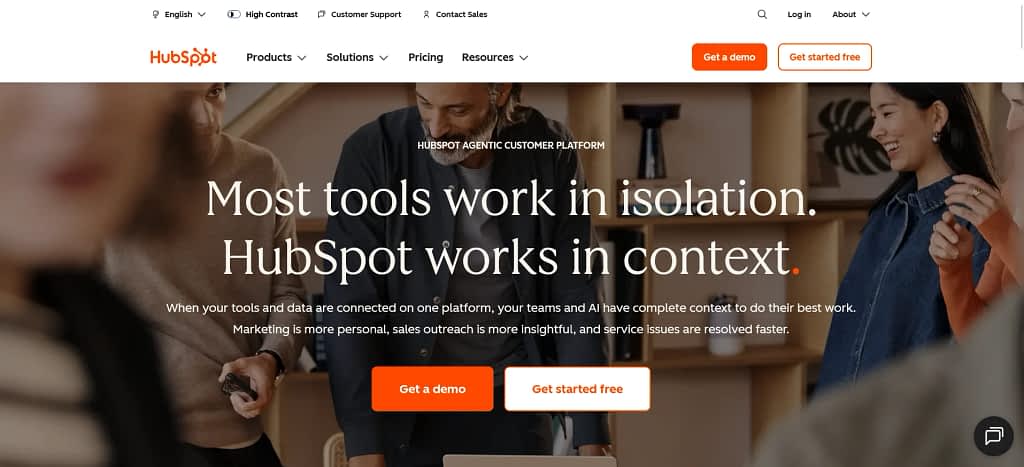
HubSpot offers a wide range of features for marketing and sales teams with a unique approach to its pricing model; you start off with its free CRM (Customer Relationship Management) and can supercharge your dashboard by buying additional modules: marketing hub, sales hub, service hub, CMS hub, or operations hub.
It’s a smart move, allowing HubSpot users to personalize their experience and only choose what they need to achieve their business goals. If someone doesn’t need a CMS, they simply don’t have to pay for it — it’s a simple, elegant solution many tools can learn from.
Data Visualization
As we have already mentioned, HubSpot offers a free CRM with a wide range of features, starting with data visualization. You can choose between a table, Kanban board, Gantt chart, calendar, map, or report views; useful when dealing with different use cases on a daily basis.
And when you need to present any data for your team, managers, or stakeholders, you can build custom interfaces to highlight what’s actually important in a specific scenario. These interfaces can be tailored in many ways, from adding React-based apps with UI extensions to enabling drill-down functionality in interactive reports.
There’s also support for real-time data monitoring, team-specific metrics, and mobile-friendly interfaces, making it easier to access what you need no matter the circumstances.
Sales Pipeline
HubSpot includes a thorough sales pipeline to move all your leads through one, seamless process without delays, unnecessary frustrations, and drama.
The pipeline is customizable, allowing you to freely add, edit, and delete stages. Most importantly, you can set up conditional stage properties, which let you control what information needs to be filled in at different stages of a process. Instead of relying on people to remember what’s required, you can define specific fields that must be completed before moving forward; like deal value, expected close date, or decision-maker details.
This helps you avoid bad forecasts and messy handovers, standardizing how your team works by ensuring that everyone follows the same exact process.
While that feels like a typical pipeline of any marketing & sales tool, its real strength lies in its connection to the rest of the platform; every deal is automatically linked to contacts, companies, emails, meetings, and activities. Because of it, you can easily track performance with built-in analytics (monitoring conversion rates, deal velocity, or revenue forecasting) and trigger workflows every time a deal moves between stages.
Now, let’s take a closer look at automation capabilities.
Automation
Pipeline isn’t the only thing you can automate, as it turns out.
For forms, you can decide what happens after they get submitted; for example, HubSpot can automatically create a task or send a follow-up email to strike the iron while it’s hot. Similarly for marketing emails, you can trigger another action to happen after your lead opens a message or clicks on a specific link in it. Depending on your subscription plan, options can vary from general to pretty detailed!
If that’s not enough, you can create entire workflows that span across marketing, sales, and operations. You can choose to start from scratch, use a premade template to kickstart the process, or ask HubSpot AI to help. No matter the option, you’ll always end up in a workflow editor; a visual builder where you can map out a flowchart of all your automated processes.
A good example of a more complex workflow that shows HubSpot automation capabilities pretty well concerns quote approvals. There, you can decide who should be responsible for approving a specific quote based on different factors (like who submitted the quote in the first place and its value) or set up automatic approval if the quote meets your criteria.
Additionally, HubSpot provides AI functionalities to make your work a little bit faster. You can use them to automatically update records from emails, calls, and the web, as well as highlight important information and get notified about any missing ones, quickly flagging issues. And when in a hurry, you can ask AI to search through the platform and your integrated apps for specific data — really handy when in the middle of a call with a client!
Collaboration
While HubSpot has a large range of features, it doesn’t have any that could work as an internal communication channel; instead, there’s a conversation inbox. It collects each message across all connected channels, from classic email inboxes to various chats and DMs from Facebook Messenger. Moreover, you can create multiple inboxes for different teams, so that, for example, your sales representatives only get messages about pricing inquiries, while the marketing team gets collaboration opportunities.
If you like keeping an eye out on what’s happening across all communication channels, you can make use of the ‘Email Overview’ and ‘Chat Overview’ customizable dashboards. They collect data on how your team members handle your customers on a daily basis, who’s the most engaged and who’s slacking off in their duties, as well as how much time passes before the website visitors get a response.
If your business hinges on customer service, handling the neverending flow of tickets, this will help you find out bottlenecks and areas that need improvement. This will be especially helpful in figuring out who needs a raise, and who needs some extra incentive to do better.
On top of it all, there’s a collaboration sidebar that lets team members leave comments on specific assets, check on assigned tasks, review the marketing calendar, and manage approvals. But again, teams will need their own communication channel outside of the platform, like Slack or Discord.
Subscription Plans
HubSpot’s pricing isn’t for the faint of heart. As mentioned before, it comes with a variety of free tools — for marketing, sales, content, and other teams — with the option to buy out subscription plans for specific modules. So for example, one business can use HubSpot’s free CRM and Sales tool while investing in the Marketing Professional subscription plan to make the best use of the automation features.
To get some insight into how much the costs can stack up, let’s see what marketing teams can expect of their own domain:
- HubSpot Marketing, Free: up to 2 users, it enables generating and emailing new leads on top of measuring success using basic metrics.
- HubSpot Marketing, Starter (€20 per seat, per month): comes with a basic suite of tools, including the ones for marketing, sales, service, content, and data teams.
- HubSpot Marketing, Professional (€880 for 3 seats, per month, with the option to buy more seats for €49 a month): meant for marketing teams that run omni-channel campaigns and need robust automation and reporting features.
- HubSpot Marketing, Enterprise (€3,300 for 5 seats, per month, with the option to buy more seats for €75 a month): for those that want to focus on creating data-driven customer journeys.
Note that both the Professional and Enterprise plans come with a mandatory, one-off onboarding for €2,930 and €6,830, respectively.
As proof that HubSpot keeps up with the latest trends, there’s also the HubSpot AEO module you can buy for €49 per month, paid annually; it will track 25 prompts across 3 answer engines every day, helping you measure your brand’s online visibility. If that’s not enough, you can always buy more prompts.
Conclusions
We’ve only touched on several aspects of HubSpot, yet it’s more than enough to see how many possibilities it offers. Without a doubt, it’s a powerful CRM software, but it comes with a huge price tag; for that reason alone, we can’t say it’s the best tool for small to medium businesses. To them, HubSpot might feel too overwhelming with all its features, required setup, and additional modules. Unless your team will make the best use of all the features presented — which could be the case for marketing and sales teams — it’s better to look for another alternative.
HoneyBook: Freelancers’ Dreamland
HoneyBook offers an excellent freelancing experience for the US and Canada citizens (sadly, the tool is still restricted to these two countries). It’s an AI-powered client relationship platform that keeps projects in check and invoices paid for. It doesn’t have any of the robust sales features that HubSpot covers; its strength lies in simplifying internal processes and elevating customer experience.
Lead Capture
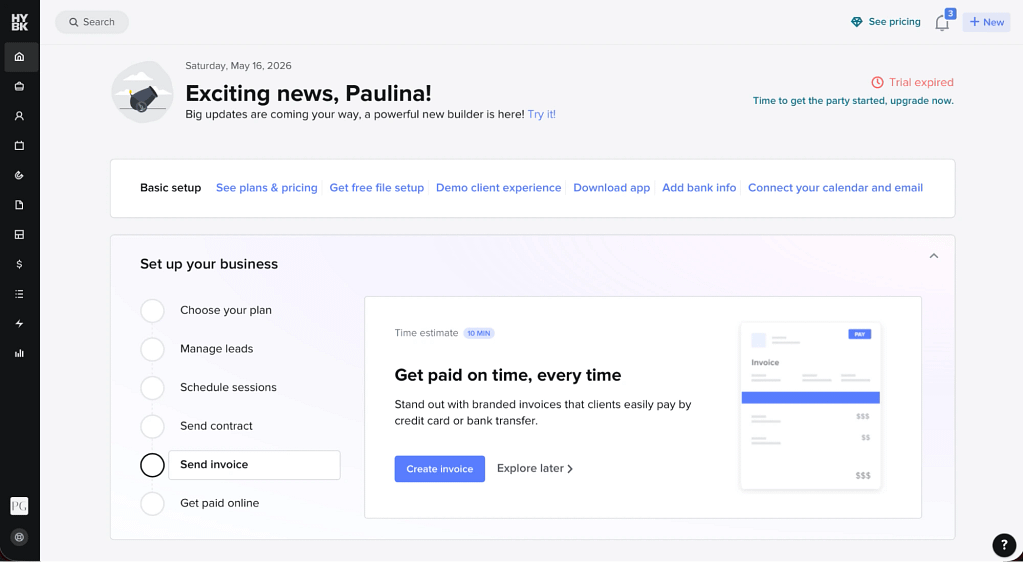
HoneyBook provides an easy way of capturing leads through contact forms — it’s not a groundbreaking strategy by any means, but it’s a proven one. HoneyBook users can decide if they want to create their own forms from scratch or to customize pre-made templates; as you’ll notice the more we dig into this solution, the more reflecting your brand will take priority.
For customization purposes, you can use an intuitive drag-and-drop editor. There, you’ll be able to change the used colors and fonts — if you want to come across as more funky than professional, you can easily strive for that impression — as well as rearrange the modules as you wish by simply dragging them around. You can of course add new ones; there’s a variety of compositions mixing both text and image fields.
You can also include the most common fields (full name, email, phone number, project date, etc) as well as different types of questions, including short and long text, dropdown, date picker, single choice, multiple choice. Once you’re done, you can either embed your contact form on your website, or share it with clients via direct link.
What happens once the form gets filled out? The client will see a thank you page and get a confirmation email as well. Depending on your automation settings, this can trigger more actions. Let’s jump into them!
Automation
Now, if you’ve ever used HoneyBook before — or read our previous articles on the topic — you might remember the workflows that were assigned per project. The new HoneyBook let go of that idea entirely, offering a completely new approach: allowing users to create smaller sets of automated rules that work across all projects, as long as they fit the provided criteria.
This decision might delight some users and worry others. Those who like to operate on rigid workflows that never deviate from set instructions might take a while to warm up to the idea, while those thriving in flexible environments might pop a champagne.
On the upside, these automations have just become more comprehensive. They’re no longer limited to just a few features (like contact form submission), but can be set to include others, like scheduling, files, bookings, or project milestones.
To create a new automation, users can use another drag-and-drop editor. In this case, you can also decide to make your own automation from the ground up, or to use the provided templates — at least as inspiration. One of them, for example, includes a scenario when the client gets a personalized onboarding packet and a questionnaire right after the first payment, while another is all about setting up task creation after a form has been submitted.
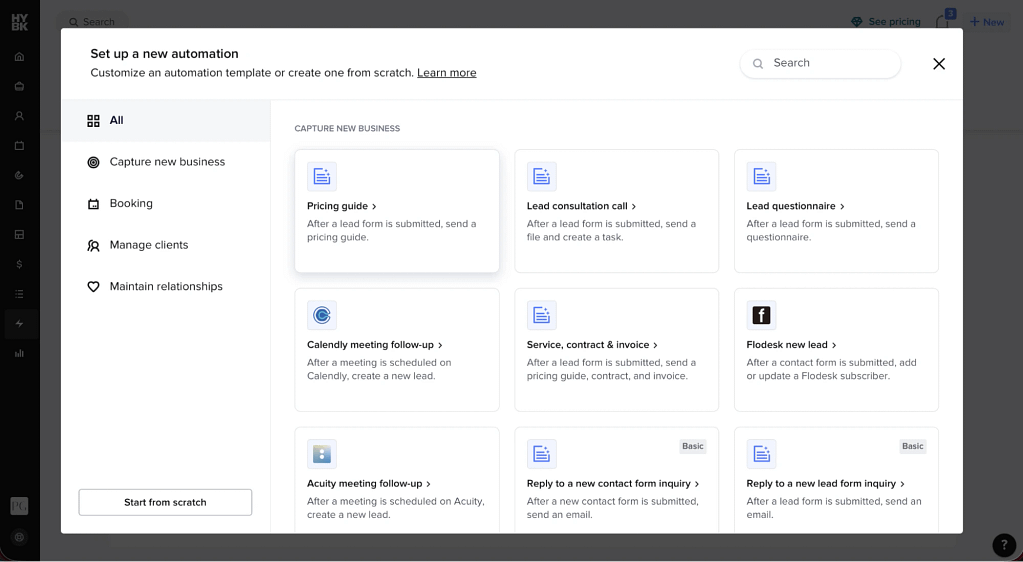
This, in our opinion, completely changes the way users think about automation. They don’t have to come up with an entire workflow that leads their customers from the very first inquiry to the last message that asks for feedback on the overall journey. Here, they can focus on the smaller chunks, not caring much when plans pivot unexpectedly.
Projects
Now, let’s see how HoneyBook handles projects, another important aspect of any business.
At the center of projects lies a customizable pipeline. Each user can add up to 20 custom stages (such as: “Waiting for Payment”, “In Progress”, “In Review”, “Cancelled”, “Finalized”) to better reflect the reality of their internal processes. In the Projects tab, users can view their pipelines in a Kanban format and drag project cards manually through the stages if they wish to (as mentioned previously, they can also be automated away). Users can also create custom views, so that they can, for example, focus only on the ongoing projects or look up just the completed ones for reporting purposes.
Selecting the project will take us to another tab, where we can take a much closer look at the details. Here, every piece of information pertaining to the deal will be stored, making it the center of operations.
You’ll find there, among others:
- Quick and easy way of scheduling meetings,
- All the documents, such as contracts, questionnaires, and invoices — both completed and those still in the draft form,
- All the email messages ever exchanged between all the parties, with the option to answer them directly without having to switch to another tab,
- All the assigned tasks that are waiting for your move to push the project forward,
- A quick look into this project’s financials, including the actual earnings, project expenses, and payments.
In short, everything that happens within a project will be showcased in one place for easy access.
Collaboration
To the previously mentioned projects, you can invite clients, collaborators, and team members to increase transparency and facilitate collaboration.
All the invited users can send emails directly from the workspace, review files and upload new ones, sign contracts, and make payments. Additionally, collaborators can change a project’s pipeline stage, track time, add new users, as well as add and view private project notes (invisible to clients). Team members can do the same actions as collaborators on top of what their role allows them to do. And there five of them:
- Basic: can only work within their own projects and contacts with limited operational access, no company-wide visibility or admin capabilities.
- Moderator: views company-wide pipelines, contacts, and projects, but still has limited execution and no admin/configuration permissions.
- Admin: manages users, forms, sessions, refunds, and edits projects across the company, but still lacks access to core account configuration and financial settings.
- Super Admin: pipeline management, reporting, bookkeeping, client portal, company-wide workflows, and work across all projects. Essentially runs the platform operationally.
- Owner: the only role with access to billing ownership, bank details, membership settings, domains, and multi-company setup.
Considering all the presented variety, does HoneyBook include an internal communication channel, or are the users forced to use another tool? Sadly, it’s the latter; HoneyBook doesn’t really offer any features that support collaboration. Users can add private notes and exchange emails and that’s about it. Because of that, it’s safer to say that this tool is more useful to lone wolves than tight-knit teams.
Subscription Plans
Compared to HubSpot, HoneyBook includes much more straightforward pricing without any additional modules that add up to the final price. Expect no nasty surprises!
There are three different pricing tiers you can consider:
- Starter ($36 per month or $348 per year) — offers core features, best for freelancers just starting out. Covers client and project management capabilities, invoices, contracts, scheduling calendar, templates, client portal, basic reporting, limited lead forms, and AI tools.
- Essentials ($59 per month or $588 per year) — good for those looking for growth and automation. Adds workflow automations, scheduler, QuickBooks integration, SMS reminders, branding customization, more lead forms, and support for up to 2 team members.
- Premium ($129 per month or $1308 per year) — best for scaling teams with unlimited seats, advanced reporting, unlimited lead forms, multiple companies, and priority support for larger or more complex businesses.
Compared to other similar tools, HoneyBook sits right in the middle when it comes to pricing; it’s not too affordable, especially for teams, but it will definitely be much cheaper than HubSpot, Salesforce, or other enterprise solutions.
Conclusions
HoneyBook offers a lot to freelancers from the US and Canada. If you’re one of the business owners looking to bring some order into your internal processes and to unify your brand across all documents, HoneyBook might be worth giving a shot — especially considering the refreshed automation features. Bigger teams though might find it too restricting, forcing users to use other tools in addition to this one. In that case, it would be wiser to invest in a solution that covers all your bases, so that you don’t have to pay twice.
Zendo
Neither HoneyBook nor HubSpot focus on one crucial thing: actually involving your client in the process. While both these tools let you oversee your client base and ensure everyone gets all the necessary files, they don’t include them as an active participant that can do more than just look up updates or exchange messages.
If that approach sounds more up your alley, consider Zendo the worthy contender for your business’ affections.
Chat-Powered Requests
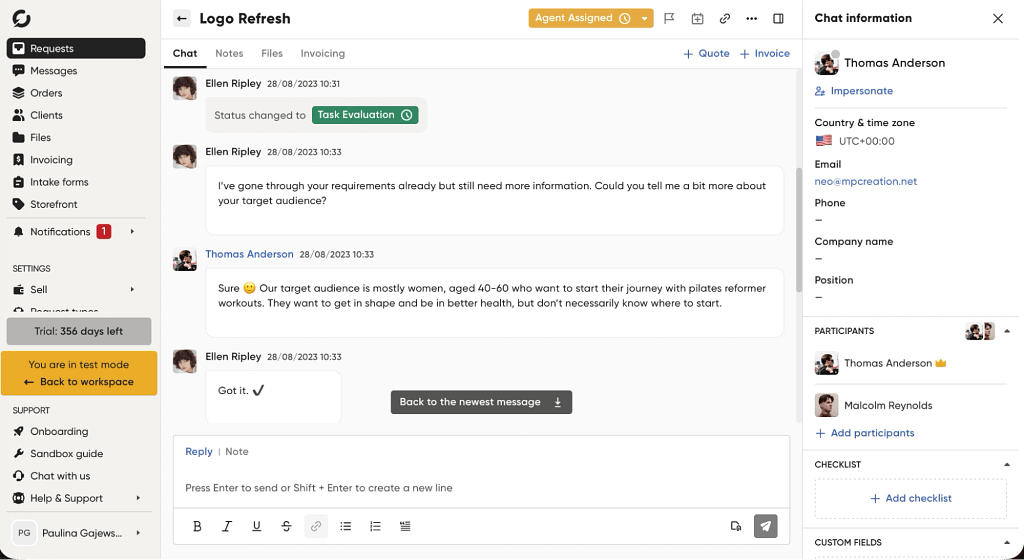
While other tools usually make pipelines or projects the center of all operations, Zendo offers a completely different approach: making chat the main activity hub. This way, users can easily interweave sending invoices and quotes for approval with exchanging messages, without having to watch over the email inbox in a separate tab.
Thanks to that smart move, the entire process of sending over files and discussing all the details got extremely simplified.
To be exact, the chat includes the following features:
- Creating and sending quotes. Team members with the appropriate roles can create new quotes — either from scratch or using a template — and send it directly in chat for clients to review.
- Accepting and rejecting quotes. Then, clients can review the quote and either accept it — prompting the invoice to get automatically generated — or reject it and ask for a new one in the same conversation thread.
- Creating and sending invoices. Similarly, team members can create and send invoices just as easily, no complex moves necessary.
- Finalizing payments. Then, clients can pay for the invoices with just a few clicks thanks to the Stripe integration.
- Status updates. Each request will have a Status assigned, such as “Waiting for Payment”, “Paid”, “In Progress”, “In Review”, and more (all customizable!). This way, everyone can easily check where the project’s currently at — moreover, the status can be changed with just a few clicks or get changed automatically if set criterias are met.
And what about the danger of missing important information, as it often happens in real-time chats? Thankfully, Zendo thought of that far in advance: all the files exchanged during the conversation get saved in the sidebar for easy access. In the similar vein, the same files will be also updated in other places as well, like in the Client Profile, so that no information is ever out of date.
As you can see, Zendo takes facilitating collaboration pretty seriously, increasing team efficiency to new levels.
Storefront
Zendo is just as convenient to clients. Instead of waiting for the team to take action, clients can on their own submit new requests, make payments, accept and reject quotes, view and download files, as well as make their own teams.
Even potential leads can enjoy the benefits Zendo offers, all due to the Storefront. It’s a customizable space for businesses to list all of their services, including productized, custom, and subscription-based. Leads don’t have to write an inquiry email to ask about pricing and wait for answers — they can simply look up the website, browse through everything on the offer, and take their time to think things through.
The storefront is an excellent place — fully customizable to boot — to make your brand shine. With richly formatted text and images you can convince potential leads to give you a shot, further enticing the deal with attractive options: adjustable add-ons, different pricing tiers, and even trial periods for subscription services.
Once a lead makes up their mind, they can fill out the Intake Form (fully customizable as well — yes, it’s a theme on Zendo!), where they can answer closed- and open-ended questions, upload files, share URLs, pick from multiple options, and more. This way, you ensure all the important information is taken care of upfront, giving you everything necessary to either estimate the project or start working on it immediately.
Those who signed up for a productized service with an upfront payment will be taken to checkout immediately. That’s how you’ll be able to lead your clients from first contact to purchase in one fell swoop!
Subscriptions
We’ve already hinted at the existence of subscription services, so let’s take a closer look at them, specifically.
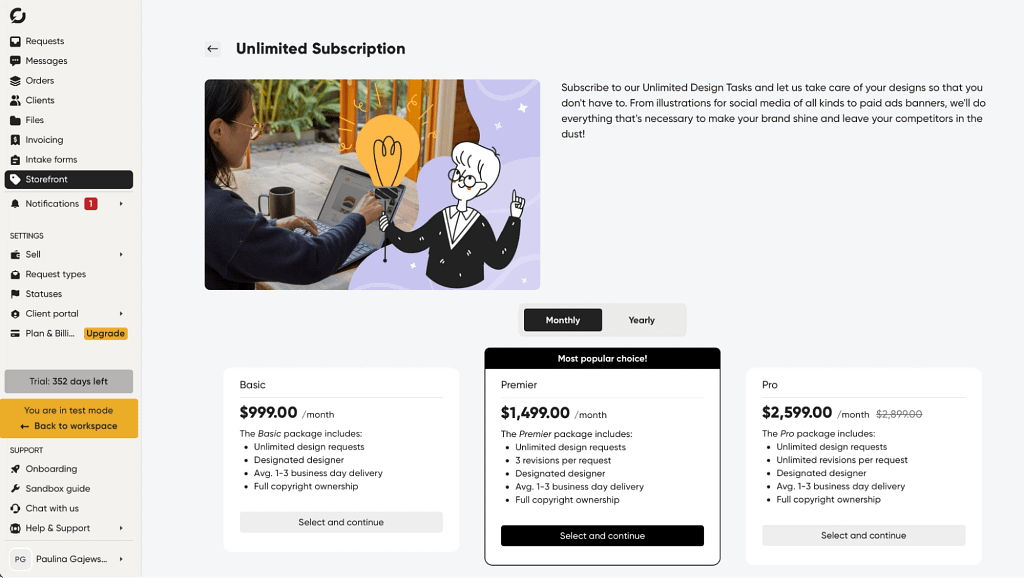
Zendo users can create as many packages as they want per each offered subscription service. Each can have different billing cycles and prices. For example, you can create a basic package to tempt leads with a good deal, and later on try to convert them to a more holistic tier.
They can also differ on the number of requests available. It’s up to you to decide how many requests per week, month, quarter, or a year you can handle and how many can be set in a queue. At the same time, clients can easily check how many requests they can still submit and get notified if they reach a limit. This will prevent any abuse from taking place.
Clients can also rest assured that they get their money’s worth thanks to the subscription pause feature. If, for some reason, they don’t need your services for a while, they don’t have to resign entirely. Instead, they can pause the service to avoid getting charged needlessly. And once they’re ready to resume the partnership, they don’t have to submit a new order — going through the entire process once more — but can simply select a single button. This could be a great selling point in your pitch!
Moreover, you can offer free trial periods for the indecisive leads. If they’re unsure of how the collaboration will look like, they can take you on the test run to see how well you mesh as business partners. And if that’s not enough, you can always throw in a discount!
Workflows
Both HoneyBook and HubSpot had automation features. Zendo isn’t any different — it introduces automation options both via request types as well as the Zapier integration.
Request types are essentially workflows, defining the project’s journey from start to finish. For each request type, you can prepare in advance a list of Statuses, Custom Fields, and Checklists that will be shown in each request of this type. You can also decide which team members will be assigned by default and select triggers. For example, you can send an automated message to each new request, send an intake form once a request status changes, or change status once request’s state changes. Zendo can easily stand as one of the most powerful request management tools.
Then, there’s the Zapier integration. This tool allows users to connect over 6,000 different apps, many of them being household names like Figma, Notion, Google Forms, Mailchimp, Facebook Lead Ads, Calendly, or Stripe. This enables creating automated workflows that span across your entire ecosystem of tools: getting messages on Slack when new requests get submitted, creating email sequences based on your client’s actions in their own workspace, or changing request’s status when a new meeting gets booked.
This integration gets even more powerful the moment you use the embedding apps feature. It allows users to include chosen apps in customizable sidebars, which can be separately tailored both to clients and team members. Thanks to that, no one has to scroll through conversations to find that one Miro board the team has been using or the onboarding YouTube video for new collaborators — all resources are neatly stored in the sidebar, easily accessible at all times.
Subscription Plans
With Zendo’s core features out of the way, it’s time to see the pricing breakdown for this tool:
- Essential (Free) — covers the absolute basics for those taking the very first steps in the business world.
- Core ($29 per month or $300 per year) — best for getting started with client work and service sales. Includes core workflows, storefront, payments, invoicing, and basic white-labeling.
- Pro ($59 per month or $588 per year) — designed for growing teams needing automation, advanced workflows, integrations, subscriptions, onboarding, and stronger branding control.
- Agency ($99 per month or $948 per year) — fully white-labeled solution for agencies at scale, with advanced customization, conditional forms, extra storage, stronger security, and upcoming API access.
Compared to other tools — which often enough, are overflated with unnecessary or fancy features that don’t push any business forwards, just adds more to the checklist of daily tasks — this tool is more affordable.
Conclusions
Zendo takes a completely different approach to the usual business problems. It will delight those looking for more flexibility for their teams, while at the same time, empowering clients by giving them means to take action; using the Kanban board, placing their own orders, pausing their subscriptions, finalizing payments directly on the platform, and more. It’s a modern answer to modern times, where strict procedures give way to adaptable and fully customizable workflows.
Another big point in Zendo’s favor is that it offers a fully white-label experience, allowing its users to replace Zendo’s branding with their own. People can switch colors, upload their own logos, and ensure their brand is well-represented with additional images. It’s a sure way of making a statement, ensuring a cohesive experience on all fronts, and staying memorable.
HoneyBook vs HubSpot vs Zendo: Final Words
If you’re a small to medium business looking for a robust platform to handle most of the administrative work, consider these three options:
- HoneyBook: great for freelancers living in the US or Canada, who will appreciate a rich template library and simple automations.
- HubSpot: good choice for those who expect to scale big in a short time, especially if they work in marketing or sales. Deep pockets are a must!
- Zendo: best choice for tight-knit teams that like to closely collaborate with their clients and who specialize in selling productized, custom, or subscription-based services.
All three options cater to specific business needs, solving similar problems in completely different ways. Now, it’s up to you to decide what most closely aligns with your unique case!
Just a reminder: Zendo comes with free trial periods to try out its paid plans on top of an entirely free plan; no strings attached, take as much time as you need to test all of its core features!
FAQ: HoneyBook vs HubSpot vs Zendo
Which tool is the best fit for freelancers?
HoneyBook is an all-in-one specifically designed for freelancers in the US and Canada. HoneyBook helps independent professionals manage their client relationships, send contracts and invoices, and automate repetitive tasks. HoneyBook fits best when ease of use and a polished client experience are the top priorities.
Which platform is best for client communication and collaboration?
Zendo stands out when it comes to client communication. Unlike HubSpot and HoneyBook, it makes chat the central hub of client interaction, allowing teams to send quotes, track leads, finalize payments, and update project statuses, all within a single conversation thread. This makes it ideal for teams that want to closely integrate and collaborate with their clients.
Which tool is best for selling subscription-based services?
Zendo is the clear winner here. It’s the only one of the three with built-in subscription management features, including different billing cycles, request quotes, subscription pause functionality, and trial periods. This makes it an ideal management tool for creative agencies or small service businesses that rely on recurring revenue.
How do I choose the right CRM for my business?
Choosing the right CRM comes down to understanding your core needs. If you’re a freelancer in the US or Canada looking for simplicity, compare HoneyBook first. If you’re scaling a marketing or sales team and need CRM and marketing automation at an enterprise level, HubSpot is worth exploring. And if you’re an independent business owner or creative agency that wants to involve clients as active participants while keeping things manageable, Zendo might be the best fit. Always evaluate ease of use, integration options, and total cost before committing.
How do HubSpot and HoneyBook compare as CRM platforms?
HubSpot is a full-featured CRM platform and marketing automation powerhouse best suited for larger marketing and sales teams. It offers robust CRM features, including lead scoring, pipeline management, and email marketing, but comes with a steep price. HoneyBook, by contrast, is a lighter CRM tool focused on client communication and project management rather than sales-cycle automation.