Kanban boards are incredibly popular because of their simplicity and versatility. A board, a few status columns, task cards, and you’re good to go. It opens up so many more possibilities than a to-do list app.
If you’re looking for the best Kanban board apps, you’re in the right place. Check out our in-depth comparison of various Kanban tools so you can choose the one that works best for your size, industry, and use case.
| App name | Best for | Free plan? | Rating |
| Trello | Overall | Yes | 4,5 |
| Asana | Large Organizations | Yes | 4,4 |
| Zendo | Agencies Small Businesses | Yes | 4,6 |
| Jira | Advanced Workflows | Yes | 4,3 |
| Todoist | Mobile | Yes | 4 |
| workstreams.ai | Work Automation and AI Optimization | Yes | 4 |
| Miro | Team Collaboration | Yes | 4,1 |
| ClickUp | Free | Yes | 4,5 |
What is Kanban Software?
Kanban software is a visual work management tool that helps teams organize tasks, track progress, and improve workflows in real time. It’s inspired by the Kanban methodology originally developed in manufacturing.
Here’s a breakdown of a traditional Kanban board:
- Just like a blackboard at school provides a dedicated space to write, a Kanban board provides a space to manage upcoming, current, and completed work.
- Status columns represent the workflow stage. Traditional Kanban has three stages:
- To do
- In progress
- Done
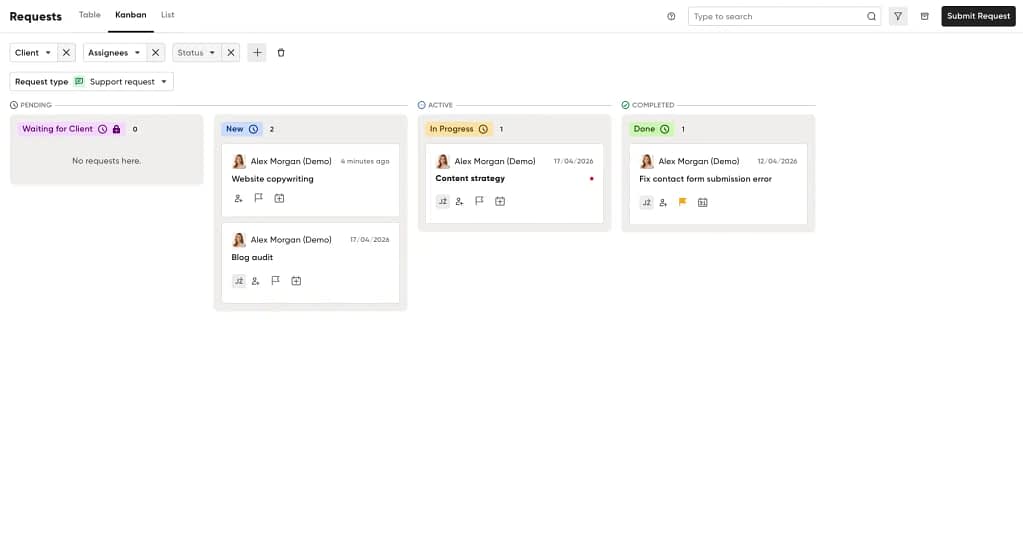
- Task cards are the work items. Usually, a task card has a title, description, and an assignee. Each card has its own status. Changing the status usually requires dragging it from one stage to another.
There is room for personalization, though. Some teams use their own versions of columns. For example, marketing teams might add an “In Review” status. Or developers might add a Backlog column.
Most Kanban apps also include features like automation, deadlines, integrations, reporting, and team collaboration tools. This allows businesses to streamline repetitive processes, improve accountability, and reduce manual admin work.
At its core, Kanban software makes work visible. Instead of juggling spreadsheets, scattered messages, and endless status meetings, teams can manage projects from a single shared workspace.
Kanban tools are widely used across industries, including software development teams, marketing, sales, HR, and customer support. Whether you’re managing content production, tracking bug fixes, or organizing daily operations, a Kanban board creates a clearer, more collaborative way to work.
What Should You Consider When Choosing a Kanban App?
The best Kanban apps match the way your team works, not force you to adapt to rigid processes. But how do you know what to look for if you’re just starting with Kanban tools?
Want to make an educated choice instead of a lucky guess? It’s important to evaluate the features, flexibility, and scalability that will support your workflows both now and as your business grows.
Ease of Use
A Kanban tool should simplify work, not add complexity. Look for an intuitive interface that lets team members create, update, and move tasks quickly without a steep learning curve. Drag and drop is a must.
Usability counts from the start. If the setup menus are too complicated, the rest of the app might follow a similar path, so beware.
Customization Options
Every team manages work differently. The right Kanban software should let you customize boards, workflows, columns, labels, task fields, and automations to fit your processes. Flexible workflows make it easier to manage projects across departments and use cases.
Collaboration Features
A lot of teams also use their task cards for communication. Discussing progress and asking questions often happen where the work is tracked. If your Kanban app lacks comments, mentions, and notifications, it won’t support fruitful collaboration.
Automation Capabilities
Automation can save teams hours of repetitive manual work. Many Kanban apps allow you to automate task assignments, status updates, notifications, recurring tasks, and workflow triggers, helping teams work faster and more efficiently.
Integrations
You’re already using so many other tools at work. Your Kanban software should connect seamlessly with them. Whether it’s a project management tool, calendars, CRMs, or communication tools, having integration options makes life a lot easier.
When your data flows automatically between tools, you don’t have to jump between apps all the time. Make sure your Kanban app integrates with your tool stack.
Reporting and Analytics
Visibility into team performance and project progress is essential for improving workflows. Look for Kanban tools with dashboards, workload tracking, cycle time reporting, and performance analytics to help identify bottlenecks and optimize productivity.
Scalability
You might be a part of a small team, but businesses grow. Choose a Kanban app that grows with you instead of hampering your growth. That means higher user limits and the ability to handle complex workflows without sacrificing usability.
Pricing
Last but not least, consider the value. Check the price per seat and what you’re getting for it. Are there any limits or restrictions to consider? What about automations? On top of that, are there any AI features included in the subscription? Or are they sold separately? With such fierce competition in the market, you’re more likely to get a bang for your buck.
Methodology: How We Compared Kanban Board Tools?
I approached this comparison just like I would have if I were looking for Kanban software. I tested each app (thanks, free trials) and used it for each use case.
To pick a winner, I decided to follow my own advice from the previous section and use some of the categories above.
They cover the most important aspects and take a user-friendly approach to finding the best software. After all, most people care about price, features, usability, and whether it makes sense for their particular environment.
Keep in mind that some of the categories are subjective. For example, one tool might feel easy to use to some right away, but others might struggle with it at first. The best way to find out if an app works for you is to test it yourself.
| Category | Criteria | Weight |
| Affordability | How much do you have to pay for each seat? Is there a free trial? Is there a free plan that lets you use the tool without sneaky catches that require an upgrade to a paid version? | 25% |
| Functionality | How much can you actually do in these apps? Are the features basic and few and far between, or are there plenty of them? | 25% |
| Ease of use | What is the setup like? Is there a steep learning curve? Is the tool easy to use by an average person? | 20% |
| Use case fit | Does it match your industry, scale, and use case? | 15% |
| G2 Rating | How highly do users rate each app? | 15% |
The Best Kanban Apps & Tools in 2026 – Comparison
Now it’s time for the actual comparison. There are countless Kanban apps out there, but only a handful of them are worth your time and money.
The Best Kanban Tool (Overall): Trello
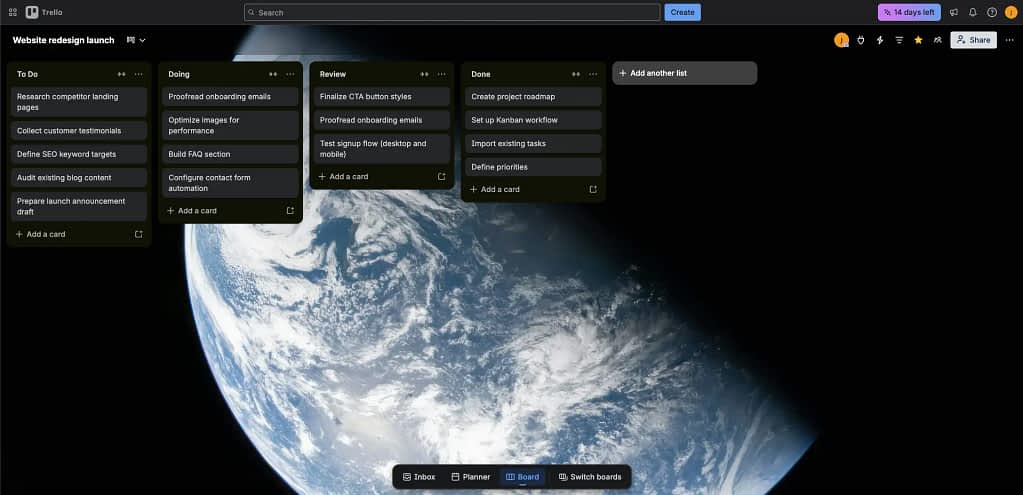
Trello is one of the most popular Kanban apps on the market. It focuses on simplicity, which is why setting it up takes no time, and the UI is clear and easy to use, even for beginners.
Functionality-wise, Trello has everything you need from Kanban software: boards, columns, and task cards. You can modify the board by adding and changing status columns, and edit the cards as you see fit.
Trello integrates smoothly with apps like Jira, Slack, Gmail, Microsoft Teams, and 200+ other tools. Power-ups let you add features and integrations to supercharge your experience.
Key features:
✅ Intuitive drag-and-drop Kanban board
✅ Easy to set up
✅ 200+ integrations
✅ Flexibility
✅ Desktop and mobile synchronization
Key disadvantage: Trello’s always been a simple tool, so its feature range is limited, especially for large-scale projects. Lack of advanced reporting and insufficient automation options make it difficult to recommend for big organizations with complex projects.
Advanced features are available in paid plans, so you will need to pay to get the most out of Trello.
Price range: $5 – $17.50 in paid plans, free plan available.
💡 Pro Tip: Synchronize Trello with your inbox and Slack or Microsoft Teams to create tasks straight from your inbox and DMs.
The Best Kanban Software for Large Organizations: Asana
What makes Asana great for larger teams? The fact that 85% of Fortune 100 companies already use it. Asana is a project management multitool. It lets you manage projects, goals, and resources, and it has robust security features.
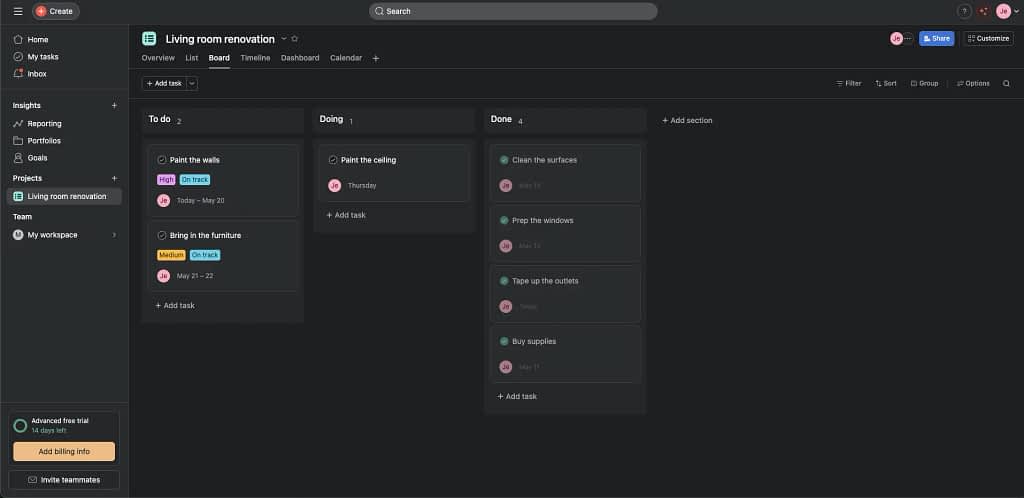
The Kanban (or Board) view is intuitive and works super smoothly. Customizing the cards and columns is easy, so even non-tech-savvy knowledge workers will figure it out in no time.
Key features:
✅ Resource management
✅ Intuitive Kanban boards
✅ Goal tracking
✅ Portfolios
✅ Workflow automation
Key disadvantage: The most interesting features are only available in the higher-end plans, which makes Asana a costly proposition. And if you consider that large organizations mean a lot of users, it gets expensive really quickly.
Price range: $10,49 – $30,49
💡 Pro Tip: Make sure all your tasks are in one workspace. You won’t be able to sync data between workspaces.
The Best Kanban Tool for Agencies: Zendo
Most of the tools listed here use Kanban to manage projects. But if you work for an agency that wants to use it to manage clients, too? That’s exactly where Zendo comes in.
Our tool uses the Kanban view to centralize your requests across your customer base. It filters requests by type to ensure various request categories don’t get mixed up, but you can filter them further if you need to.
Plus, each request can serve as a project with tasks, due dates, assignees, and statuses.
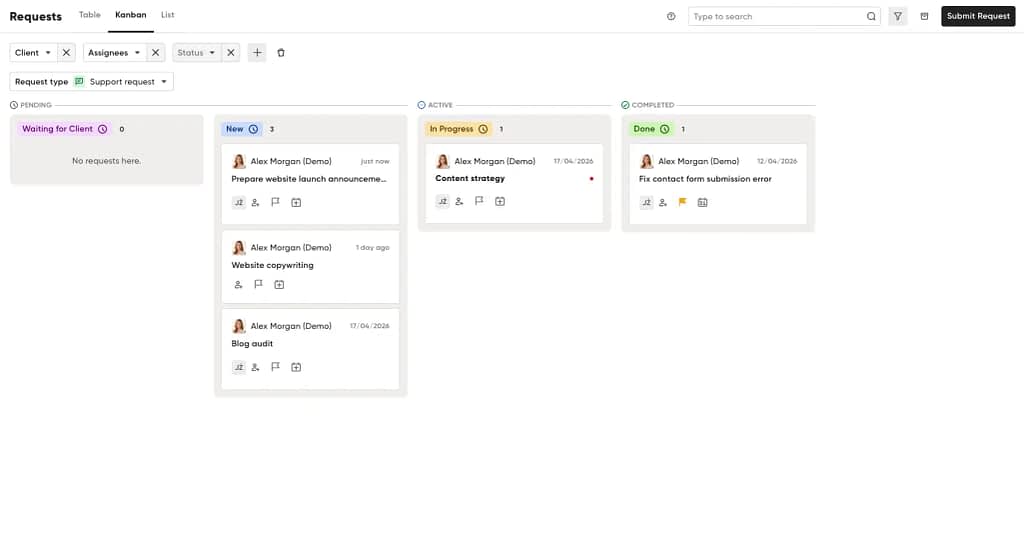
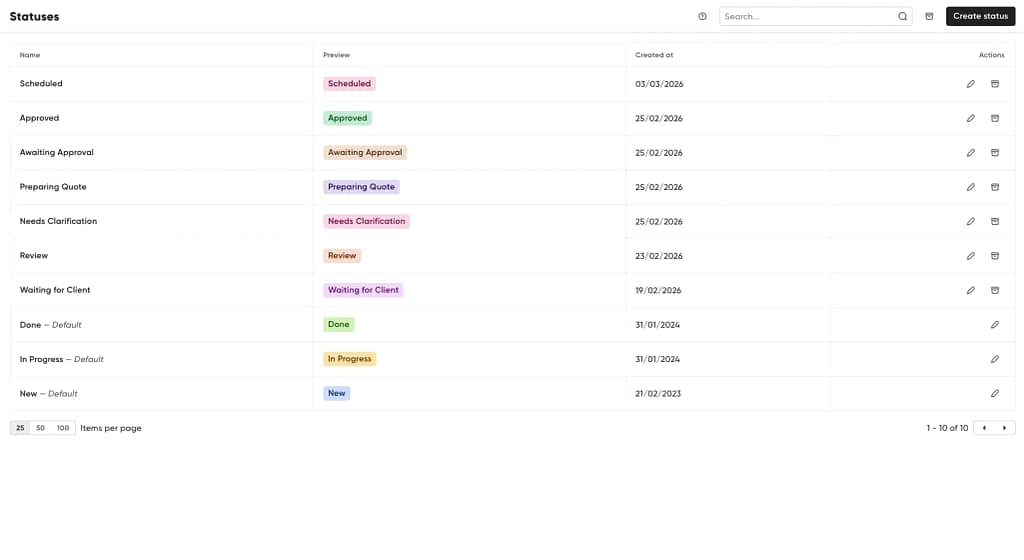
Speaking of statuses, different types of services require different status types. With Zendo, you’re in full control of your statuses. You can create new ones or rename the existing ones with ease.
Key features:
✅ Fully customizable Kanban board
✅ Custom statuses
✅ Frictionless payments
✅ Automations
✅ Client portal
Key disadvantage: It’s not a traditional Kanban tool for project management. Instead, it adds a request management layer on top of project management capabilities.
Price range: $24.99 – $99 per month per user. A free plan is available.
💡 Pro Tip: Add tasks to your requests to break down the work more granularly.
The Best Kanban Platform for Advanced Workflows: Jira
Jira is more of a project management powerhouse than Kanban software. It helps manage work across the organization, especially for teams such as IT, Marketing, Operations, and Engineering.
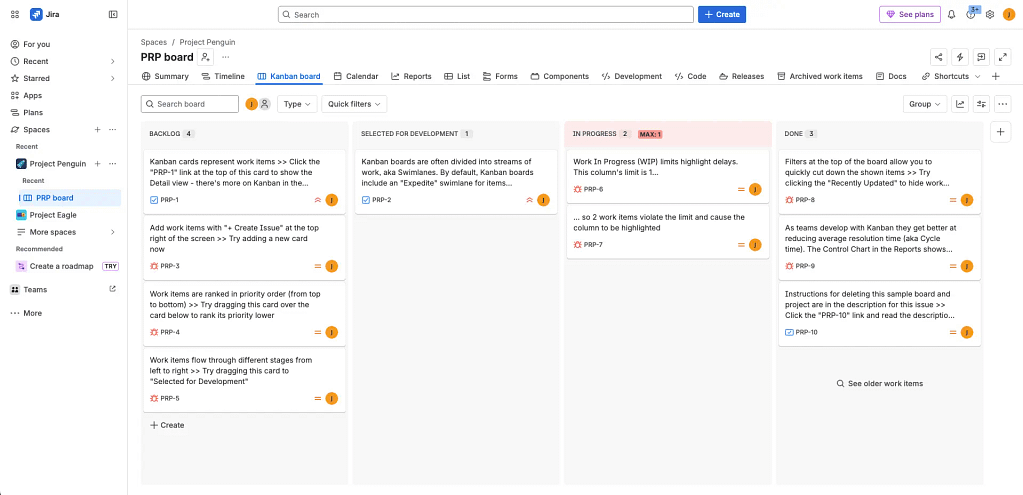
Multiple view types allow you to go beyond Kanban boards. Jira lets you see entire projects as lists or timelines. However, the Kanban view is sophisticated and fully customizable.
What makes Jira great for advanced workflows is its Workflow Builder. It allows you to map out and automate workflows with virtually any restrictions. The visual builder makes it easy to create and understand how it works.
Key features:
✅Workflow builder
✅Customizability
✅Advanced reporting
✅Dependency tracking
✅AI agent
Key disadvantage: Jira is a very competent tool. But it’s so complex that companies usually hire dedicated admins to manage it across the organization. Smaller businesses might find it overwhelming.
Price range: From $9 to $18 per user per month, free plan available for up to 10 users.
💡 Pro Tip: Upgrade your Jira capabilities by adding third-party apps and integrations in the Atlassian Marketplace.
The Best Kanban Tool for Work Automation and AI Optimization: workstreams.ai
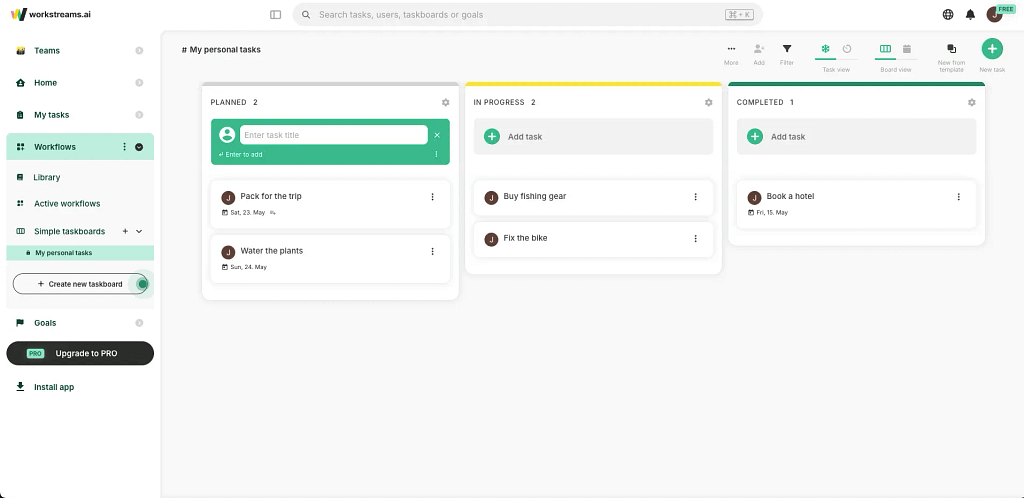
As the name suggests, workstreams.ai makes AI the core of the app. You can use it to speed up actions like creating or modifying task descriptions or generating subtask structure based on the description.
The app allows you to create highly customizable workflows that are tailored to your specific use case. Integrations with Slack and Microsoft Teams create Kanban boards in those apps and let you create and manage tasks without leaving them.
Key features:
✅AI tools
✅Time allocation
✅Automated status forwarding
✅Workflow library
Key disadvantage: The free plan has all the Pro features unlocked, but it’s limited to three users. Most teams will need a Pro plan to use workstreams.ai effectively.
Price range: €6 – €8 per user per month, free plan available for up to 3 users.
G2 Rating: N/A
💡 Pro Tip: Set time intervals for repetitive tasks to save time.
The Best Kanban Apps for Small Business: Zendo
You’ve seen Zendo listed as the best Kanban app for Agencies, but it’s also a great choice for other small businesses. Why? Because it allows you to manage orders, sell products and services, send quotes and invoices, and collect payments in one place.
So it doesn’t matter what you offer and where your customers are, Zendo is here to support your business and make your life easier. By having one tool for client management, you spend less time switching between apps and making sure your data is accurate in all of them.
The Best Kanban Software for Team Collaboration: Miro
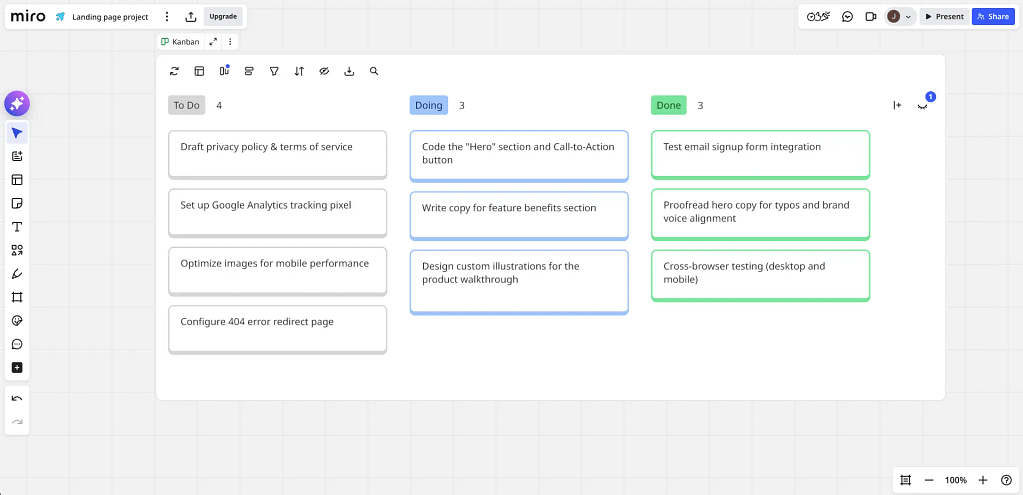
Think of Miro as a canvas where multiple teams can collaborate in real time. Choose a template, customize your board, add task cards, and it’s ready. Miro synchronizes with Jira, allowing you to add Jira issues as task cards.
What’s great about Miro is that your whole team can work on the board simultaneously. And you can see who contributes what and where. If collaboration is what you’re after, you should give Miro a try.
Key features:
✅ Hotkey shortcuts
✅ Integrations
✅ Templates
✅ Interactive board
Key disadvantage: Miro isn’t a full-fledged Kanban software, so the task cards aren’t as customizable as in other tools.
Price range: From $8 to $20 per team member per month. A free plan is available.
💡 Pro Tip: When sharing your board with other team members, make sure they can edit the board and move the cards.
The Best Mobile Kanban Apps: Todoist
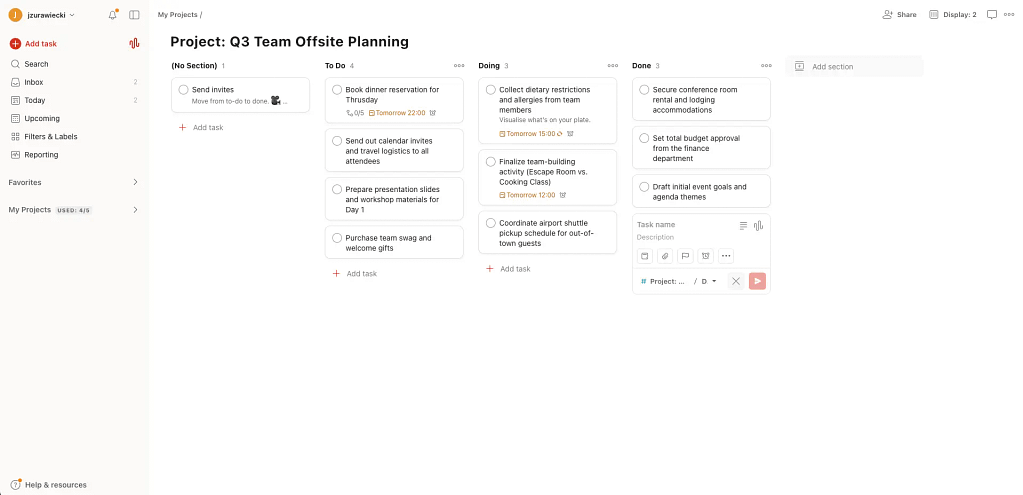
Todoist is one of the most popular to-do list apps on the market. When it comes to personal task management, Todoist is more than capable. The interface is intuitive, both in the desktop and mobile apps. One of the most underrated features is called Ramble. It lets you use your voice to add tasks instead of typing.
While most task management tools prioritize desktops, Todoist works on smartphones, tablets, and even smartwatches. If you’re looking for an app that synchronizes with all your devices, Todoist is the clear winner.
Key features:
✅ Voice dictation
✅ Reminders
✅ Priorities
✅ Integrations
Key disadvantage: Advanced features are not available in the free version. Team spaces and projects are only available in the most expensive Business plan.
Price range: $5 – $10 per user per month. A free plan is available for up to 5 projects.
💡 Pro Tip: Todoist has a Kanban board listed as a template, so you’ll need to copy a setup in the app to manage your projects or lists with Kanban.
The Best Free Kanban App: ClickUp
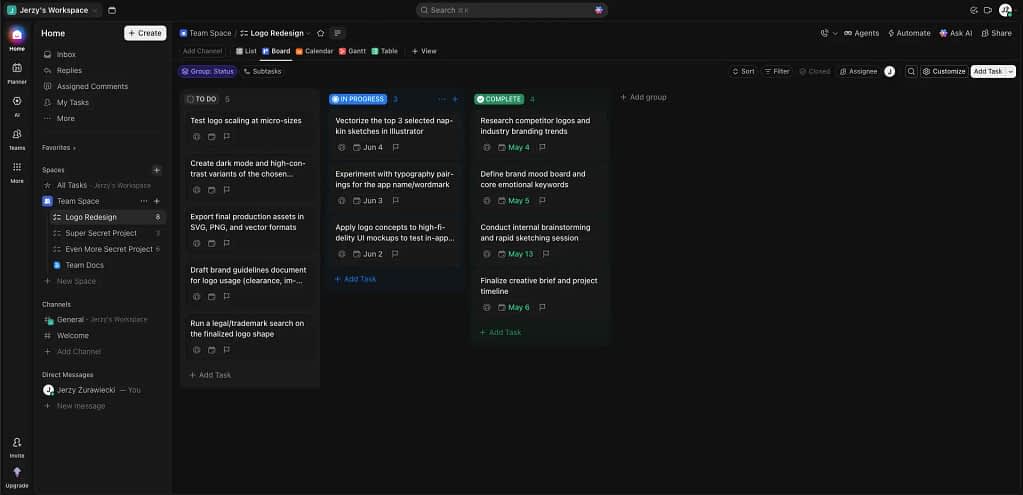
With so many competitors in this space, and each one having a free plan, what makes ClickUp stand out? The free plan has no limits on team members or tasks, so you can manage projects on a Kanban board with no issues.
The Kanban experience is great, too. Aside from the basics, you can drag multiple cards at once and add custom fields. Plus, you have the option of setting limits for each column when you don’t want to overburden your team. The paid plans offer a lot more, but the free plan is more than enough for most use cases.
Key features:
✅ Custom statuses
✅ Google Drive integration
✅ Mobile app
✅ Unlimited tasks and users
Key disadvantage: The free version only allows for 60MB of file storage. If you plan on uploading a lot of screenshots or videos to your board, the free plan might not be enough for you.
Price range: From $10 to $19 per month per user. A free plan is available.
💡 Pro Tip: Share your Kanban view with clients without giving them access to the rest of the app.
Conclusions
Choosing the best Kanban software isn’t about finding the app with the longest feature list—it’s about finding the tool that aligns with your team’s specific workflow, size, and operational bottlenecks. As we’ve seen across our 2026 lineup, the market has evolved to offer highly specialized solutions for every type of organization.
To wrap up, here is a quick roadmap to help you make your final decision based on your primary business need:
- For Absolute Simplicity: If you want a clean, no-fuss digital whiteboard that your team can adopt in five minutes, Trello remains the gold standard for user-friendly task tracking.
- For Complex Workflows and Scale: Large enterprises that need deep security controls and resource tracking will find their match in Asana, while highly technical teams or cross-departmental operations requiring strict workflow guardrails should opt for Jira.
- For Client-Facing Businesses: If you’re an agency or service provider where project management intersects directly with client requests and billing, Zendo bridges that gap uniquely by layering a client portal over its Kanban functionality.
- For Automation Enthusiasts: If your primary goal is to reduce administrative overhead through AI-generated subtasks and seamless Slack/Teams loops, workstreams.ai is built exactly for that purpose.
- For Maximum Value on a Budget: Small teams on a tight budget should head straight to ClickUp to take advantage of its incredibly generous free plan, while individuals or mobile-first professionals will get the most out of Todoist.
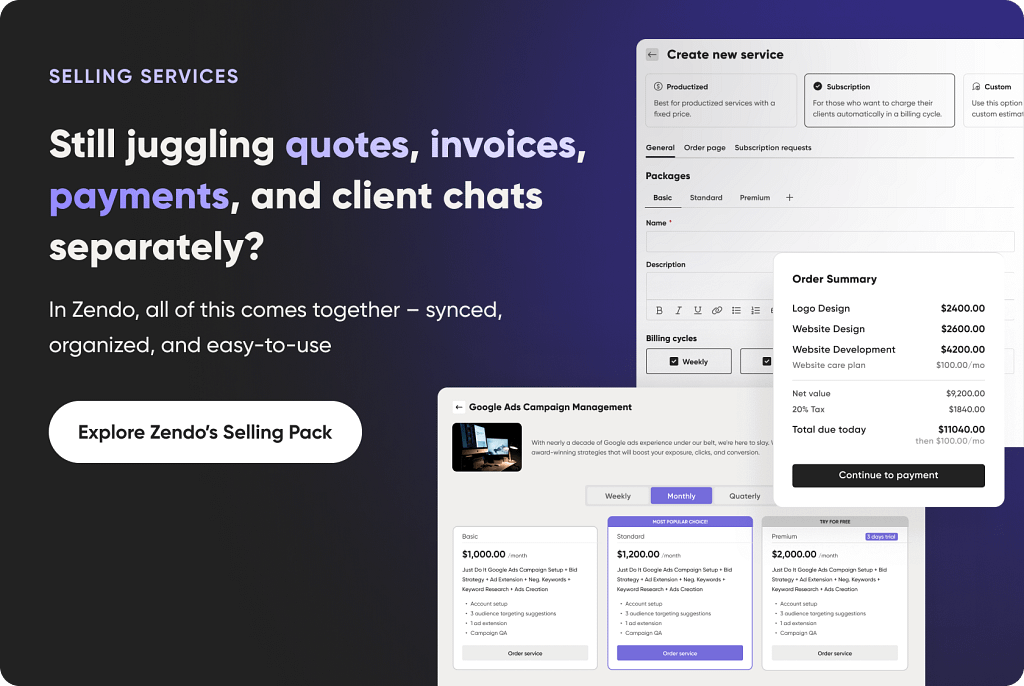
Want to see for yourself how Zendo makes life easier for agencies and small businesses? Test it out for free with no strings attached or a credit card required.
FAQ
What Is a Kanban Board?
A Kanban board is a visual project management system used to organize tasks and track workflow progress. It consists of columns representing different stages of work, like “To Do,” “In Progress,” and “Done”, with individual tasks displayed as cards that move between stages.
Kanban boards help teams visualize workloads, identify bottlenecks, and improve efficiency by making every task and its status easy to track in real time. Today, most teams use digital Kanban boards through dedicated software platforms that support collaboration, automation, and project tracking.
How Can Businesses Benefit from Kanban Board Software?
Kanban board software helps businesses improve visibility, collaboration, and workflow efficiency. By centralizing tasks in a shared workspace, teams can easily track progress, prioritize work, and stay aligned on project goals.
Businesses often use Kanban tools to reduce delays, streamline repetitive processes, improve accountability, and increase productivity across teams. Features like automation, real-time updates, reporting, and integrations also help organizations scale operations more effectively while minimizing manual work and communication gaps.
Does Microsoft 365 Have a Kanban Board?
Microsoft 365 doesn’t include a dedicated Kanban app by default, but users can create Kanban-style workflows using tools like Microsoft Planner, Microsoft Teams, and Microsoft Project. Microsoft Planner is the most common option, allowing teams to organize tasks using board-based layouts similar to Kanban boards.
However, while they’re suitable for basic task management, these tools may lack the advanced customization, automation, and workflow management features available in specialized Kanban software platforms.
Does Google Have a Kanban Tool?
Google doesn’t currently offer a native Kanban tool within Google Workspace. However, teams often create simple Kanban boards using Google Sheets or integrate third-party Kanban apps with tools like Google Drive, Gmail, and Google Calendar.
Many businesses choose dedicated Kanban software for more advanced features such as workflow automation, task dependencies, reporting, and team collaboration capabilities.
What Are the Disadvantages of Free Kanban Apps?
Free Kanban apps can be a good starting point for individuals and small teams, but they often come with limits that affect long-term scalability and productivity. Common disadvantages include restricted automation features, limited integrations, user caps, storage limits, and fewer customization options.
Many free plans also lack advanced reporting, security controls, permission settings, and customer support. For businesses managing complex workflows or larger projects, paid Kanban software often provides greater flexibility, efficiency, and scalability.