
Marketplaces spent a decade commoditizing web designers, with Fiverr and Upwork training clients to shop by the best price possible.
Now there’s a second wave of these shenanigans happening to those who sell website design.
Similar in the sense that it’s often making web designers compete on prices, but it goes even a step further: AI tools like Lovable, v0, and Claude Code let your clients generate a working first draft of a site before they’ve ever reached out to you.
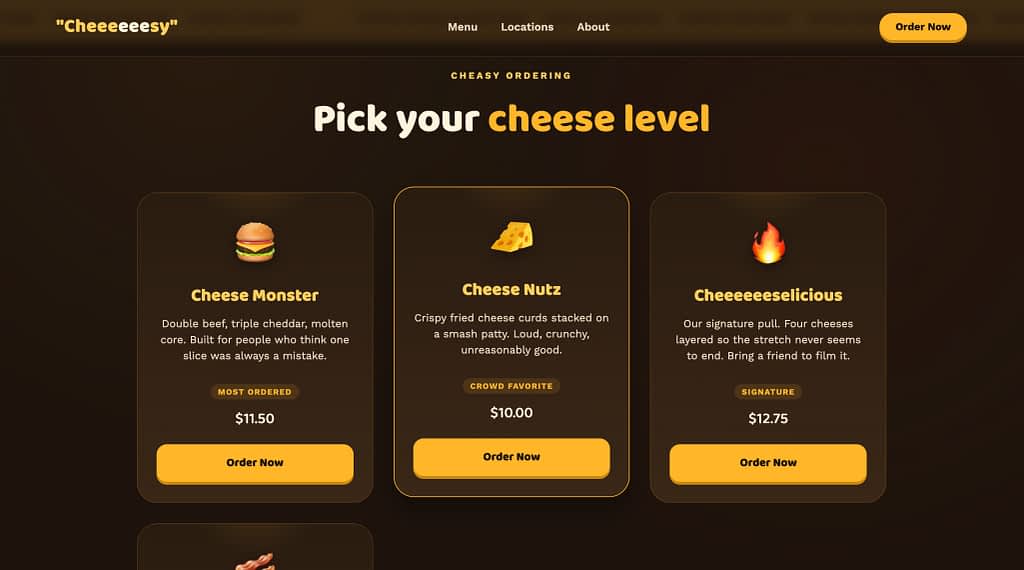
Like this mockup generated in just about a minute.
This can be both a blessing (get a better grasp of what someone’s vision is) or a nightmare (try to design off of an impossible to recreate vision, difficult-to-open files, and more).
Fast Company and AIGA’s 2026 Design Pricing Transparency Project surveyed 1,273 freelance designers and 150 hiring managers this spring and found that nearly 40% of companies now use AI to kick off a creative project, but only 14% of hiring managers expect their need for freelance designers to actually shrink over the next year.
So, the way AI has entered the chat now is mostly as a brainstorming buddy.
Phew.
Companies are reaching for AI to generate a starting point, then still reaching for a designer to make it work.
What Do These Changes Mean for Selling Web Design?
It changes what you’re actually selling.
As Designjoy founder Brett Williams put it in a recent LinkedIn piece arguing against the “Figma is dead, learn to code” narrative:
“When everyone can build, design becomes the only differentiator.”
Nobody pays a premium for design anymore.
They pay for judgment, trust, and the confidence that someone who knows what they’re doing is steering the outcome.
So…it’s a game you can win. 😉
This guide is built for that fight, specifically for solo designers and small teams with no one to hand off the parts you don’t love.
Instead of theory, you’re getting 25+ tips you can act on this week, plus the three tools that make running this side of the business feel less like a second job.
25+ Tips for Selling Your Web Design Services This Week
Okay, you’ve known all these changes, you’ve lived through them yourself.
So, let’s get to what you can actually do to sell your web design services harder, better, faster, stronger (making Daft Punk proud).
Especially talking to solo designers that don’t have enough headcount, separate teams, or a whole sales process set up just yet (like web design agencies often do).
Polish the Portfolio, Duh
The number one tip, can be perceived as basic, but it’s the absolute foundation of any design business: building out your portfolio.
DO NOT skip it, even if you already have a portfolio in place.
- If you don’t have many client projects yet, build 2-3 spec/concept projects for a specific niche (e.g. redesign a real local business’s site as a “here’s what I’d do” piece) rather than generic dummy projects.
- Show the thought process, not just aesthetics: a before/after slider or a short breakdown of the problem you solved, converts better than a static screenshot. Show that you know exactly what you’re doing.
- Keep it to 4-6 strong pieces over 15 mediocre ones just to show off all your work.
And above all, make it easily accessible and easy to read.
- You’re a web designer. So use it to your advantage. We all know doctors make the worst patients, but this is something you have to get past.
Create such a beautiful website with your portfolio that it simply cannot be skipped. Unleash all your creativity. Just like in these memes where you push ChatGPT to create “the ultimate version” of “input whatever niche here”. The pinnacle of web design. You get it.
Define Your Web Design Service Model(s)
Before you touch pricing or packaging, you need to know what you actually want to sell. This is the decision that shapes everything else on this list, so get it right first.
- Pick one primary service model, and commit to it. Productized (fixed-scope packages), subscription (ongoing retainer-style work), or fully custom. Whatever you choose, pick a lane.
You can offer a mix once you’re established, but starting out, trying to be all three at once is what makes your pricing page (and your pitch) confusing.
If you’re not sure which to pick: productized is the easiest to market and the easiest for a potential client to say yes to, since there’s no “let me think about the price” moment.
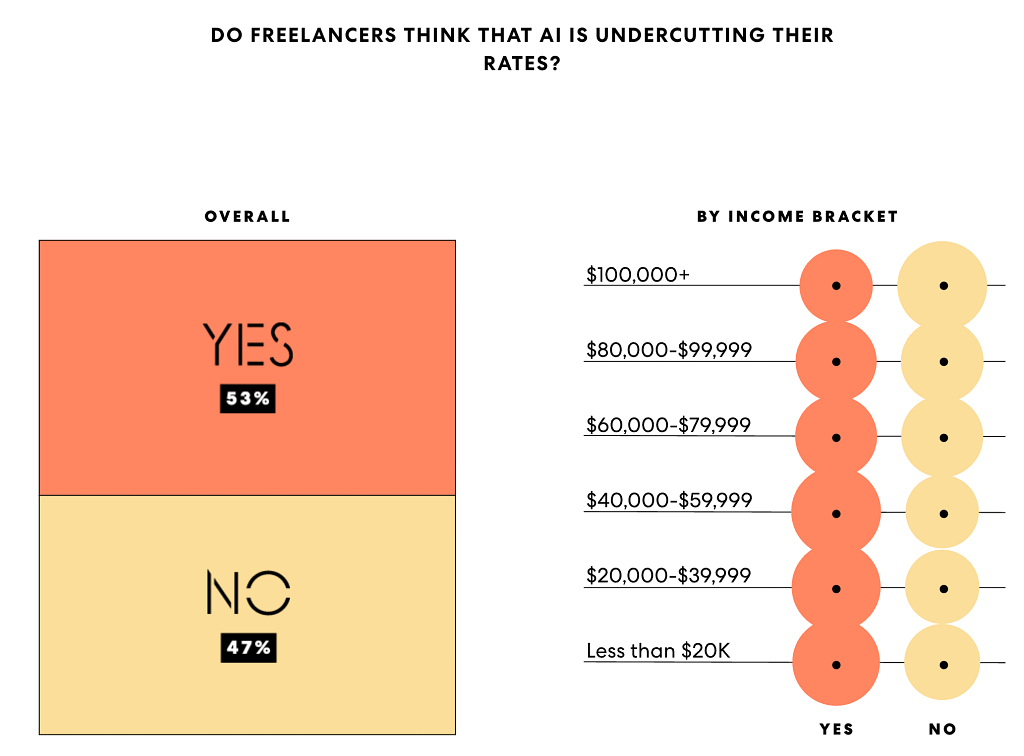
Especially now with AI in the picture, most (53% according to a study done by FastCompany) freelance web designers believe that AI is in fact undercutting their rates.
Don’t undersell your design because of AI, but do make the pricing and the reasoning behind choosing you as a professional super clear.
- Package your core service into 2-3 clear tiers. Three tiers is the sweet spot, two feels like a binary “cheap vs expensive” choice, and five overwhelms people into picking none of them.
A simple structure: a starter tier (could be a single landing page or small site), a core tier (a full new website for a small business; the one you want most people to pick), and a premium tier (could be a full-blown ecommerce store, custom features, or more pages).
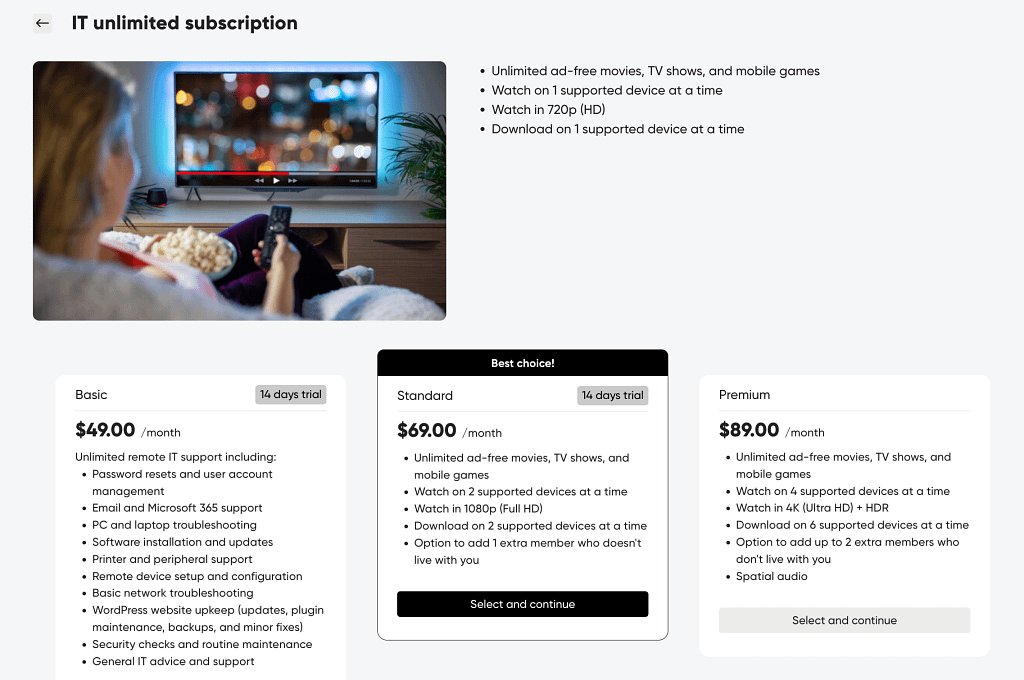
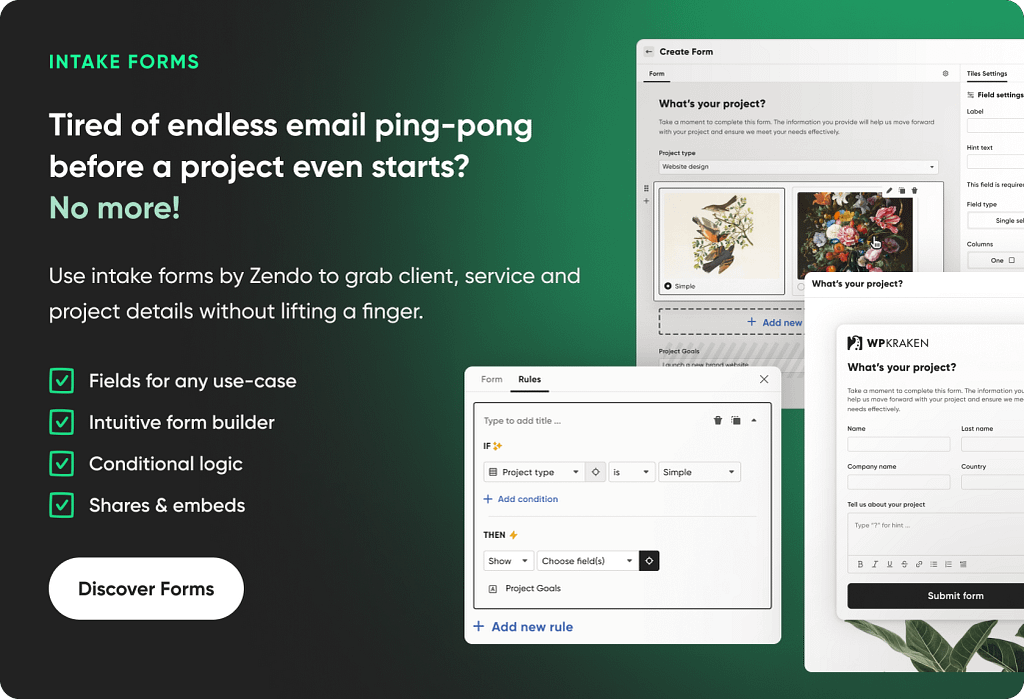
Zendo‘s Order Pages are built around exactly this kind of tiered setup, so clients can browse and choose without the back-and-forth email chains.
All you have to do is head to Services → Overview and choose Subscription as the service type.
Build each tier as its own package with its own name, description, and price, then highlight whichever one you want most people to land on.
You can add a free trial per package, cap how many requests can be active at once (say, one at a time on your starter tier, two on your top tier), and turn on pause/cancel-anytime for clients (the same unlimited-requests-but-one-at-a-time model Brett Williams uses for Designjoy’s Standard and Pro plans, which is a big part of why people subscribe without hesitating.)
- Name the flagship offer in a memorable way.
Based on whatever you’ve already proven works: a type of project you’ve delivered multiple times, something you did as an in-house designer before going independent, or just the kind of work you enjoy most and are fastest at.
Choose that as your flagship, highlighted offer and then…give it a name.
A memorable one.
One more thing worth setting up here, since it touches every tip above: whichever model and tiers you land on, the portal your client actually uses to buy the set up services, matters as much as the offer itself.
A client who logs into something that says “Powered by [some other company]” doesn’t feel like they hired you, they feel like they hired a reseller.
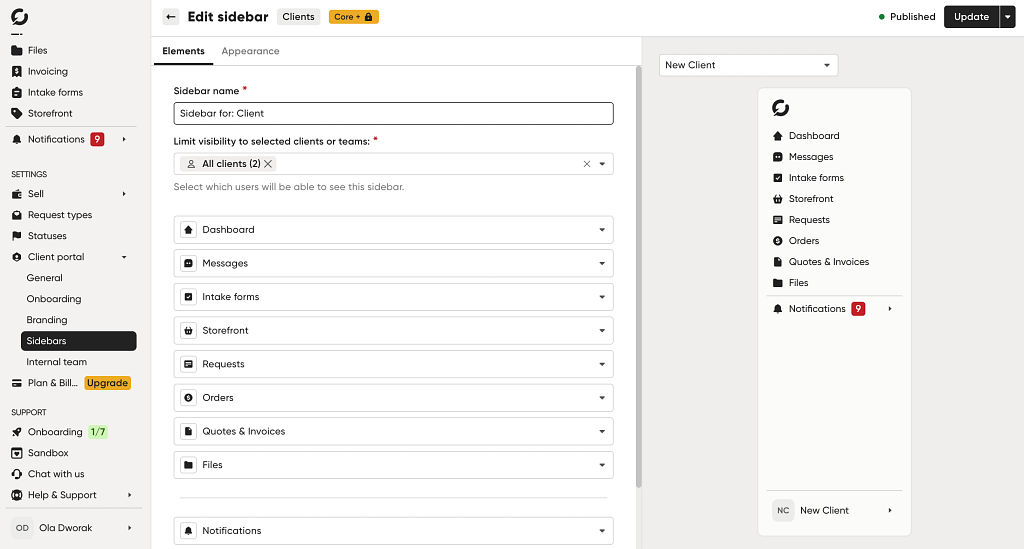
Zendo lets you white-label the whole thing: your own logo, colors, and custom domain, a chatbot named after your business instead of the platform’s, and the “Powered by Zendo” badge removed entirely.
It’s a five-minute setup under Client Portal → Branding, and it’s the difference between a client feeling like they bought a service and a client feeling like they hired a professional, which is the whole thesis of this guide.
A real example: Etch Design, a small brand-design studio offering unlimited design requests on subscription, deliberately caps how many clients it takes on to keep quality high, and runs delivery through a white-labeled Zendo portal.
Founder Kyle Courtright has said that on demo calls:
“we get to the backend (white labeled Zendo) near the end of the call and eyes get even wider. It’s a true value-add for folks.”
Price With Confidence (Stay Stronk!!)
First.
Pricing your offer may make you feel a bit overwhelmed.
Here’s another excerpt from the FastCompany survey/report:
“With little way of knowing how other freelancers operate, only 12% of our survey takers report being “very confident” in pricing their work (with 49% sometimes feeling afraid to ask for a higher rate).”
It’s not that simple. But there are a few ways you can get more confident over time.
- Price around outcomes and value, not hours. Hourly pricing punishes you for getting faster and rewards you for being slow, which is just backwards.
If a project will help a client achieve more leads or sales, price against that value (value-added services or value-based freelancing), not against how many hours you’ll log. This also removes the awkward moment where a client asks “how long will this take you” as a proxy for “how much will this cost me.”
- Set a minimum project size. This does two things: it filters out potential buyers who were never going to be profitable, and it signals that you’re not a bargain-bin option.
You don’t have to announce the number publicly. Just have it in mind so you can politely decline (or upsell into your smallest package) when someone’s budget doesn’t clear it.
- Have a scripted way to handle budget conversations. Not a rigid script you read word for word, but a plan for the moment someone says “what’s this going to cost.”
Something like: “That depends on scope, but most projects like this land between [range]. Once I understand what you need, I’ll give you an exact number.”
Build Out Your Personal Brand
Your portfolio gets people curious. Your personal brand and consistent online presence is what gets them to trust you before they ever hop on a call.
Here’s how to build one without turning into a content machine you hate running.
- Create outcome-focused content, not too technical content. Nobody outside the industry cares about your stack, your grid system, or your plugin choices.
They care about more leads, more sales, and not looking amateur next to competitors.
So…write and post about the results your work produces. This is also the content that actually performs on LinkedIn, where business owners (your buyers) spend their time.
I personally wouldn’t completely strain from sharing the technical stuff and the reasoning behind design choices. You’re an entrepreneur, show it off. Because it may also attract other designers into your network and help build out your brand, but most importantly shows off how you solve their problems. Lead with the results.
- Publish before/after case studies. This is one of the highest-converting content formats for visual work, because it doesn’t ask anyone to imagine the value, it shows it.
A simple format: what the old site looked like, what was wrong with it, what you changed, and what happened after. Even one real result (more inquiries, faster load time, higher conversion) makes this land harder.
- Niche down and let it show in what you post. Web design consultant Steve Schramm makes this case repeatedly in his own posts about pricing and positioning: he argues the businesses that win client trust are the ones with a focus area the agency understands deeply, rather than a “we do everything” menu of services.
For a solo designer, that means picking an industry or project type (local service businesses, course creators, whatever you’re fastest at) and letting your content, case studies, and offer name all point at it.
Going deep on relevance is what moves you out of price competition, even when you’re not the cheapest option on the list.
It’s relevant for services, but also for the most recent LinkedIn algorithm analysis. Picking a lane in what you’re posting (and adding to your profile) can help you broaden your reach as well.
- Use LinkedIn to build authority with business owners. This is where your buyers actually are, more than TikTok or Instagram for most B2B web design work. Post consistently, comment on posts from your target niche, and treat your profile like a landing page, not a resume.
My best tip after running a program for building and maintaining personal brands on LinkedIn is…stay authentic.
Especially now with the new “mark as AI slop” option. Work with your own voice, share your expertise, show off your best results, explain your reasoning, show you’re better than AI.
And stay consistent.
If you want quick results and best CTRs…go for what social media loves best: controversy and a good hook. 😉
- Use short-form video to show the process and results. Doesn’t have to be TikTok. A 30-60 second video posted natively on LinkedIn showing a redesign, a quick tip, or a client win works just as well and reaches the audience you’re already trying to build authority with.
Screen recordings of before/afters are an easy, low-production way to start. And to make your content a bit more unique.
- Systematize asking for referrals instead of hoping they happen. Referrals are the highest-trust, highest-converting lead source there is, and most designers leave them to chance.
Build a simple habit: at project completion, ask your customer directly (“do you know one or two other business owners who could use something similar?”) or simply (“On a scale 1-5, how satisfied are you with the results delivered? Why?) instead of waiting for it to happen organically.
- Be creative. Stand out. This is the tip most people skip and it’s the one that actually differentiates you in a market full of near-identical portfolios and near-identical “contact us for a quote” websites.
Have an opinion. Show off your personality. Say something in your marketing that a templated competitor never would.
Turn Attention Into Leads
Now, likes and comments feel nice, but they don’t pay your rent. Not alone usually.
Here’s how to turn that attention into actual conversations.
- Track who’s engaging with your content, and reach out. If the same person keeps liking or commenting on your posts, that may as well be a lead.
Add them to your network if you haven’t, and reach out with something specific, not a generic “let’s connect.”
- And if you have bigger lists of people to reach out to…Set up an automated outreach sequence on LinkedIn. Manual one-by-one outreach doesn’t scale for a solo designer with no sales team.
Use a tool, like Lemlist, which can run a personalized connection and follow-up sequence for you, so outbound keeps happening even on weeks you’re heads-down on client work.
Run Sales Calls That Close
Getting someone on a call is only half the job. What you do once you’re on it decides whether they sign or ghost you.
- Research the prospect before the call. Look at their current site, their social presence, and their competitors before you ever get on the phone.
Fifteen minutes of prep turns “so, tell me about your business” into “I noticed X on your site, tell me more about that,” which immediately signals you’re not treating this like a generic call.
- Frame the call before diving into questions. Tell the prospect what to expect before you start asking things: “I’ll ask a few questions about your business, then we’ll talk about how I could help, then budget and next steps.”
Set this up as a repeatable template for yourself, but stay flexible. If a call goes off script because the prospect brings up something important, follow it, don’t force it back onto your outline.
- Ask problem and outcome questions, not just “what do you need.” “What do you need” gets you a feature list. “What’s not working right now” and “what would it mean for your business if that were fixed” get you the actual reasons someone will say yes. Dig into both the pain and the goal, not just one or the other.
- Recap what you heard before quoting anything. Play back the problems and goals the prospect told you, in their own words, before you name a price.
This does two things: it proves you were actually listening, and it gets a small “yes, exactly” from them right before the number comes up, which makes the price land in context instead of cold.
A note on all four of these: if you have a solid productized offer (tip #5 and #6), a lot of sales calls either won’t be needed at all, or will be short and easy, because the prospect already knows the scope and price before they ever talk to you.
Deliver, Bill, and Systemize
Selling the project is the fun part. You can hear the cha-ching already, right?
But delivering it without losing your mind is where the real business gets built. These tips keep the operational side from eating your week.
- Turn repeatable delivery steps into checklists. Every project has a version of the same phases: discovery, wireframes, design, revisions, launch.
Document the checklist once, and every project after that gets faster and harder to mess up.

With a tool, like Zendo, you can attach that checklist directly to the request type as a private, internal task list only your team sees.
It then travels with every project automatically instead of living in a separate doc you forget to open.
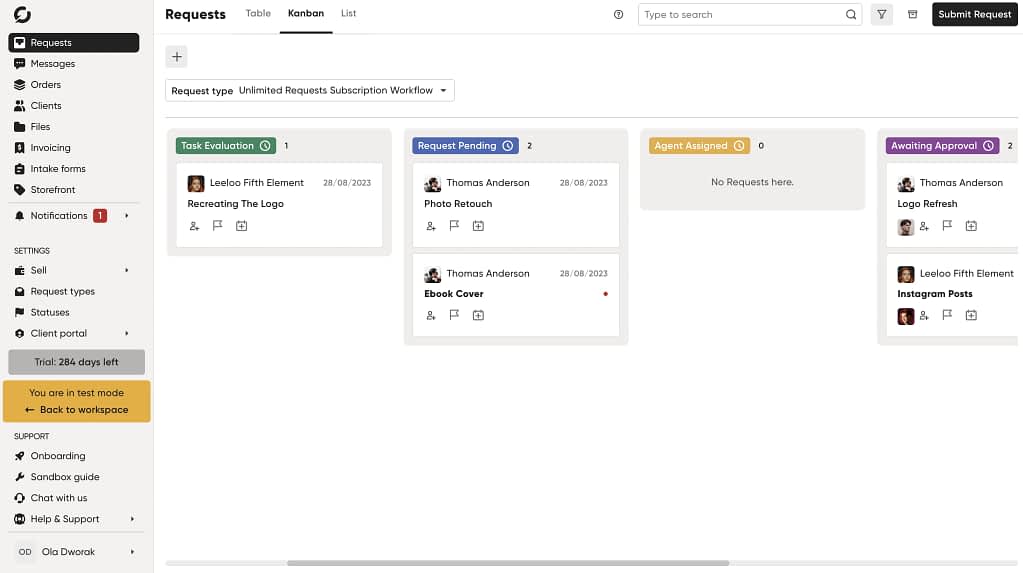
Pair it with the Kanban view of your Requests tab, filterable by client, status, or request type, so you can see what’s stuck where without scrolling through a mixed board of everything at once.
- Automate quotes, invoices, and payments. A tool like Zendo handles quotes, payment requests, and invoices as part of the same client conversation, so nothing falls through the cracks.
In Zendo: turn on “Automatic request creation” under a service’s Automations tab, and a purchase instantly generates the right request for you to start on. No manual triage required.
Quotes, invoices, and payment requests can go out automatically too, via Stripe checkout or bank transfer, all inside the same thread the client already uses to talk to you.
- Use contracts that prevent scope creep before it starts. A short, clear contract that defines what’s included, how many revision rounds are covered, and what counts as “extra” protects you from the single biggest profit killer in custom project work.
Grow Through Clients, and Protect Your Time
A happy client is your best marketing channel, if you actually treat them like one.
Here’s how to grow off the work you’ve already done, without working yourself into the ground doing it.
- Ask for reviews and testimonials at the right moment—right after launch, or right after they’ve told you they’re happy with the results, not weeks later as an afterthought email.
In Zendo: the groundwork for this starts earlier than launch day, though.
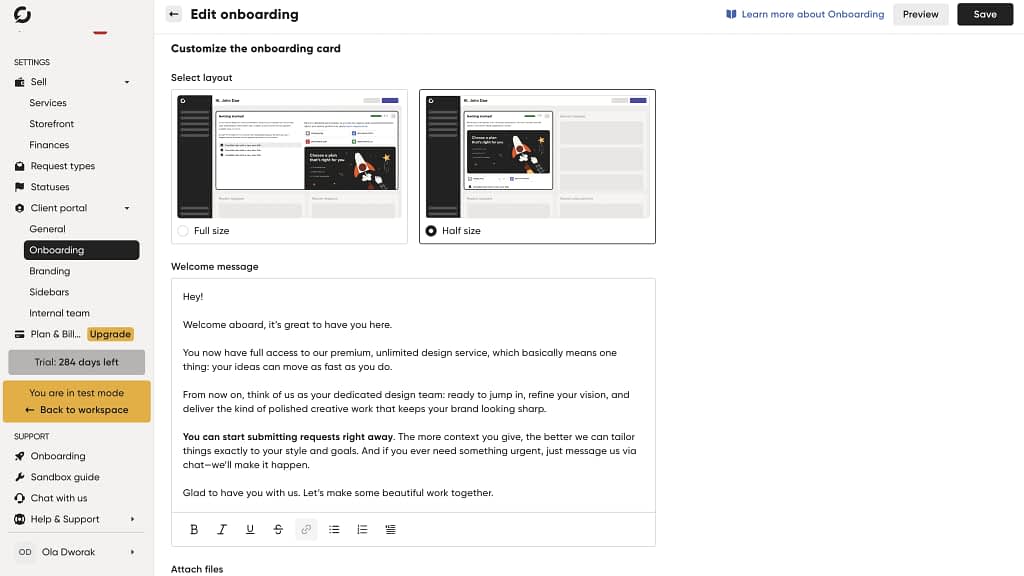
Zendo’s onboarding builder lets you set a welcome message, attach a short video or files, and add a first-steps checklist that shows up the moment a client logs into their portal for the first time.
A client who never feels lost in the process is a lot more likely to say yes when you ask for a testimonial at the end of it.
- Turn happy clients into a referral engine. Don’t leave this to chance either. A simple client satisfaction survey (NPS-style: “how likely are you to recommend this to a colleague”) lets you spot your promoters and follow up specifically with them for a referral or testimonial.
- Set boundaries on hours and scope. Growth that just means more hours at the same rate isn’t growth, it’s a slower path to burnout. Decide in advance what your working hours are, how many active projects you’ll take at once, and what you’ll say no to, before a client puts you in a position to figure it out on the fly.
- Use AI tools as your delivery multiplier, not your competitor. Tools like Claude can compress hours of repetitive work.
Boilerplate, first-draft copy, basic components, into minutes. Go a step further and build reusable prompts or workflows for the tasks you repeat on every project: writing a brief from a client intake form, drafting a proposal, generating a first-pass sitemap.
ADPList CEO Felix Lee, who published a post on a running breakdown of the AI tools designers are using to ship without an engineering team, makes the point bluntly: the tools are not the moat—knowing what to build with them is. The point isn’t to replace your judgment, it’s to free up your time for the parts that actually need it.
3 Tools You Need In Your Tech Stack
You don’t need a full agency’s worth of software to run this like a real business. Just three tools, each doing one job well.
- Lemlist: for outbound lead generation via LinkedIn/email sequences
- Zendo: for selling, client portal, delivery, and payments in one place: a white-labeled storefront for tiered/unlimited-request subscription packages, custom order forms, request checklists and Kanban tracking, plus automated invoicing and onboarding for new clients
- Claude: for speeding up delivery, proposals, and repetitive sales/ops tasks
Bonus: create free “Book time with me” slots in Google Calendar to avoid paying for Calendly or similar tools.
Google Calendar has this built in, and it takes about five minutes to set up.
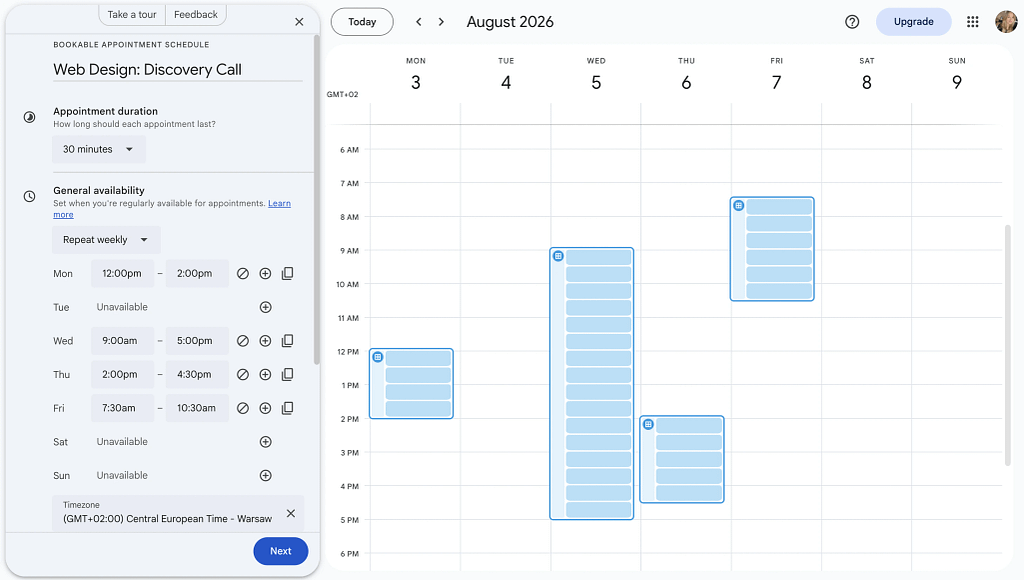
Here’s how:
- Open Google Calendar and click “Create,” then select “Appointment schedule.”
- Name it something clear, like “Discovery Call” or “Book a Design Call.”
- Set your available windows (say, Tuesdays and Thursdays, 10am to 2pm) and how long each slot should run. 15 or 30 minutes is usually enough for a first call.
- Add a buffer between bookings if you don’t want back-to-back calls eating your whole day.
- Once you save it, Google generates a booking page with a shareable link. Anyone who clicks it sees your open slots and books directly into your calendar, no email back and forth needed.
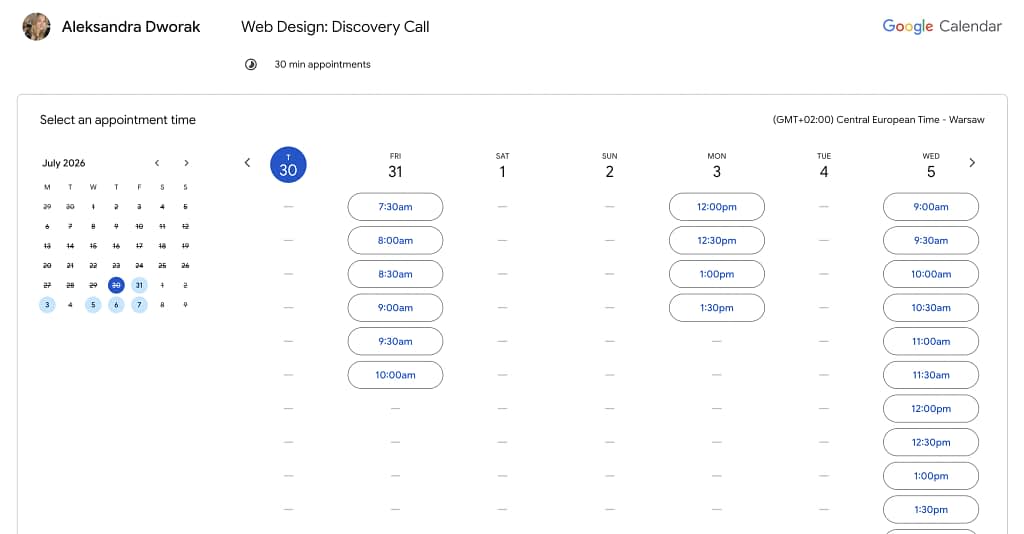
Drop that link in your LinkedIn bio, your email signature, or straight into a DM when a prospect says they’re interested. It does the same job as a paid scheduling tool, minus the monthly bill. 😉
Key Challenges in Selling Design Services
Look, no amount of prep makes selling design frictionless.
Even with a killer portfolio, clear pricing, and a process you could run in your sleep, the same handful of objections keep showing up.
Here’s how to actually deal with them when they do:
Your prospect says “I’ll just use AI myself.”
Raw Materials founder John Roescher—whose agency won D&AD’s 2024 Design Agency of the Year—argues that AI is best used to accelerate an idea a human already had, not to replace the thinking behind it, and that creativity is one of the most powerful tools we have precisely because it can’t be generated on demand.
Lean into that distinction with prospects: show them what their AI-generated draft is missing (hierarchy, brand judgment, a second pair of eyes that knows their market) rather than arguing AI is useless.
Worth knowing for your own confidence too: the same AIGA/Fast Company survey found 70% of freelance designers believe AI is hurting the quality of creative work, versus only around 41% of the hiring managers who actually pay for it.
Designers are more worried about AI than the clients buying design are. So, you have to prove you know what you’re talking about. Show where AI is right and where it’s wrong.
Scope creep on custom work.
This is the one that eats profit margins quietly, project after project, until you look up and realize you’ve been working for half your rate.
A tight contract (tip #26) is your first line of defense here. It puts in writing what’s included and how many rounds of revisions you’re covering, so there’s no ambiguity to argue about later. A clearly productized service with a defined scope (tip #5) goes even further, since there’s nothing to creep when the offer was fixed from the start.
Budget objections.
Every designer hears “that’s a bit more than we were hoping to spend” at some point. The trick is not treating it like a surprise every time.
Your scripted response (tip #9) means you’re never caught flat-footed when the question comes up, you already have a range ready to go. A visible minimum (tip #8) does the filtering before the call even happens, so you’re mostly talking to people who can actually afford you. Together, they mean you’re rarely negotiating from scratch.
Clients who don’t know what they want.
This one isn’t really an objection, it’s just a reality of working with people who aren’t designers themselves. They know something feels off about their current site, but they can’t always say what.
This is where a structured discovery call (tips #20 to #22) proves useful.
Problem-and-outcome questions surface a concrete brief even when the client can’t articulate one themselves, so you leave the call with a clear direction instead of a vague “make it pop.” 🤪
3 Things to Do This Week
This article was a lot.
But if you want to make tomorrow just a little bit better, don’t apply all of those tips at once.
Here are three easiest things you can do to sell web design better, this week:
- Try Zendo for free and set up your services
- Post your first post on LinkedIn and polish your profile (add in your experience, portfolio, customize your profile URL)
- Polish your portfolio
Bonus: work on why you’re better than AI.
Good luck!!
FAQ
What’s the best way to find clients for web design services?
Referrals and your network first, then niche-specific content on LinkedIn (see tip #13).
How to sell web design services on social media?
Outcome-focused content plus before/after case studies: the two formats that convert well on LinkedIn, where your buyers are (see tips #11–12).
How do I sell web design services without a large portfolio?
A named, productized flagship offer plus a couple of strong spec projects in your niche does more than a big generic portfolio would.
How do I sell landing page web design services?
Same framework as the rest of this guide: pick a model, package it into tiers, and niche the positioning down to landing pages specifically (see tips #5-6, #13).
How much should I charge for a small business website?
Price around the outcome (leads, sales) the site will generate, not the hours it takes you to build it, and have a scripted range ready before the client asks (see tips #8, #10).