Scoro is a work management platform for professional service firms with a sprinkle of AI functionality to keep things interesting. It’s a robust solution that tries its best to become the only one system a business might need, covering anything from resource planning and financial reporting to workflow management.
But not everyone is happy with Scoro. In some cases, it’s a simple mismatch of needs and preferences; there’s no point in paying for features you don’t even need, like revenue recognition or complex budget tracking. Some businesses using Scoro outgrow the tool and have to invest in enterprise ones, while others just can’t get used to its complexity.
If that’s your story, settle in. We’ll share the best Scoro alternatives for professional services, although each comes with its own pro and cons.
Here’s a quick comparison table of all the mentioned tools for the impatient readers (we see you!):
| Best Scoro alternatives for agencies in 2026 | |||
| Accelo | Business management software focused on analytics, finances, and micromanagement | Good for big organizations that outgrew Scoro | No free plan |
| Flowlu | Project management platform with CRM capabilities | Good for small to medium businesses that don’t mind rigid workflows | Free plan included |
| Zendo | Client Portal with professional services automation and subscriptions, perfect for agency management | Good for agencies that look for flexibility and teamwork improvements | Free plan included |
| Agiled | AI-powered business management tool with CRM features | Good for small to medium businesses that want to focus on the CRM aspects | Free plan included |
Scoro Reviews: Where it Shines and Where Underperforms?
Scoro scores well across the most popular reviewing sites:
| G2 | Capterra | Trustpilot | TrustRadius |
| 4.5/5 | 4.5/5 | 3.3/5 | 7.4/10 |
| based on the number of reviews | |||
| 464 | 262 | 4 | 17 |
But numbers hardly ever tell the whole story. Let’s dig into what people actually say.
Scoro Strengths
Scoro certainly wins in the ‘versatility’ category. Just a cursory glance makes it clear enough that it was built for agencies, helping them tackle most administrative sides of the business. It also facilitates team collaboration and improves financial visibility at all times. In other words, using Scoro means staying in control.
Scoro will especially delight team leaders. It enables micromanagement, quickly noting who’s been working for what and for how much. Some leadership styles might scoff at this approach, while others will be happy to get so much insight into team utilization.


Scoro Disadvantages
Because of that, Scoro won’t be the right choice for freelancers. Similarly, small teams on a tight project budget might find this platform way too complex; it’s neither intuitive nor easy-to-use, requiring some in-depth onboarding for all team members.
There are also some complaints about the pricing — after all, Scoro charges a hefty sum for its continued use. As always, all businesses have to consider their budgets and decide if this platform for agencies is worth the investment.


4 Best Scoro Alternatives for Service Businesses
Now, let’s get to business — what tools are worth the switch from Scoro?
1. Accelo: Tracking Everything
First on our list is Accelo, a PSA software for professional service teams. It promises to shorten down your quote-to-cash cycle times, give you contextual insight by collecting all information, and rich automations to choose from.
On G2, Accelo’s rating is currently at 4.4. Here’s a quick rundown of pros and cons of this tool:
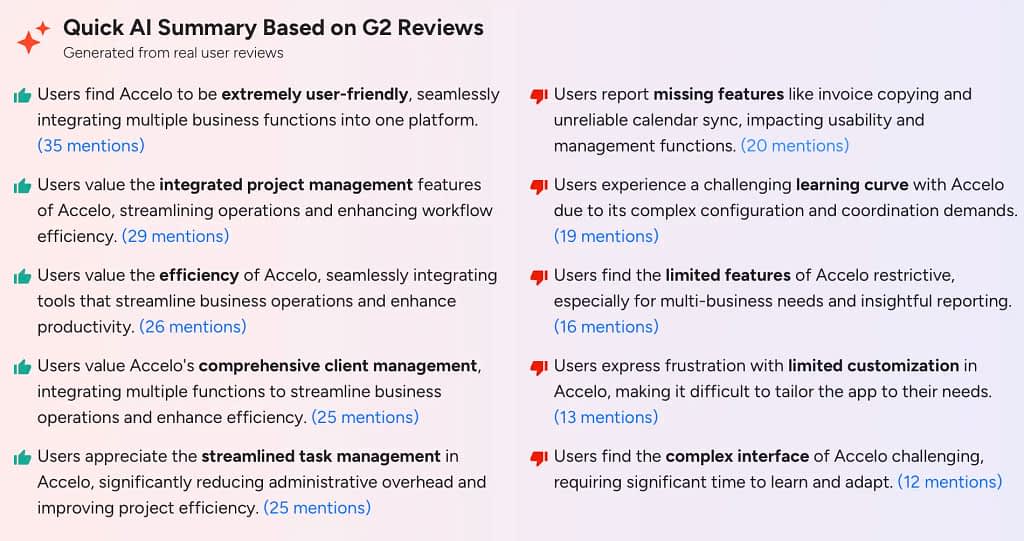
From our perspective, we need to add one more con to the table: lack of transparent pricing. The only way to get any details is to contact the team, which makes us suspect it might be on the pricier side.
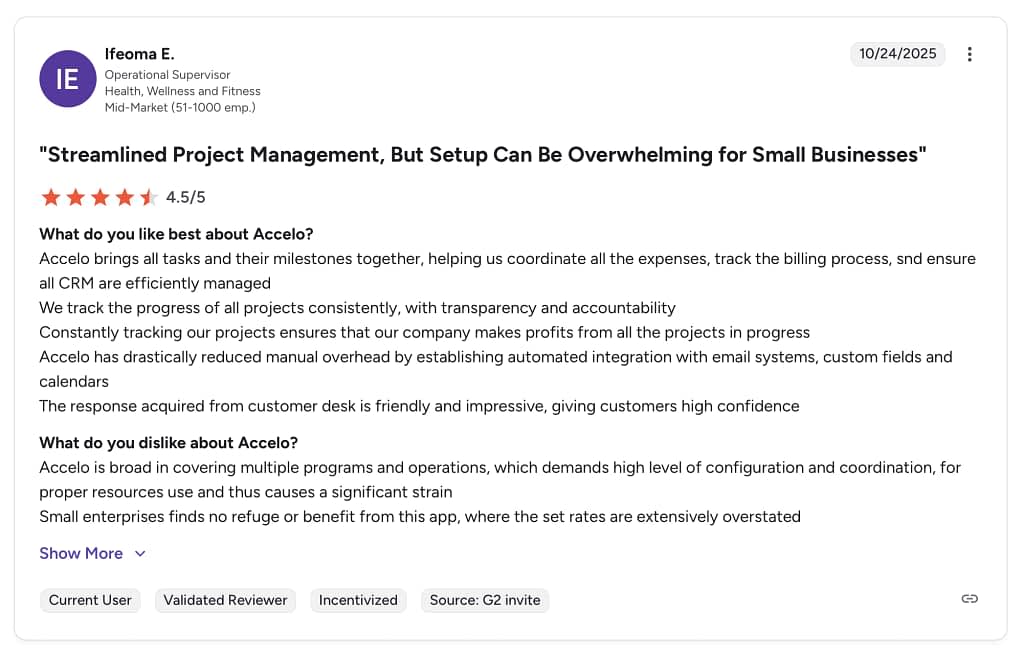
Project Management
When it comes to project management in Accelo, the emphasis is put on maintaining visibility into project progress and profitability, catching overruns early, identifying performance gaps, and anticipating timeline risks.
Projects can be divided into milestones and tasks. For example, under a “Kickoff” milestone, you can enter “Client Call” and “Internal Review”, and under a “Development” milestone you can have “Data Analysis”, “Implementation”, “Presentation”, and more. Each step comes with its own status, task assignments, due date, time budget, and even “children milestones” (if you want them to resemble matryoshka dolls!). To make your life easier, you can save your settings as project templates for later use.
On top of projects, there are also Tickets, which can be used for customer support. They also come with assigned users and date, as well as expenses, sale price, markup rate, and related objects (tasks, sales, projects).
Does Accelo make project management easier, more intuitive for an average employee? Not necessarily; in order for all the reports and forecasts to work, everyone needs to enter all data correctly, updating as it goes, and maintain a pretty strong discipline from day one. But team leaders will be beyond ecstatic to have all that data right at their fingertips.
Timesheets
Since Accelo is all about counting the money, it had to introduce timesheets to keep track of logged time. Thankfully, not everything has to be logged manually; for example, if you had scheduled a future time slot for a specific project, Accelo will automatically include it on your weekly timesheet. It also logs time spent on sending emails (the suggested time is 5 minutes) and of course, scheduled meetings (as long as you booked them with Accelo, G Suite, or Microsoft Outlook).
For daily timesheets, you can see how your time is spent via graphs. They include a histogram (the amount of activity during the day, divided into 15-minute intervals), billable hours and non-billable hours. This way, team members can easily point out what client work eats up their time the most (great argument for pointless meetings!) and what’s the status of the real-time budget at all times.
To make it a little easier, users can also use the time tracking feature. You can easily connect it to a task or project you’re focusing on, add tags, or log it as a call. As always, it’s important to remember your timer is on in the first place!
All that logged time leads us to utilization dashboards. There, leaders can view a bar graph of logged and scheduled time to help them decide who needs more work, and who could do with some leeway.
Finances
But where Accelo really stands out is in its financial management. It gives you a clear overview of all money coming in and going out, so nothing slips through the cracks; especially with notifications for overdue payments set in place.
Accelo also makes it easy to compare planned vs. actual revenue and simplifies forecasting by using historical data to highlight trends and patterns. This way, you’ll quickly notice which projects bring in the most money and which ones seem to be bottomless pits of wasted time.
Summary
Is Accelo the right Scoro alternative? As long as you’re not looking for a productivity tool that will facilitate teamwork; this agency management solution seems to be geared more towards leaders who want to have all aspects of the business under control, and especially team capacity. Also, considering the hidden pricing, the cost might be too steep for small to medium businesses.
But those who have grown Scoro and need more robust reporting features, go for it!
Not sure? Check out our article about alternatives to Accelo.
2. Flowlu
Flowlu is a project management tool and a CRM combined into one. Created for small and medium businesses for various industries — including marketing, IT departments, legal professionals, and more — it helps simplify work, facilitate sales conversations, and increase efficiency at the same time.
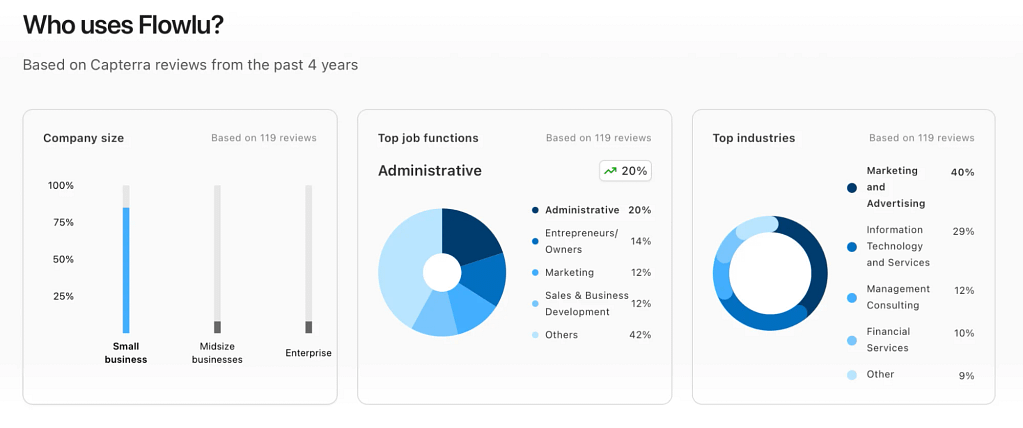
On Capterra, Flowlu’s current rating is 4.8. Going by their data, small marketing and advertising teams are their most common users.
Thankfully, Flowlu does offer pricing. There are four plans total, of which one is entirely free, and the most expensive one costs $22 per user per month. And for enterprise businesses, there’s also the option to reach out to Flowlu’s team for a custom quote.
Project Management
Projects in Flowlu are a complex matter. It’s not just a bundle of tasks squeezed into one space; it’s the main activity hub, where users can switch between different project views, including the Gantt chart, team members, work structure, finances, documents, lists, time spent, automation, and more. Everything concerning the project gets noted down there.
Tasks can be categorized by their status, similarly to Trello (To Do, In Progress, Needs Approval, etc.) which of course can be customized. Each task can be assigned to a team member and can include a checklist, time spent & time required, as well as tags.
For similar processes, users can create workflows to speed things up. They get their own special board for managing several projects at the same time; perfect for team leaders to check on their team’s capacity.
Flowlu will also help you track your finances. Each project can have expected costs and revenues outlined, keeping your cash flow in check. Moreover, a built-in diagram will flag any deviations from the plan, giving managers an instant read on overall project health.
Online CRM
Client management makes a huge part of Flowlu’s appeal. It will help you capture leads, track follow-ups, and move deals through a customizable pipeline.
Flowlu isn’t a fan of repetitive tasks, so of course you can automate your sales process as much as you need. You can set up multiple custom automation rules for personalized email sequences, reminders, and streamlined project creation; no need to do these things manually!
For communication, you can connect several inboxes to ensure no important message slips through your fingers. You can also use Flowlu to call clients directly, as well as automatically create contacts and tasks.
And of course, we get rich data insights in the form of real-time reports and dashboards to help with evaluating efficiency, profitability, and forecasting. If there’s a metric you don’t care too much about, don’t worry — you can customize widgets to show you only what you want.
Knowledge Base
Flowlu will also support you in setting up your single source of truth for both team members and clients. This will result in more efficient onboarding and fewer questions from your clients, as long as they read the presented documents.
Thankfully, Flowlu’s knowledge base can be pretty well organized. It comes with a drag-and-drop feature to manage your pages across a tree structure for convenience. You can also include images and embed videos to spice things up, and — most importantly — help users find what they need through a smart search support.
But what if your client stumbles on a “how to handle difficult business partners page”? This won’t ever happen in this tool — you can configure the access rights, not only when it comes to who can see the content in the first place, but also who can leave comments or make editions.
Summary
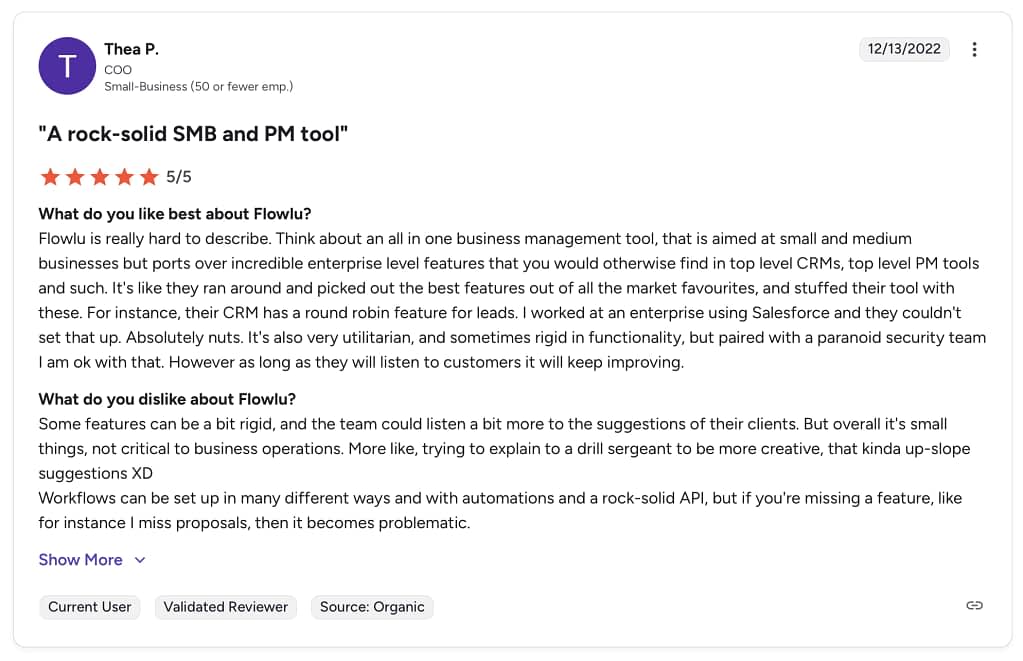
If you’re looking for the closest Scoro alternative, Flowlu might turn out to be a pretty good candidate. Unlike setups that require a separate tool for CRM and another for project management, Flowlu easily handles both. But teams will have to learn how to adjust their workflows to fit the tool, since it is at times pretty rigid; for those needing flexibility, this could be a dealbreaker.
Others, especially those who will appreciate the CRM, can give Flowlu a chance.
3. Zendo
Zendo, in contrast to the other two propositions, is less about setting up rigid workflows or micromanagement and more about facilitating collaboration — both with clients and team members. Plus selling services. While it doesn’t offer rich analytics features or real-time dashboards, it offers all the right tools to boost efficiency and productivity instead in completely new ways. And it has a user-friendly interface, too!
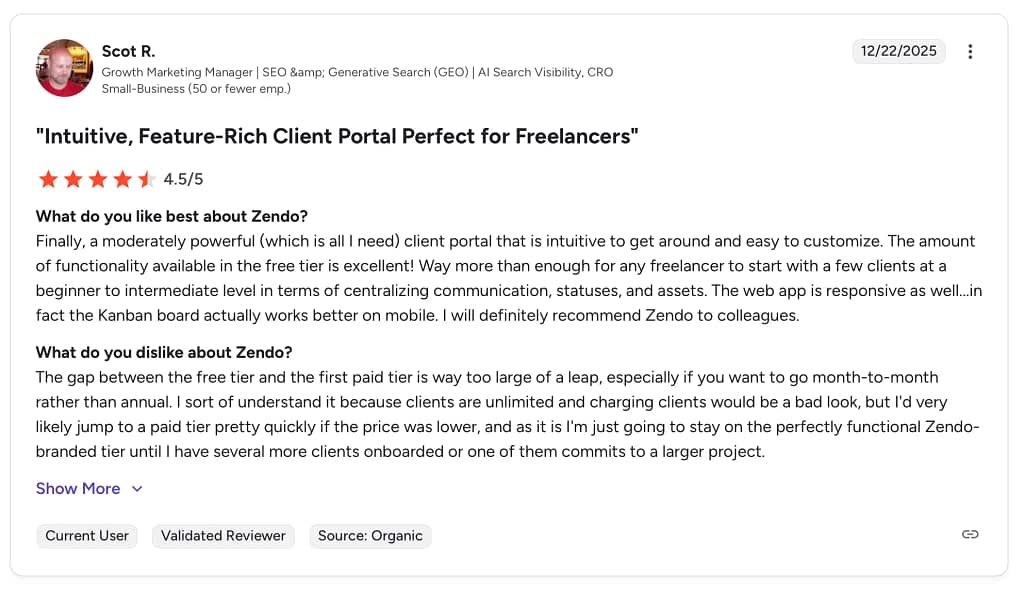
Zendo’s rating on G2 is currently at 4.9. Here’s a quick rundown of pros and cons of this tool:
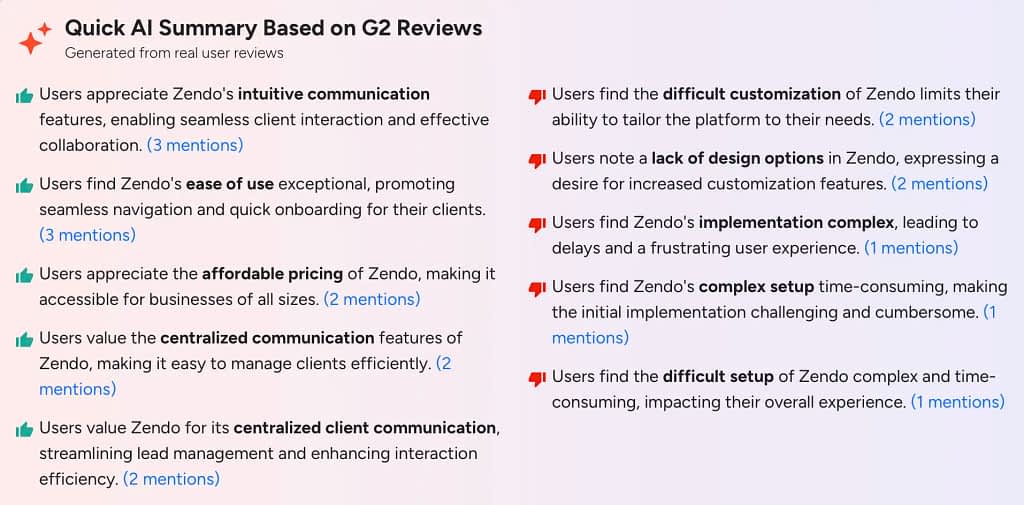
As mentioned on the list, affordable pricing is one of Zendo’s strong points. It comes with four plans: Essential, Core, Pro, and Agency, each adjusted to a different business scenario; the first plan, which comes with no price tag at all, is a perfect choice for those just starting out, while Agency would be best suited for rapidly growing businesses.
Each plan comes with its own trial, so don’t hesitate to check out Zendo’s features yourself!
Client Portal
Zendo’s main mission is to facilitate collaboration, so many features revolve around just that. And it’s not just about turning teamwork into dreamwork, but also about inviting clients to become full-fledged partners in crime.
How come? They can log in to their own secure dashboard. From there, they can participate in conversations with the team, look up what’s new with all the submitted requests, manage their subscriptions — if they have submitted any — finalize payments, share files, and more. This achieves several goals: clients feel more special and closer to the team than ever before, they don’t have to hunt you down for project updates, and you don’t have to bother them about a missed invoice.
But there’s more. Zendo’s Client Portal allows you to create interactive onboarding to help your clients get settled in; you can explain how they can use it, include a checklist of things to do, and share screenshots of the most useful features.
And you can personalize their sideboards as well. This way, you control what pages they have right at hand, ensuring they don’t get overwhelmed with unnecessary tabs. And if you want to include something extra — a YouTube video, a Miro board, or a Figma workspace — you can simply embed them.
Storefront
To elevate the customer experience even more, you can allow clients to submit any project requests they want on the customizable Storefront.
Storefront is a space for listing all the services you offer, including custom, productized, and subscription-based ones. There, you can describe your terms and conditions, explain what collaboration with you includes in detail, and show off different tiers and packages for. Clients can browse on their own time, select add-ons, and fill out order forms to describe what they expect.
Clients can also immediately pay for the purchased services if they require upfront payment. For others, clients will either be automatically charged for the chosen recurring services, or expect a custom quote they can reject or approve directly on the management platform itself.
And they don’t have to look for a separate tab to find the issued invoices and pay for them. They can do so right in thereal-time chat, which serves as the heart for every request; users can use it to not only exchange messages, but also to settle finances, share files, check on the project’s status, and more.
Subscriptions
We’ve already hinted at subscriptions. This business model is popular for a reason — it’s easy to build long-term relationships this way, increasing Client Lifetime Value (CLV). You don’t have to keep inviting clients for repeat purchases; they can instead sign up for a much longer deal, further incited by lowered costs or special offers.
When creating a subscription service, you can create several packages of different tiers. Those tight on a budget can settle on a basic option, while those ready to splurge can choose something much pricier. And clients who are still on the fence can try out a trial first to see if they like working with you; as long as you enable that option, of course.
It’s also up to you to decide just how many requests clients can submit within a single subscription service. For example, you can set an upper limit of 4 tasks a month, with the overall limit for tasks in a queue being 10. This will make workload management a breeze.
But what if your client won’t need your services for a while — during summer, for example? Will they have to resign entirely? Not at all; they can use the subscription pause feature to temporarily suspend the service. This way, they won’t spend money needlessly, but they also won’t sever ties with you. And trust me — they’ll appreciate this feature a lot.
Summary
If Scoro didn’t satisfy you in terms of flexibility and collaboration, Zendo will be a good alternative. It doesn’t come with rigid processes that only add up to your work, and offer very little micromanagement; just enough to see what’s happening, but not to the point of monitoring each and every move of your teammates.
Remember that Zendo comes with a free plan that will let you test it out thoroughly. Meanwhile, the paid plans have their own trials, if you’re curious about premium features.
4. Agiled
Agiled is another CRM tool that combines project management, invoicing, scheduling, and client collaboration. It helps teams lead clients from the moment they show up as leads to collecting payments, all in one fell swoop.
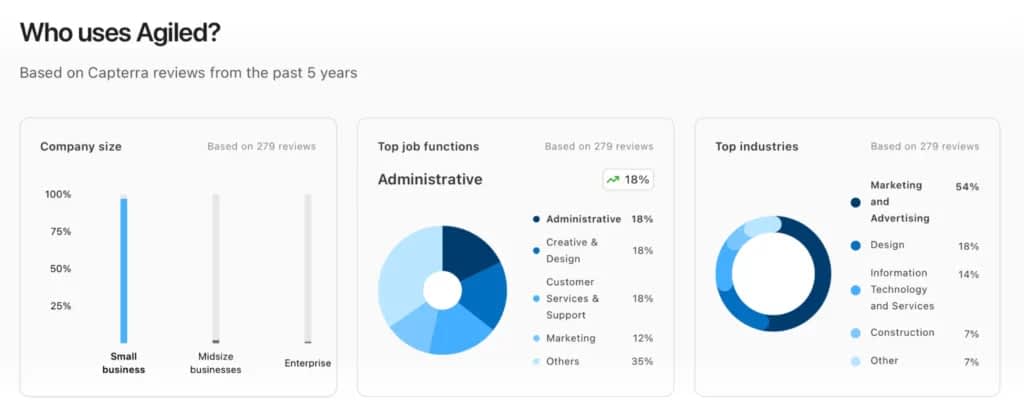
Agiled can boast of a 4.7 rating on Capterra. According to collected data, 54% of reviewers work at small companies, specializing in marketing and advertising.
When it comes to pricing, there are four subscription plans to consider, with the first one being entirely free, and the last one coming up at $99 per month, billed monthly. Not too shabby!
Deals & Pipelines
Since Agiled is CRM first and a Client Portal second, deals & pipelines make for its core feature. You can use it to create multiple pipelines for different business types, upsells, and partnerships; each supported with their own stages, custom fields, dates, and even dropdowns.
You can easily drag deals between stages and bulk edit them as you go. You can assign tasks to individual teammates or split ownership, whichever is more convenient. No matter what’s going on, you always get the right visibility into who’s busy with what.
And of course, the financial aspect has also been included. Each deal can have a set win probability on top of weighted pipeline value; thanks to that, you’ll know what’s likely and what isn’t to close this month.
Accountability is also accounted for: Agiled will log automatically each and every action taking place on the platform, including emails, tasks, and updates. You’ll see who’s slacking off, who made a crucial mistake, and who deserves the ‘employee of the month’ badge.
Forms & Deals Capture
Agiled streamlines the very first touchpoints with your clients. Once they submit a form, it can prompt creation of a new project, open a deal, or file a ticket, depending on your setup.
To create the forms in the first place, you can use the intuitive, drag-and-drop builder to ensure all the important questions are accounted for. A form can include text, checkboxes, selections, files, and the most common fields like email or phone number.
Most importantly, you can create conditions so that specific questions are hidden or shown, depending on the previous answers. This way, clients won’t have to waste their time answering pointless questions that aren’t relevant to their business case.
For those who value aesthetics, they can use premade themes for a splash of extra color. It won’t necessarily fit the brand ideally, but it can be adjusted slightly to at least not stand out too much.
Scheduling
Once clients are ready to see you face to face, you can share booking pages to set the right data and time. To make sure your calendar doesn’t become impossible to handle, you can create availability rules, including working hours, buffer time, and minimum notice periods.
You can also offer different meeting types, each with its own duration, location, and availability. This way, you can offer an abundance of quick phone call slots in between special team workshop meetings that take more than an hour.
To avoid the risk of ugly misunderstandings taking place, Agiled will automatically detect your client’s time zone so that they see the available time slots in their local time.
Summary
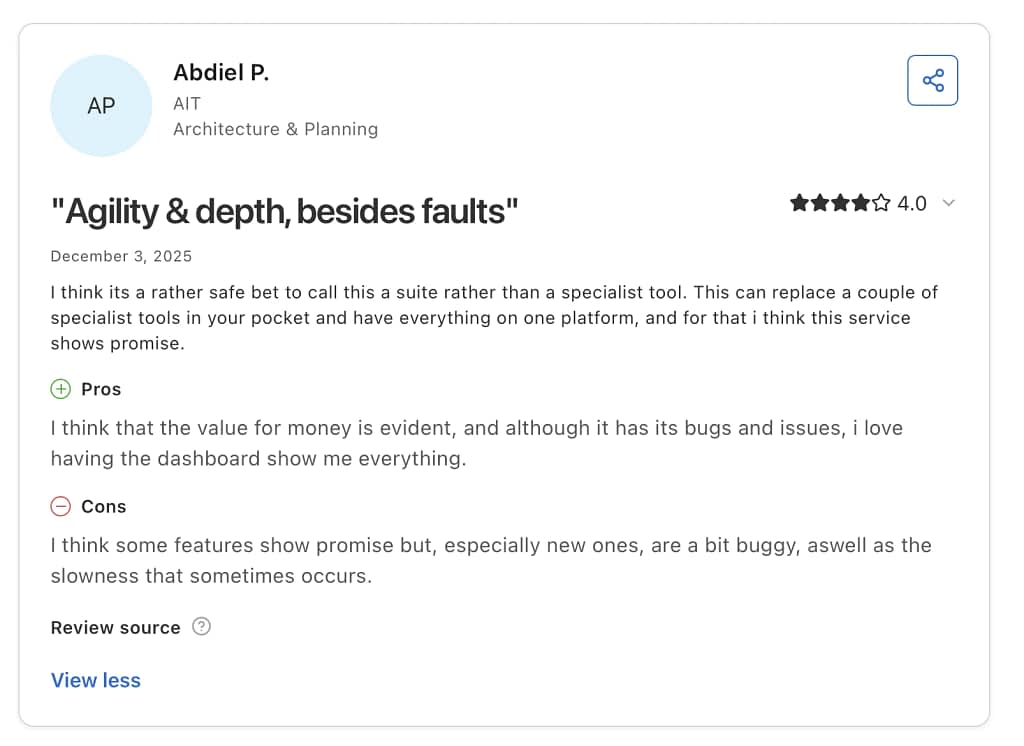
If you’re looking for a tool that will take good care of all your deals, Agiled might be a good option to consider. With its freshly redesigned platform, it has finally caught up with the modern times, offering a much improved experience than it used to be.
Conclusions
These days, no one has to settle for Scoro. There are many great options available on the market, each with their own strengths and weaknesses; some focus more on resource allocation, others on expense tracking & custom reporting, and some revolve around streamlining client communication.
But you don’t have to trust our word. Try out all these tools yourself and see what best fits your needs — just remember to not get swayed by fancy yet ultimately useless features. See what truly solves your most pressing business needs.
If Zendo’s the one that caught your eye, here’s a reminder that it comes with a free tier and trials for each paid plan!
FAQ
What are the Best Scoro Alternatives for Project Management and CRM?
The best Score alternative is Zendo, a robust Client Portal that focuses on facilitating collaboration and selling productized, custom, and subscription-based features with an easy to use interface. For teams that need more detailed analytics and features better suited for resource management, they can look up Flowlu.
What Should I Know When Looking for Scoro Alternatives?
When comparing options, it helps to understand what Scoro includes, what Scoro requires in terms of setup and onboarding, and how Scoro handles different areas like project management, CRM, and billing. Many tools position themselves as a top Scoro alternative, but what really matters is whether their approach fits your workflow. What makes Scoro stand out is its all-in-one structure, as Scoro covers everything from sales to delivery. Scoro exports projects as well!
Are There Any Free Alternatives to Scoro?
There aren’t any entirely free alternatives to Scoro, but there are options that come with free plans; while they’re a bit restricted in terms of available features or user seats, it can still be used by freelancers or those wanting to simply check the tool out. Out of all the work management solutions mentioned in this article, only Accelo doesn’t come with a free plan, in contrast to Zendo, Flowlu, and Agiled.
Does Zendo Have Automation Features?
While Zendo may seem like a simple tool at a first glance, it does actually have several automation options. First of all, you can create workflows — called Request Types — to account for different types of projects that might come your way. But most importantly, Zendo has a Zapier integration, allowing users to create automated workflows across all the systems they use, such as Slack, Discord, Gmail, Google Sheets, Miro, HubSpot, monday.com, and more.
Which Tool Is The Best For Small to Medium Creative Agencies?
Zendo is a platform built for agencies of any type, including creative ones. It’s not an enterprise tool that will overwhelm users with complex systems, but it’s also not as simple as Trello. It will help you with project planning using Kanban boards, improve client engagement by inviting people to work alongside your team, and facilitate communication thanks to the built-in chat; something that’s often neglected in other tools!