


Managing clients as an agency is no easy feat. Trying to handle all the requests, messages, and making sure the work is done on time and within budget can be tough. But if you use a different tool for each of these actions, it’s even more difficult.
But it doesn’t have to be this way. Client portals allow you to do all your client-related work in one place, helping you save time and avoid mishaps while jumping between platforms.
There’s no need to spend days finding the best client portal for agencies – we’ve done the hard part for you. Check it out, see which one fits your needs best, and spend more time nurturing client relationships and delivering quality work instead of drowning in apps.
| Focus | Price Range | Our Rating | |
| Zendo | White-label client portal for agencies | Free – $79/mo | 4,7 |
| FuseBase | AI-powered client workspace & portal | $32–$266/mo | 4,4 |
| monday.com | Work management with client portal features | $9–$19/user/mo | 3,5 |
| SuiteDash | All-in-one business & client portal platform | $19–$99/mo | 4,2 |
| ClickUp | Project management with client portal templates | $7–$12/user/mo | 4,0 |
| Dubsado | Client management for service businesses | $35–$55/mo | 4,2 |
| OneSuite | Client work management for agencies & freelancers | $29–$149/mo | 4,3 |
| Clinked | Enterprise-grade white-label client portal | $194–$719/mo | 4,0 |
How Does an Agency Client Portal Work?
An agency client portal serves as a centralized workspace allowing agencies and clients to communicate, share information, manage projects, and handle payments without relying on multiple disconnected tools.
The process usually starts when a client receives access to the portal. After logging in, they can submit requests, review ongoing projects, upload files, access important documents, and communicate directly with the agency. Instead of digging through lengthy email threads, clients can find everything they need in a single location.
On the agency side, the portal serves as a control center for managing client interaction. Team members can view incoming requests, assign tasks, track project progress, and update statuses. When a change is made, the portal can automatically notify the client, reducing the need for manual follow-ups and status update emails.
Many portals go a step further by integrating with tools agencies already use, such as project management software, CRMs, accounting platforms, and communication apps. These integrations help automate repetitive tasks and keep data synchronized across systems.
Why You May Need a Client Portal for Your Agency
You might not be using a client portal, and it’s not like anything’s on fire. You talk to customers via email, keep records of orders in a spreadsheet, and manage payments in a dedicated software. You’ve always done it this way, so why change now?
First, a client portal lets you centralize client management. For example, your old email communication can now shift to a real-time chat within an app instead of a separate email client. Your orders flow into a dedicated centralized view, and payments get processed automatically and with minimal effort. One tool with many applications.
That also unlocks new ways of client collaboration. Instead of writing messages, portals let you quickly update request statuses and send notifications automatically. That way, you make a change with a few clicks, and the client gets informed even faster.
According to Worklenz, agencies using client portals reduce the number of project emails by 70%.
Client portals also streamline onboarding. Having all relevant documentation and communication in one place means the clients are less likely to be confused. Less confusion means a more positive experience.
The best client portals help facilitate payments. For example, in Zendo, clients can use one-click payments using Stripe. If they forget to pay an invoice, they receive a notification that takes them straight to the window to complete the transaction.
Last but not least, customers actually want to use client portals. According to Statista, 88% of customers expect brands to have online self-service portals. So it makes your life easier, and the customers expect to use it. Kind of a must-have, don’t you think?
Client Portal for Agency: Key Features
Just like with any other software, having the right features can make or break a client portal.
First, a portal must provide space for agents and clients to upload, edit, and send files. Whether it’s a contract, a deliverable, or anything in between, making sure files are easily accessible is crucial. It’s a much more convenient alternative to sifting through emails to find attachments.
However, access must be restricted to authorized users, so data protection is as important. Password protection is the way to go here.
Then, there’s the place where you can oversee all the orders placed by your customers. Having quick access to additional information, such as status, customer, or price, will provide you with context that makes it easier to navigate a myriad of orders and focus your attention on the ones that need it the most.
Orders usually mean there’s work to be done, and a good client portal is where you can track that work. That’s where task management comes in. Even better if the orders and relevant tasks can be connected. It will result in a more organized work environment and improved clarity of information.
Speaking of information, most agencies use a bunch of specific tools that simply cannot be replaced. But it doesn’t mean you can’t connect them to your client portal. In fact, integrations are one of the most important functionalities of client portals.
Integrations can help you get a bigger picture of your data by combining multiple data sources, automate various actions, or add new functionality to your portal.
Another useful area of functionality concerns payments and invoices, and it works both ways.
From the agency’s perspective, having the ability to generate an invoice directly in the portal saves time and, if the invoice retrieves data from the portal automatically, reduces the possibility of making a mistake.
From the client’s perspective, being able to pay for a product or service in the portal is more convenient than going into a banking app and typing all the wire information manually before the funds get transferred. There’s a reason invoice and billing history is one of the most-used functionalities of the portal. Per Salesforce’s State of Service Report, 78% of customer portals use this feature.
Last but not least, there’s the white label option. That way, your client portal has your agency branding all over it. While it makes no difference functionally, it definitely impacts the way your customers perceive your company.
But white-label isn’t just about having your name and logo here and there. Branded portals also have custom domains, so the name of your business is part of the URL customers use to access the portal.
Methodology: How We Evaluate Client Portals
Choosing the right client portal can have a major impact on your agency’s efficiency and client experience. That’s why we didn’t rank these tools based on marketing claims or feature lists alone. Instead, we evaluated each platform using a consistent set of criteria that reflect what agencies might actually need in day-to-day operations.
Our scoring system focuses on five key areas: functionality, price, ease of use, scalability, and user ratings. We also look beyond surface-level features to consider long-term value, onboarding experience, and whether the platform can grow alongside your agency.
| Category | Criteria | Weight |
| Functionality | Does the portal support the most important features for agencies? | 25% |
| Price | What is the cost of each user? Do you have to pay for each customer as a user? Are there any add-ons that agencies would need to get the most out of the portal? | 20% |
| Ease of use | How easy is it to use on a daily basis? Would customers have trouble with onboarding? | 20% |
| Scalability | Can the client portal get the job done as you grow your business? | 15% |
| User rating | How highly do users rate each portal? | 20% |
How to Create a Dedicated Client Portal for an Agency?
With the right software, creating a dedicated client portal is easy. Let’s take a look at an example using our own tool, Zendo.
You’ll see how to set up your portal, which includes creating onboarding for your clients, personalizing the look of your portal by adding your branding, and customizing the sidebar. That way, you can easily control what your clients see in the portal and what actions they can perform.
First, expand the “Client portal” dropdown in the sidebar and click “General.” In the “Essentials” tab, you’ll see the main settings of your portal. That’s where you determine who gets access to the portal, what views they can see, and what the announcement banner will look like.
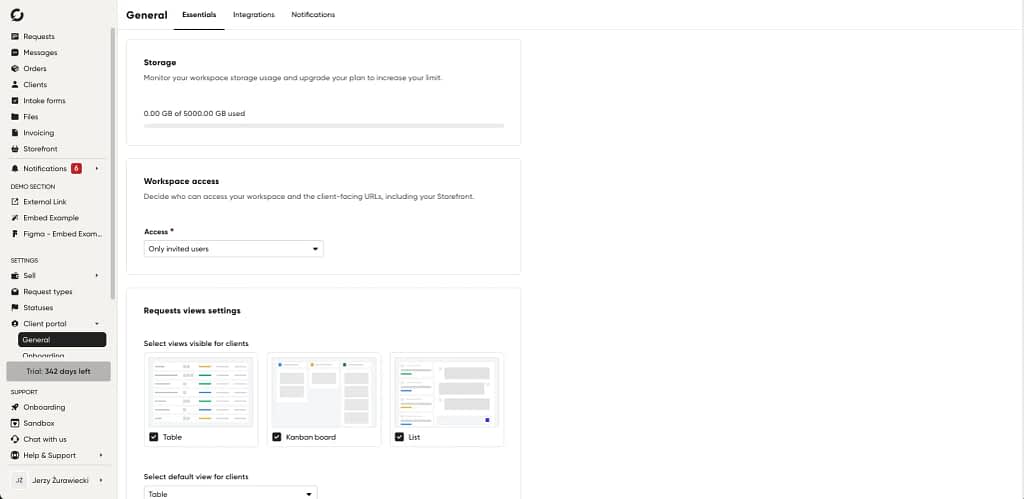
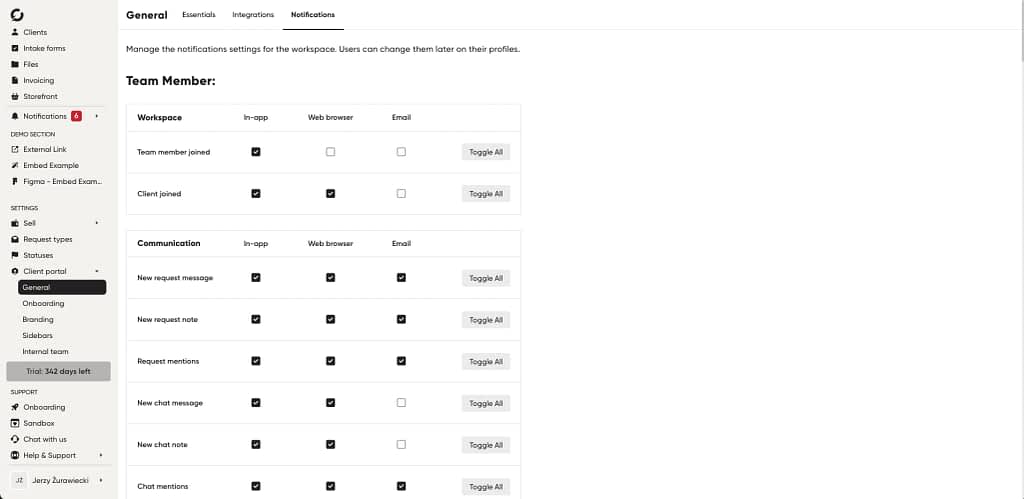
The “General” card is also where you can integrate your portal with Zapier or Stripe, as well as add embedding domains and custom code. Last but not least, you have complete control over the notifications, both for team members and the clients.
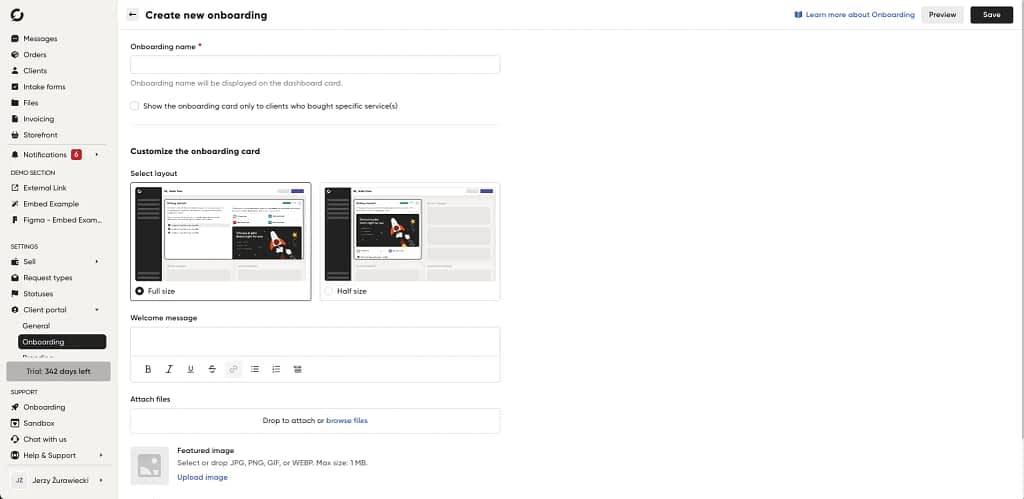
Then, it’s time to create your first onboarding and get your clients acclimated with the portal. In the “Onboarding” card, click “Create your first onboarding” to open the creator screen. That’s where you’ll be able to pick a layout, welcome message, attach relevant files, and add tasks for your clients. That way, they’ll have all the information in one place as well as a checklist of things to do in the portal.
But that’s not the full extent of customization, far from it. The “Branding” card gives you the ability to personalize the way your portal looks by changing colors, adding your own logo, customizing the chatbot, and adding URLs to pages such as Help Center or Terms of Service.
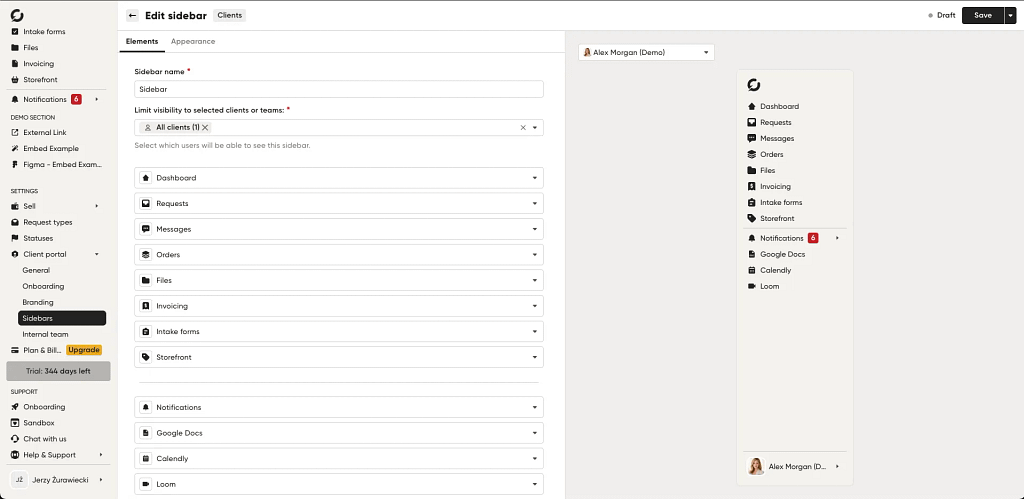
On top of that, you can customize login and sign-up pages, the email footer, and the sidebar. In the latter, you have full control over what parts of the portal your clients can see and use.
You can change the order, add and remove items, or even add links and third-party apps.
Finally, there’s the “Internal team” card. That’s where you can manage your team members. And that’s it, now your client portal is ready. All that’s left to do is onboard your customers and discover how much easier it is to handle so many actions in one place.
Top 8 Client Portals for Agencies in 2026
1. Zendo
Zendo is a white-label client portal platform that allows you to simplify a wide range of actions across the entire client lifecycle. Whether you want to onboard new clients, communicate with them, manage requests, and send deliverables and invoices, Zendo makes it easy.
Thanks to advanced white-label customization options, you can make a custom client portal look the way you want.
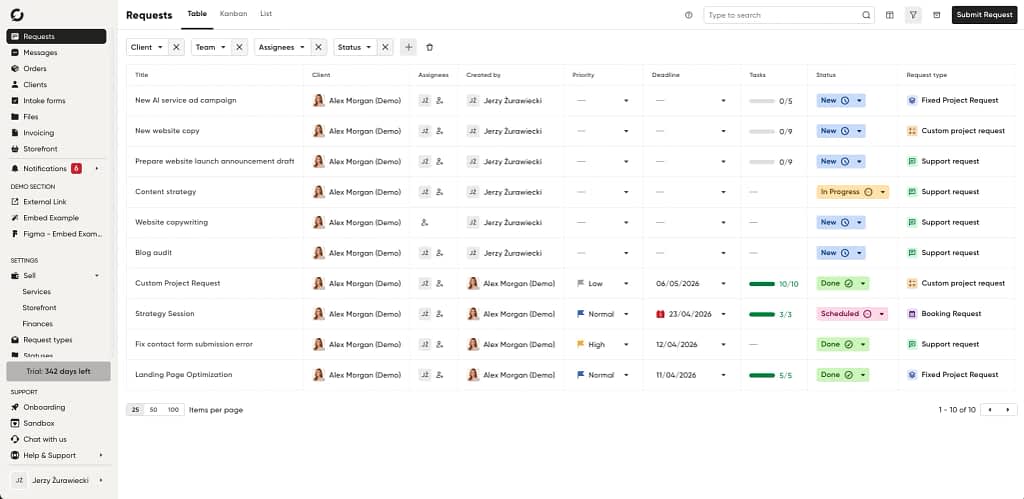
Why is Zendo a good pick for agencies?
The custom client portal is the core of Zendo. Our tool allows you to create a fully branded portal solution with ease. But white-label capabilities are just the tip of the iceberg. You can manage all your files, tasks, and messages in one tool for a seamless client experience.
Thanks to access control, your client portal is a secure hub of information. Agencies handling payments often will appreciate one-click payments and built-in invoicing options.
Best features for agencies:
- White label
- Task & file management
- One-click payments
- Invoices
Missing features:
No tool is perfect, not even ours. For example, we don’t offer the most advanced CRM of all time. Fortunately, the team is working on new improvements, so the app will gain new functionalities as time goes on.
Price range: Starts at $25 per month, up to $79 per month. A free plan is available.
Like what you see? Try Zendo for free, with no strings attached or a credit card required.
2. FuseBase
FuseBase is an AI-powered workspace and agent platform. It allows you to create branded and secure workspaces without any coding. The AI aspect comes in the form of embeddable custom AI agents used to automate various actions, such as onboarding, project tracking, and compliance, to name a few.
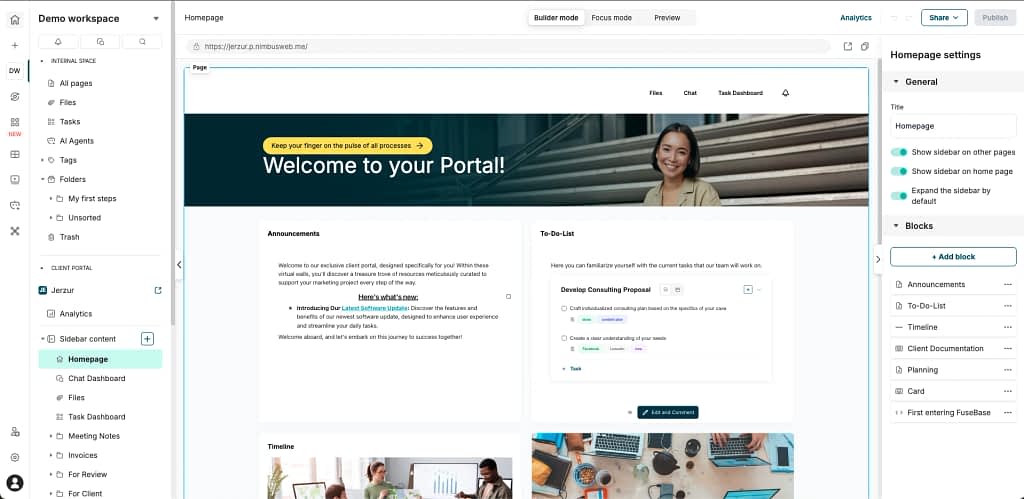
Why is FuseBase a good pick for agencies?
The app has a clean UI, and the AI agents work well. Agencies are able to manage tasks and files in the app, as well as a calendar. Users also like the document editor and automation options.
Best features for agencies:
- AI agents
- Task management
- Chat
- Integrations
Missing features:
Price-wise, FuseBase caters to larger agencies. For example, the Solo plan only allows for one client and one portal. And it has no white label option – that is reserved for the most expensive plan.
Also, FuseBase offers add-ons, including one for a client portal. However, each portal is billed separately, so your bill might get out of hand quickly.
Another thing users have pointed out is the insufficient number of integrations. Per Mark D. from G2, “The new AI agents are brilliant, but the workflows need more integrations. e.g., being able to output information to a Google sheet.”
Price range: Starts at $32 per month, up to $266 per month. There is no free plan, only a free trial.
3. monday.com
The thing about monday.com is that it’s not a client portal. It’s a work management platform with multiple tools, such as monday CRM or monday service. The latter offers customer portal capabilities.
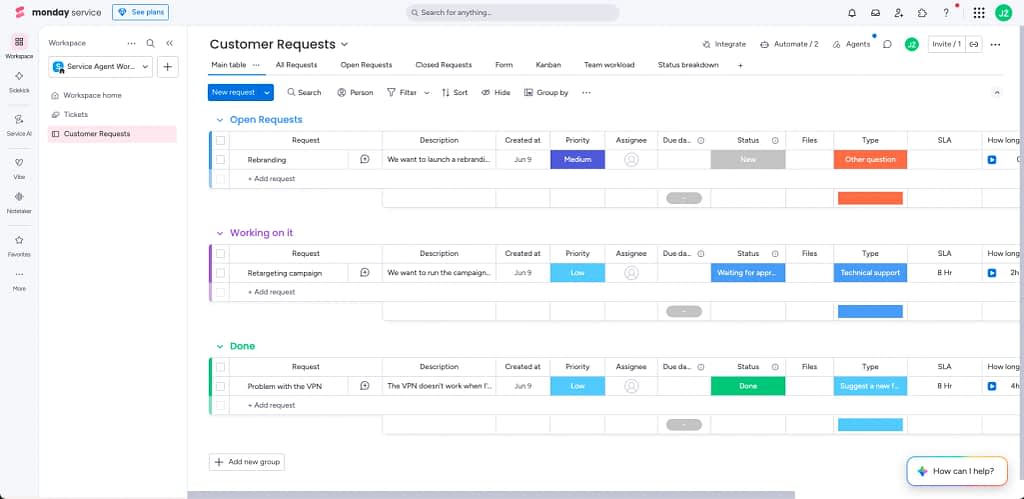
Why is monday.com a good pick for agencies?
The good aspects of monday.com for agencies don’t revolve around the client portal. The work management tool visualizes projects very well. You can see all your initiatives on a timeline, track time, and share deliverables with clients. Agencies can make use of various templates, such as client project, video production, or event management.
Best features for agencies:
- Multi-portal support
- Ticketing
- AI tools
- Analytics tools
Missing features: The issue with creating a portal in monday.com is that it’s the opposite of straightforward. I tried to do it myself, just to see what it was like. And I simply couldn’t do it. Even the instruction video didn’t help because the layout had already changed so much since the video was published that it was impossible to follow. So if the client portal is crucial for your agency, I recommend trying other tools.
Price range: Starts at $9 per seat per month, goes up to $19 per seat per month. There is a free plan available.
G2 rating: 4,8
4. SuiteDash
SuiteDash is a client portal software with many other tools included in the subscription. It aims to be an all-in-one business software. The use cases include digital agencies, accountants, real estate agencies, financial advisors, travel agencies, and more.
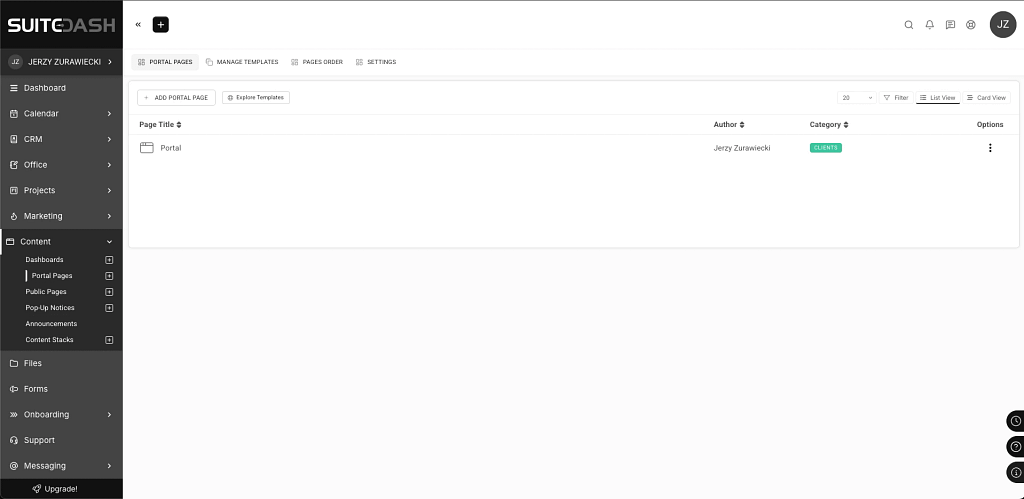
Why is SuiteDash a good pick for agencies?
The app has a lot of functionalities built in. Aside from a client portal, there’s appointment scheduling, automated CRM, file exchange, support tickets, and secure messaging, among others.
Best features for agencies:
- White label
- File exchange
- Project & task management
- Billing & payments
Missing features: Some users complain about a steep learning curve. For example, Tony M on G2 writes, “SuiteDash promotes itself as being extremely customizable to your needs. I found this to be extremely inaccurate. Once you get through the labyrinth of understanding how it works, you start to uncover that the software is slow, clunky, not user-friendly, and a step back from most other solutions.”
Price range: SuiteDash starts at $19 per month and goes up to $99 per month. There is no free plan available.
5. ClickUp
ClickUp is a work management tool that combines projects, documents, chat, time tracking, and AI capabilities to help businesses centralize work. ClickUp is used by teams from various industries, including healthcare, education, agencies, construction businesses, and more.
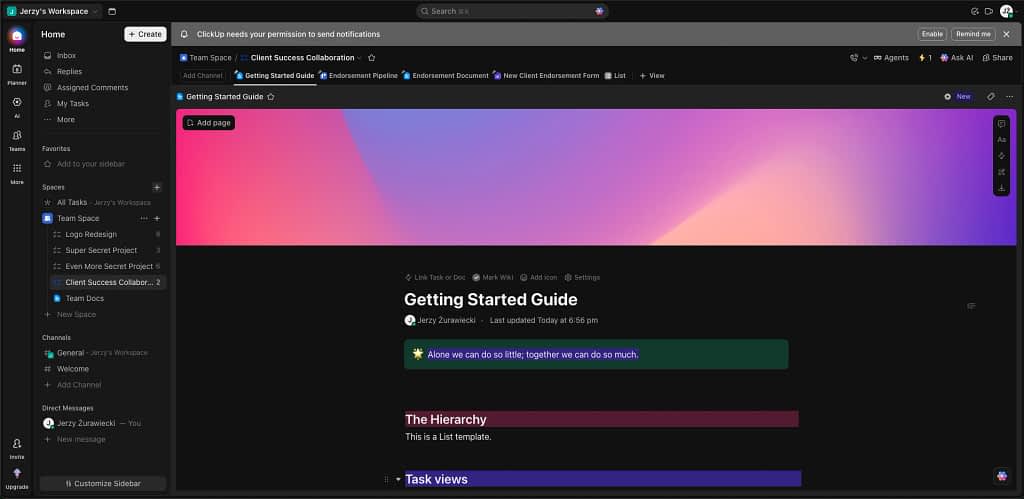
Why is ClickUp a good pick for agencies?
Agencies using ClickUp will appreciate advanced project management capabilities, such as time tracking, resource management, and dashboards. They support accurate billing and clarity in the availability of team members.
Best features for agencies:
- Project & task management
- Integrations
- Resource management
- Document management
Missing features: In order to use a client portal in ClickUp, you need to use a template. So it’s easy to see that the portal is not a priority for this tool.
As for the tool in general, agencies might be overwhelmed with ClickUp because of the number of features. Luigi P. on G2.com says, “ClickUp can feel overwhelming at first because it has so many features and settings. There’s a bit of a learning curve, and sometimes the interface feels busy, especially when you’re just trying to manage simple tasks. Performance can also slow down occasionally with larger projects.”
Price range: ClickUp starts at $7 per month per user, and the Business plan starts at $12 per month per user. There is a free trial available.
6. Dubsado
Dubsado is a business management tool that helps creative service businesses manage clients. With Dubsado, you can capture leads, centralize contracts, send invoices, and track project data, among other things.
Aside from a client portal, Dubsado’s platform features workflow automation that speeds up work and lets you create repeated processes.
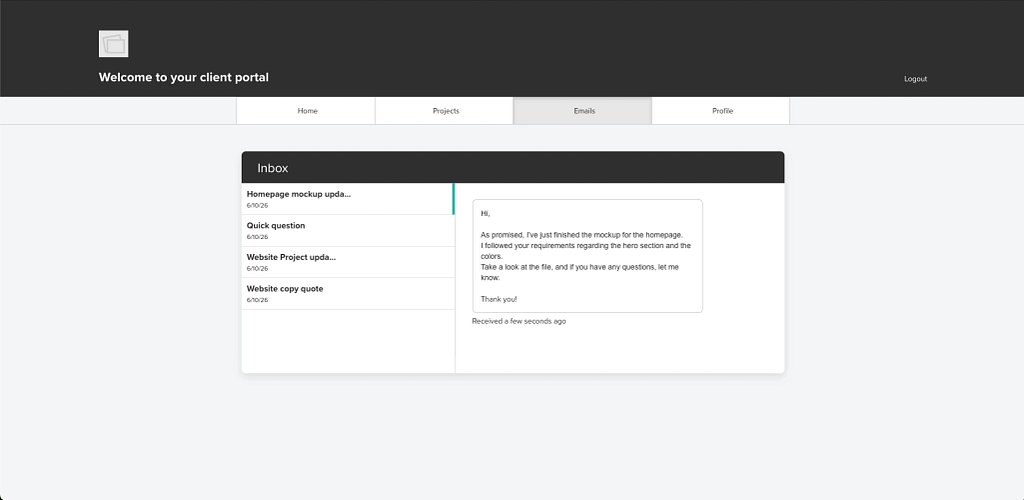
Why is Dubsado a good pick for agencies?
Dubsado has all the tools for managing client work. Whether it’s messages, events, invoices, projects, tasks, or forms, you can manage all of them in the app. Then, there is the client portal. It allows clients to communicate with agencies, and agencies to manage each client more easily.
Best features for agencies:
- Task management
- Invoicing and payment
- Reporting
- Contract templates
Missing features: The client portal customization capabilities leave a bit to be desired. Then, there is an issue with the speed of the tool. Here’s an excerpt from Rowan’s review at G2. However, keep in mind that it is not a sentiment shared by other users.
“Sometimes the tool can be quite buggy. Pages load with old information on them, and they don’t update quickly enough. The initial setup was quite confusing and took a long time, and I had to go to the Facebook group to get help.” Rowan W. at G2.
Price range: Starts at $35 per month, up to $55 per month.
7. OneSuite
OneSuite is a client work management platform for agencies and freelancers. The tool offers a combination of multiple areas important for agencies: project management, customer relations management, contracts, invoices, payments, and messages.
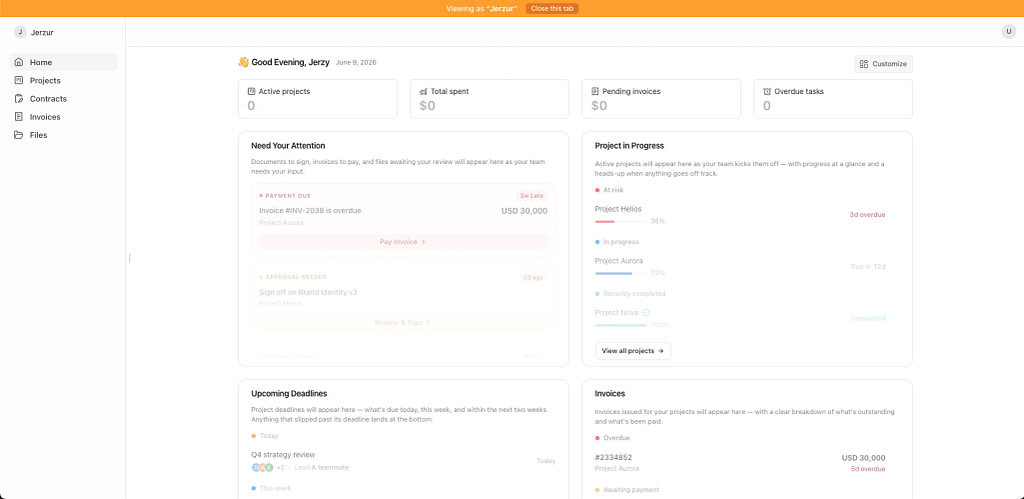
Why is OneSuite a good pick for agencies?
OneSuite users can quickly invite customers to a client portal and provide self-service capabilities. Customers will appreciate the ability to send requests and approve the work directly in the portal. Agencies will make use of recurring invoices, e-signatures, and payment integration options.
Best features for agencies:
- White label
- E-signatures
- Invoices and payments
- White label
Missing features: One of the things OneSuite users would like to see is time-tracking, which makes time management more difficult than it needs to be. On top of that, the app can sometimes load a bit slowly.
White-label is built into the Enterprise plan, but for all the other plans, it’s only available as a paid add-on.
Price range: Subscriptions start at $29 and go all the way to $149. There is no free plan available.
8. Clinked
Clinked is a white-label client portal and collaboration tool that helps agencies and clients communicate and share files securely. The tool caters to larger agencies with a lot of agents. The security aspect is supported by various certificates, such as GDPR and HIPAA, to name a few.
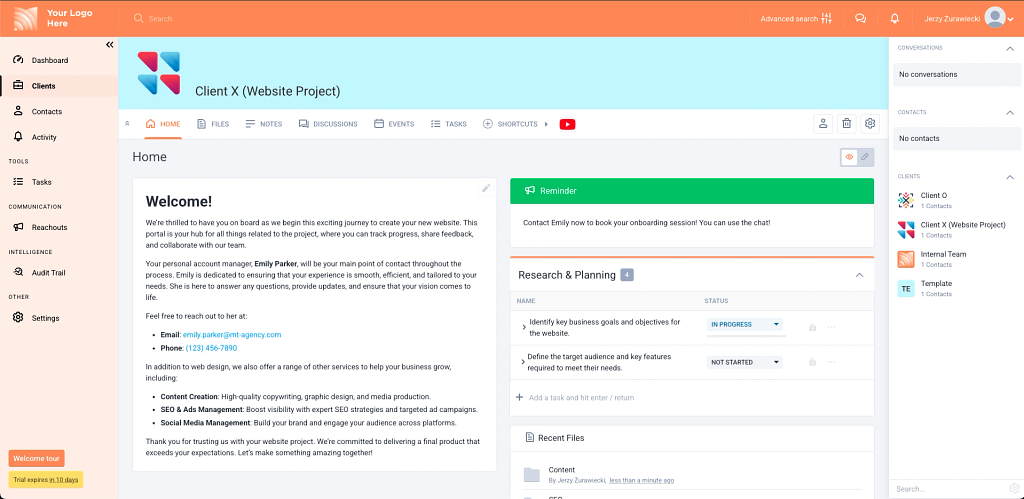
Why is Clinked a good pick for agencies?
Clinked lets you personalize your portal and add your own URL to make it as white-label as it can be. Agencies also benefit from a large number of integrations and a branded mobile app. Certificates mean that professional services other than agencies can use the tool, too, be it healthcare, finance, and accounting professionals.
Best features for agencies:
- White label
- File management
- Custom domain
- Chat
Missing features:
Users point out that the customization in Clinked isn’t up to the same standards as the competition. Other issues include limited integrations. Keep in mind that the subscription price is higher than most of the competition.
Price range: Clinked subscription starts at $194 per month and goes up to $719 per month. There is no free plan available.
Choose the Right Client Portal for Your Agency
Do agencies need a client portal to streamline work? Definitely. Helping teams and clients exchange information faster and with less friction is invaluable. But it’s all about picking the right software.
If you’re looking for a client portal, make sure it allows you to store files, send messages, generate invoices, and handle payments.
Additionally, it should be easy for you to create and customize your client portal to match your brand’s visual language.
Luckily, you don’t need to look far for a tool like this. Zendo checks all those boxes and then some. See for yourself how much of a difference an excellent client portal makes.
FAQ
Which Client Portal is The Best for Marketing Agencies?
The best client portal for marketing agencies is one that combines client communication, project management, invoicing, payments, and branding in a single platform. Zendo stands out because it was built specifically for service-based businesses and agencies. It allows agencies to manage orders, communicate with clients, track work, collect payments, and create a fully branded client experience from one centralized workspace. By reducing the need to switch between multiple tools, Zendo helps agencies streamline operations and deliver a better customer experience.
What are the Advantages of Client Portals for Marketing Agencies?
Client portals help marketing agencies centralize communication, project information, files, invoices, and payments in one place. This reduces the number of emails, improves transparency, and makes it easier for clients to track the status of their projects. Client portals can also automate notifications, simplify onboarding, speed up payments, and create a more professional customer experience. As a result, agencies can spend less time on administrative work and more time delivering services.
Can I Personalize a Client Portal with My Agency’s Logo and Colors?
Yes. Most modern client portals include white-label features that allow agencies to customize the portal with their logo, brand colors, and visual identity. Some platforms also support custom domains, allowing clients to access the portal through a URL associated with the agency’s brand. Personalization helps create a more professional and consistent client experience while reinforcing brand recognition.
Can I Connect my Existing Software Stack to a Client Portal?
Yes, many client portals provide integrations with popular business tools, including CRM platforms, accounting software, payment processors, project management applications, and communication tools. Integrations help automate repetitive tasks, synchronize data between systems, and reduce manual work. Before choosing a client portal, it’s worth checking whether it supports the specific tools your agency already uses.
Is Client Portal an Alternative to Project Management Tools?
Not necessarily. While some client portals include task management and project tracking features, their primary purpose is to improve collaboration between agencies and clients. Dedicated project management tools often provide more advanced capabilities for planning, resource allocation, reporting, and internal team management. However, some all-in-one platforms combine client portal and project management functionality, allowing agencies to manage both client-facing and internal workflows from a single system