Imagine a typical workday in a B2B setting.
One hour, you’re buried in endless email chains just to confirm an order. Next, you’re trying to focus on deep work, but notifications from teammates keep pulling you away.
Your accountant suddenly needs an invoice yesterday, and your client’s marketing lead is asking for updates on the articles they reviewed last week. Every step requires chasing someone, double-checking approvals, or digging through spreadsheets and emails.
Now imagine flipping the switch.
A B2B digital customer portal puts all that information in one secure, self‑service hub. Not only for your customers, but also internally, for your employees, colleagues, and everyone else involved in the buying process.
Multiple stakeholders—from procurement to finance—can check orders, approve quotes, track shipments, and download invoices without pinging you every five minutes.
In fact, 68% of B2B buyers who use self‑service portals report saving 30–60 minutes per purchase compared to doing it manually, and over one‑fifth save more than two hours per transaction.
Instead of chaos and distractions, customer portals serve as the ultimate hub to grant you clarity, operational efficiency, and a smoother customer experience.
What is B2B Customer Portal?
A B2B customer portal is a secure online space where one business manages its relationship with another business in a self-service way.
Unlike B2C portals, which are built for a single person checking their orders and moving on, a B2B portal is designed for an entire company or an entire team from a given company to collaborate on order management and more.
The client portal is available to multiple people (often with varied levels of authority and access to specific sections). Someone placing orders, someone approving them, someone in finance looking at invoices, and someone reaching out to customer support when something doesn’t add up.
B2B Customer Journey vs B2B Customer Portal
Pricing and ordering process (aka, customer journey) can also be much more complex.
In B2C it’s usually, “This costs $20, here’s where you can pay.”
In B2B it’s more like, “This costs $2000 for you, but only if you buy in volume, have a contract, or special terms—and by the way, this decision involves more than one person.”
In B2B, the customer journey doesn’t stop at the price. There are multiple decision-makers and stakeholders involved. For example, an SEO team lead at Company X might want to buy a package of articles from a copywriting business, but they’re not just clicking “buy.”
They need to compare options, check budgets, get approval, and justify the decision to the CEO by showing ROI, performance metrics, and long-term value.
A B2B customer portal offers full support to that whole process (quotes, contracts, approvals, reporting, real-time conversations) not just the final payment, to every person involved. With the amount of information they need to see.
What are Some Examples of B2B Portals?
Let’s take a look at some more specific examples to really paint the picture of a B2B customer portal.
Wholesale & E-commerce Portals
While there isn’t one singular solution that can serve as a B2B customer portal only (most client portals don’t niche down that much), we can definitely look at different examples from the perspective of different industries.
Starting with wholesale and e-commerce. Here, what’s important is definitely repeat buying, bulk orders, and negotiated pricing.
Take Shopify as an example.
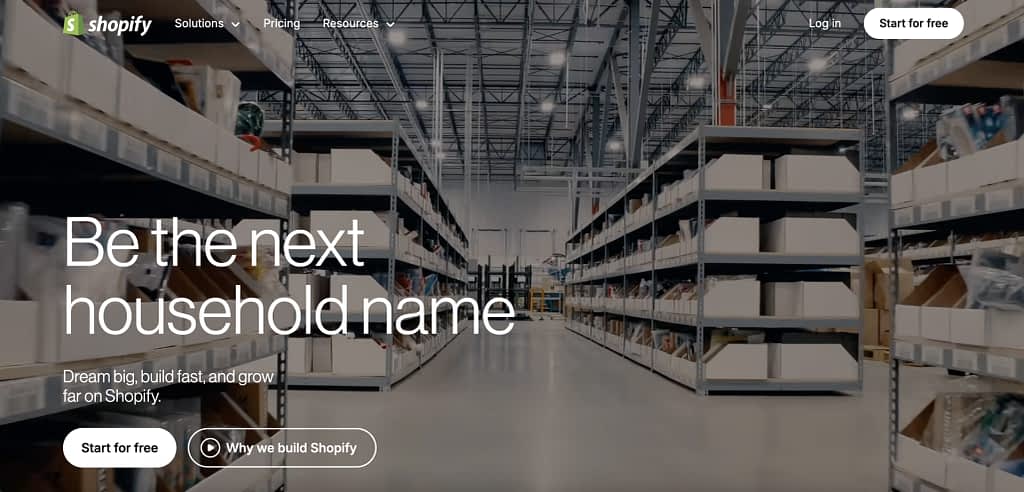
It doesn’t position itself as a B2B customer portal necessarily, more of an e-commerce platform, but it checks off all the boxes for a B2B ecommerce portal dot to dot.
These portals are built for businesses that reorder the same products regularly, often in large volumes (hello Shopify). Customers log in to see the pricing of a given business, place bulk orders, track shipments, and handle invoices without calling a sales rep every time.
With example features like…
| Feature | How it’s used in real life |
|---|---|
| Customer-specific pricing | The retailer logs in and only sees their negotiated prices—no public catalog, no confusion |
| Bulk & repeat ordering | Buyers quickly reorder past purchases or place large orders without rebuilding carts |
| Company accounts | Multiple buyers can be associated with one company or location under a single account |
| Order tracking | Buyers can view order status and track deliveries from their customer account |
| Invoices & payment terms | Buyers view invoices and pay using agreed terms (e.g. Net-30) without manual follow-ups |
| PO numbers | Buyers add required PO numbers at checkout for internal accounting and reconciliation |
SaaS & Subscription Portals
Next, let’s go more from physical products to a less defined type of business: digital products, tools, and subscriptions.
SaaS, Software as a Service, is a great example of this.
Because SaaS portals aren’t really about buying—they’re about everything that happens after the sale, customers log in to manage their account, add or remove users, check their plan, look at usage, and see what they’re actually getting for their money.
For many B2B SaaS tools, this kind of portal is essential (often built into the SaaS itself). When multiple people use the product, subscriptions change over time, and renewals depend on perceived value, customers expect visibility into usage, billing, and support history without emailing someone on your team.
For subscriptions, the story is a little different. Let’s take an example of a design retainer.
A marketing team signs up for a monthly package of design hours. They don’t want to email the graphic designer every time they need a banner or a social post, they want visibility and control.
In the portal, they can track how many hours they’ve used, submit new design requests, see what’s in progress, and download finished work. They can also manage who on their team can submit requests, check invoices, and review past projects—all in one place.
Procurement & Finance Portals
In large organizations, managing spending can get messy fast.
A procurement and finance portal helps give teams a single place to handle everything—from requesting a service to approving vendors to processing payments.
Employees submit requests through the portal, managers review them, procurement checks vendor compliance and contract terms, and finance completes the payment.
Every step is tracked and stored, so nothing gets lost in email threads or spreadsheets.
For example, a marketing team might request new software licenses. The manager approves the request, procurement confirms the vendor meets contract requirements, and finance schedules the payment.
Along the way, the portal logs approvals, stores contracts, tracks invoices, maybe even gives a way to sign the contract electronically, and provides dashboards showing spending trends and budget status.
Benefits of B2B Customer Portal
So what are the tangible benefits of a B2B customer portal specifically since it’s usage can be so varied.
Well, there’s lots of them.
For customers
- They get centralized access to everything in one place: pricing, orders, invoices, contracts, and reports, you name it.
- Easier internal coordination between procurement, finance, managers, leadership, and any other team involved.
- Faster purchasing experience: buyers report self‑service portals can save 30–60 minutes per purchase compared to manual processes.
- Fewer emails and meetings just to get basic information. 95% of buyers believe self-service portals improve efficiency.
- More confidence in purchases thanks to transparency and documentation.
- Higher satisfaction: 86% of buyers rate their experience with a self-service portal purchase positively.
- Improved loyalty: 88% of buyers say portal availability positively influences their decision to continue purchasing from a supplier.
For the business
- Reduced manual work for Sales and Customer Support, Finance and Procurement teams, and more.
- Fewer errors in orders, pricing, and billing.
- Revenue boost: companies with B2B portals (B2B ecommerce specifically) have seen an average ~25% increase in revenue, driven by easier ordering and repeat purchases.
- Reduced service teams workload: 63% of businesses report a significant drop in customer service workload after implementing a portal.
- Faster operations: 45% of companies reduced procurement lead times, meaning orders move from request to fulfillment more quickly.
- Quicker responses and automation: a B2B portal offers to handle routine tasks faster, with automation reducing response times by up to 37% compared to manual processes.
- Better scalability as the customer base grows and as you grow your business overall.
- Stronger long-term relationships built on trust and visibility.
For both sides
- Password protection! Both sides can be sure that their sensitive data is not only in a single, easy-to-access hub, but it’s also properly protected.
- A single source of truth for the entire customer relationship.
- Clearer communication and fewer misunderstandings.
- More efficient, predictable, and repeatable processes.
- Time saved on operational tasks, spent instead on higher-value work.
Key Features of B2B Customer Portal
If we’ve got your interest so far, let’s dive a bit deeper: into the features and functionalities one can use.
Features of course may vary by industry (as seen by the examples we’ve discussed earlier), but most B2B portals share a common foundation designed to support complex workflows, multiple users, and long-term accounts.
User & Access Management
Starting with user and access permissions, because B2B customers are teams, not individuals. Client portals that want to serve as a B2B solution need granular access control.
| Feature | Why it matters |
|---|---|
| Multiple users per account | One company, many people |
| Role-based permissions | Order, approve, view-only, finance, admin, support, etc. |
| Password protection | Ensures sensitive data stays secure; supports password protection and separate login for every user |
Pricing, Quotes & Contracts
Pricing in B2B is rarely static. The portal allows you to have a system of record for commercial terms.
| Feature | Why it matters |
|---|---|
| Customer-specific pricing | Contracts, volume discounts, special terms |
| Quotes & proposals | Supports longer sales cycles |
| Contract access | Keeps terms transparent and accessible |
But it’s not just about custom quotes, a good B2B customer portal will allow you to take a more standardized approach just as well, with productized services and defined subscriptions.
Ordering & Subscription Management
Whether physical goods or digital services, ordering is often recurring and structured in a B2B setting.
Hence, you should take a look if the portal you’re considering has the following features.
| Feature | Why it matters |
|---|---|
| Bulk & repeat ordering | Common in wholesale and manufacturing (but not only) |
| Subscription controls | Upgrade, downgrade, renew plans, pause subscription, highlight the best option etc. |
| Order history | Helps with forecasting and reordering |
Billing, Invoicing & Payments
Finance teams are always involved in B2B—portals need to support them directly.
| Feature | Why it matters |
|---|---|
| Invoice downloads | Accounting needs documentation |
| Payment tracking | Fewer disputes and delays |
| Spend visibility | Helps customers manage budgets |
Reporting & Performance Visibility
B2B buyers often need to justify decisions internally, which is exactly where reports features come in handy.
| Feature | Why it matters |
|---|---|
| Usage & performance metrics | Supports ROI discussions |
| Spend and order reports | Helps with budgeting |
| Exportable data | Easy sharing with leadership |
Support & Communication
Support in B2B is contextual and ongoing, not one-off. The feature you should put particular attention to is definitely real-time chat that will allow you to talk with your customers in an efficient way.
| Feature | Why it matters |
|---|---|
| Support tickets | Structured issue tracking |
| Message history | Reduces repeated explanations |
| Real-time chat/live chat | Let’s both sides resolve any issues faster than going over email or scheduling calls |
Integrations
Most B2B portals don’t live in isolation. Connecting with other tools in your tech stack may be just as crucial as any other feature on this list.
| Feature | Why it matters |
|---|---|
| ERP | Inventory, fulfillment, accounting |
| CRM | Sales and account management |
| Finance tools | Billing and reconciliation |
| Zapier | For stitching in everything else |
Customization & Branding
B2B companies want their portal experience to reflect their brand, duh. White labeling and customization is a crucial part of a good B2B customer portal.
| Feature | Why it matters |
|---|---|
| White-labeling | Makes the portal feel like part of the client’s ecosystem |
| Custom themes & branding | Consistent look and feel across touchpoints |
| Configurable dashboards | Tailors the experience to business needs |
Intake Forms & Workflow Automation
B2B processes often involve multiple steps and approvals; portals can help simplify them with…customizable intake forms, but most importantly, workflows and automations to let go of as manu manual tasks as possible.
| Feature | Why it matters |
|---|---|
| Custom intake forms | Capture necessary information upfront |
| Automated workflows | Reduce manual steps and speed up approvals |
| Notifications & reminders | Ensures nothing gets delayed or overlooked |
How To Choose a B2B Customer Portal?
Experiencing the many pain points of operating your B2B business without a proper, centralized source of truth kinda tool, you may start to lean into choosing a B2B customer portal of your own.
On this journey, you may be tempted to start by trying to adapt platforms like Salesforce, Shopify, Zoho, or even Notion and Trello into makeshift B2B portals.
While these can work for simple needs, they often fall short when you need multi-user permissions, complex workflows, custom pricing, password protection, white labeling, and most-importantly actually selling your services/products.
Choosing the right portal from the start can save time, reduce frustration, and scale with your business, not against it.
So first things first, you gotta…
1. Define Your Business Needs
Start by mapping out exactly what your business requires from a portal.
Consider:
- Who will use it? Will it be one buyer per customer, or multiple roles like approvers, finance, support, and managers?
- Workflows: does it need to handle quotes, approvals, recurring orders, or support tickets? Do you want any automation while at it?
- Integrations: should it connect with ERP, CRM, accounting, or inventory systems. Is Zapier enough to stitch things up?
- Complexity: are your products and pricing simple, or do they involve contracts, volume tiers, or negotiated terms?
Getting clarity here prevents you from choosing a portal that looks good but can’t handle day-to-day operations that are specific to your business and your customers.
2. Identify Core Features
Completing the first step should already lead you into the next one, which is identifying the must-have features the client portal simply needs to check off to work for you.
If you don’t have an idea yet, a good B2B portal should support all the steps in the customer journey, not just orders.
Key features you may want to look for:
- Multi-user accounts with role-based permissions and approval hierarchies,
- Customer-specific pricing, quotes, and contract management,
- Bulk ordering, reordering, and subscription management,
- Invoice access and payment tracking with different payment methods customers can choose from (take a look at additional fees while at it!),
- Real-time chat for conversing with clients to drop the never-ending back-and-forth emails,
- White-labeling and portal customization to make sure the client portal is an extension of your business, not some random site someone landed on,
- Seamless integration with ERP, CRM, accounting systems or a Zapier connection to help you get those done yourself.
3. Evaluate Technical and UX Considerations
Beyond features, make sure the portal you want to go for is practical to implement and use.
Ask (or better yet, test the top 3 options you’ll find) for:
- How easy is it to set up and maintain?
- Can it handle your unique workflows without heavy customization?
- Is the interface intuitive and mobile-friendly?
- Can it perform reliably under high usage?
- Does it meet security and compliance standards for sensitive data?
- Does the Support team actually support you in case of hurdles, not just send off to their AI trained on a help center updated half a year ago?
4. Consider Business Fit
A portal should make sense for your organization, not just your IT team. Keep in mind:
- Budget & licensing costs versus expected ROI,
- Implementation timeline and internal resource availability,
- Scalability: can it grow as your customer base and processes expand?
- Alignment with your long-term roadmap and business strategy.
5. Make the Decision
The right portal should:
- Support the full B2B customer journey, not just ordering,
- Serve multiple users with clear roles and permissions,
- Handle complex pricing, contracts, and approvals,
- Integrate smoothly with your existing systems,
- Reduce operational friction and improve customer experience.
Some scenarios to help you out
Scenario 1: Small, Simple Operations
Context
A small business sells a few digital products to a handful of regular business clients. Orders are straightforward, pricing is standard, and only one or two people per client place orders.
What to choose: a makeshift portal using Zoho, Salesforce, or Trello could work, but a dedicated B2B customer portal provides a better opportunity to grow with the business (some are even free for basic usage).
Why it fits:
- Minimal setup required,
- Low complexity, limited users,
- Quick launch with basic ordering, invoicing, and account access.
Limitations to watch:
- Won’t handle approvals or complex pricing,
- Limited scalability as customers or SKUs grow.
Scenario 2: Multi-Stakeholder Purchasing
Context
A mid-sized company sells subscription services to businesses where purchases require approvals from managers, finance teams, and department heads.
Option: A dedicated B2B portal is recommended.
Why it fits:
- Supports multi-user roles and approval workflows,
- Handles custom pricing, quotes, and contracts,
- Provides reporting and analytics for internal decision-making.
Risks of a makeshift portal:
- DIY setups may require heavy customization,
- Shopify-style portals usually lack robust approval and role management.
Scenario 3: Agency Selling to Business Customers
Context
A marketing or content agency offers services like article packages, social media campaigns, or consulting hours to multiple business clients. Each client may have several stakeholders—project managers, finance teams, or executives—who need visibility into orders, deliverables, and invoices.
What to choose: a dedicated B2B customer portal is the right choice.
Why it fits:
- Provides multi-user access with role-based permissions, so different client stakeholders can see what’s relevant to them,
- Supports service packages, custom pricing, quotes, and approvals tailored to each client,
- Centralizes deliverables, feedback, and reporting, reducing emails and miscommunication,
- Offers secure invoicing and payment tracking for finance teams,
- Scales as the client base grows without breaking workflows.
Limitations of makeshift portals:
- Tools like Notion, Monday.com, Zoho, or Shopify can handle basic deliverables, but they struggle with complex approvals, custom pricing, and multi-stakeholder visibility,
- Data and workflow management can become messy, slowing down operations as clients scale.
B2B Customer Portal: Development or Ready-Made Tools?
You may also think: what if I build it myself?
Custom development gives you total control, right? Every workflow, every permission, every quirky requirement can be tailored. But it takes time, budget, and a team who can handle it (and all the never-ending updates and upkeep).
And don’t even dare thinking about vibe-coding this unless you’re ready to tackle the lawsuits from customers whose data you’d be handling without a care in the world.
Ready-made tools, on the other hand, let you launch quickly with tested features, integrations, and full professional support.
Though they may require some compromise on unique workflows, founders and Product Managers are usually pretty happy to hear and implement user feedback. So don’t be afraid to voice your needs to make a ready-made tool work perfectly.
How to Create a B2B Customer Portal?
Okay, let’s get into what we all came here for: an actual description on how to create a B2B customer portal.
Here’s a step-by-step approach, using Zendo (a professional and modern client portal) as an example.
Step 1: Set Up the Core Portal Structure
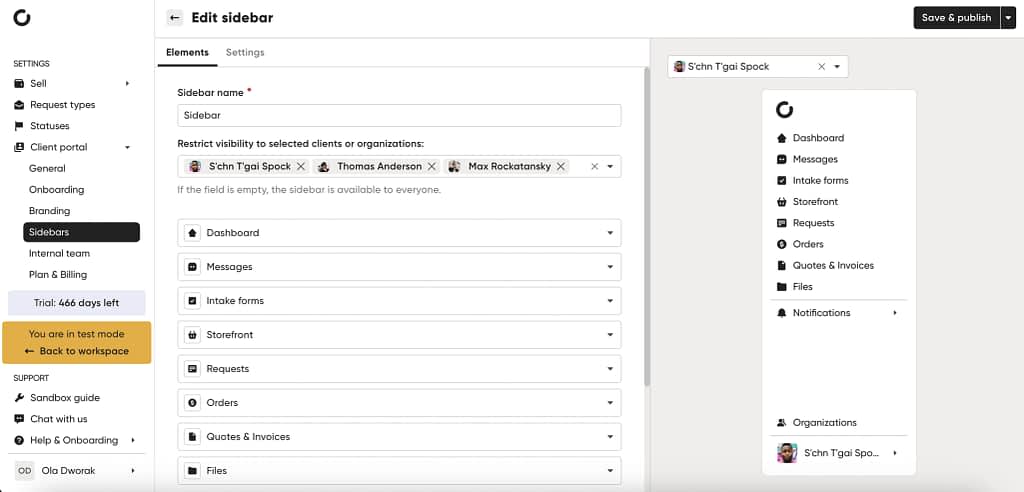
Start by defining the main elements of your B2B portal, which will serve multiple users from the client organization.
With Zendo, you can modify/rename/add things like:
- Dashboard: a unified view of orders, invoices, contracts, and requests.
- Messages/Chat: real-time communication for multiple stakeholders, so emails don’t get lost.
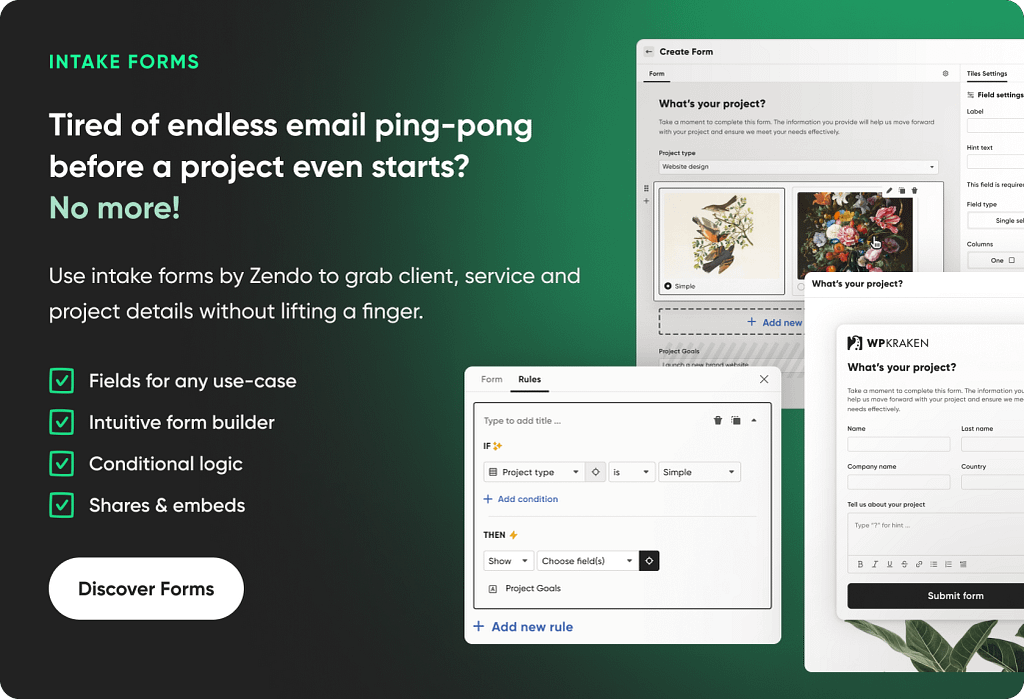
- Requests/Forms: for approvals, service requests, or support tickets, all tracked in one place.
- Orders & Services: access to past and current orders, custom service packages, bulk purchases, or subscriptions.
- Quotes & Invoices: downloadable documents for finance teams to approve and process payments.
- Files & Reports: share contracts, project files, and performance reports securely.
- Notifications: alerts for status changes, approvals, or new invoices.
Once the base is ready, customize it for your B2B workflows.
For instance, you may want different dashboards for finance, procurement, and project managers, or a separate tab for high-value client-specific reports.
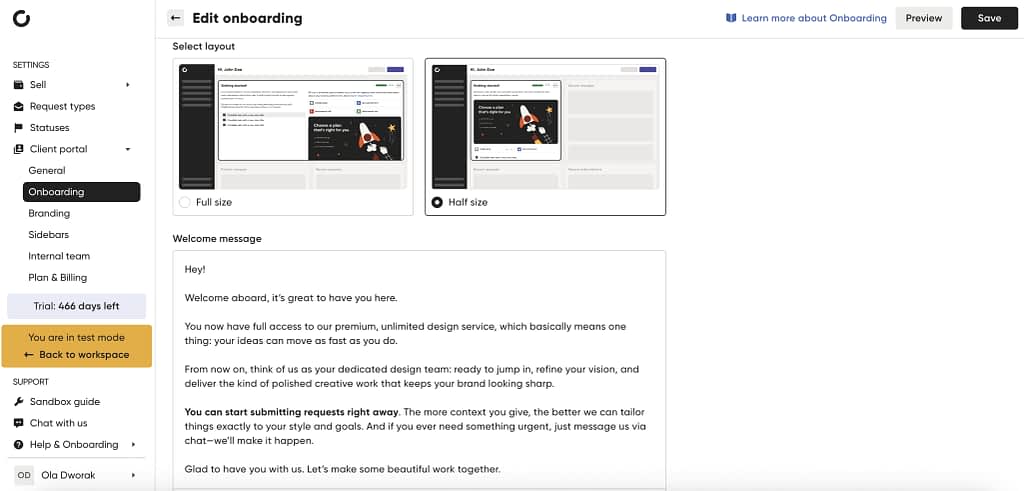
💡Tip: add onboarding instructions tailored for each role within the client organization, so every user knows where to find the data they need.
Step 2: Add Services, Products, or Packages
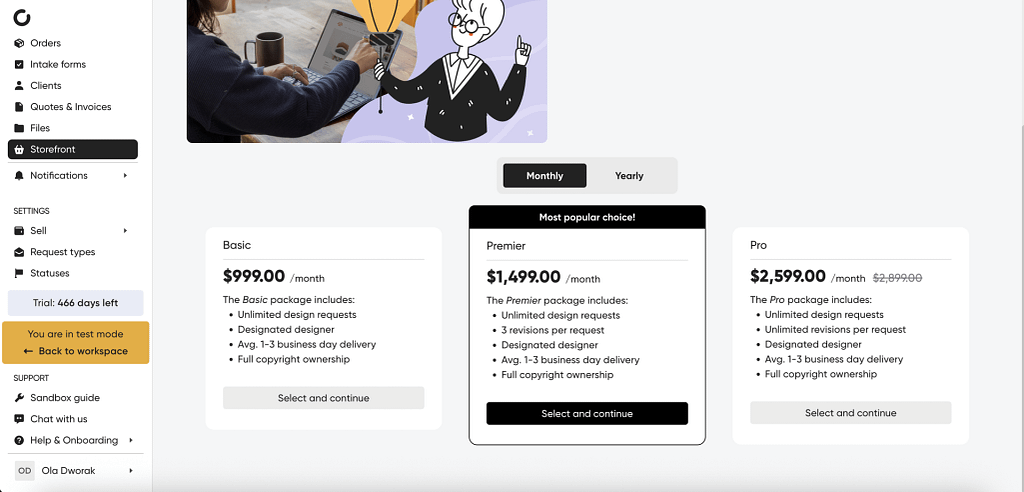
B2B customers often buy services in custom packages or bulk quantities.
Use the portal to make ordering self-service while still respecting approvals:
- Productized Services: standard packages with clear pricing for repeatability.
- Subscription Services: ongoing contracts or recurring orders with flexible billing cycles.
- Custom Services: projects requiring quotes and approvals before purchase.
- Free Services or Forms: for inquiries, RFP submissions, or trial offers.
Each service or product can have custom intake/order forms, so clients submit necessary information for approvals, project kickoff, or billing, all within the portal.
On top of that, you can customize each service you add. For example, add different pricing tiers and highlight the best option for subscriptions services, create add-ons for productized services, create dedicated checkout pages, and more.
💡Tip: use a Storefront tab so clients can place repeat orders or explore new packages on personalized product catalogs, without leaving the portal.
Step 3: Customize & White-Label
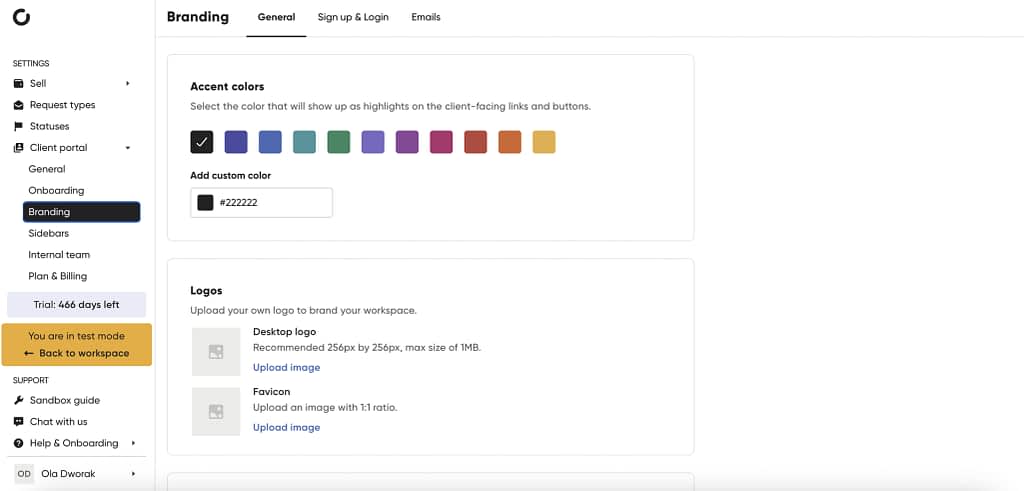
A professional B2B portal should feel like part of your brand, not a generic third-party tool. So be sure to work on:
- Branding: add in your logo, accent colors, custom domain, and removal of platform branding.
- Sign-Up & Login: for more personalization, work on customizing the login and sign-up page to fit your brand.
- Emails & Notifications: ensure notifications include relevant context for B2B workflows and are not existing just to annoy your customers.
- User Permissions: assign roles to manage visibility and actions.
💡Tip: customize tabs and dashboards for different clients or client groups to reflect their unique processes and contracts.
Step 4: Invite Your Clients & Test
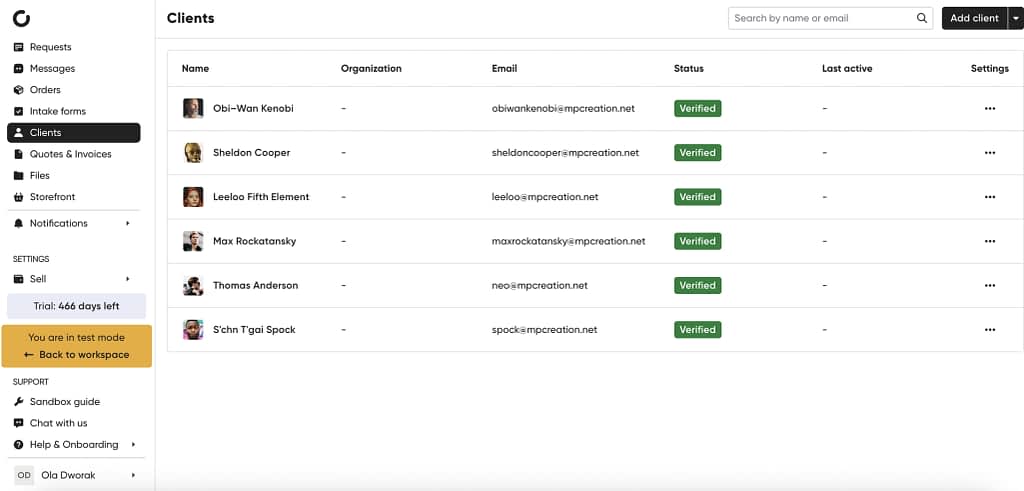
Once the portal is set up:
- Add client accounts: invite multiple stakeholders from the same organization or multiple organizations.
- Assign roles: ensure each user sees only what’s relevant to them.
- Test the experience: click around to make sure everything looks good.
- Communicate value: share onboarding guides or a welcome video so clients can start using the portal efficiently.
This ensures everyone—from project managers to finance teams—can self-serve while staying aligned with your internal workflows.
💡Tip: to make sure everything runs super smoothly, use a dedicated testing environment called the Sandbox.
Why This Works for B2B?
- Multi-user access: supports different roles within the same company. From viewing-only permissions to full admin roles.
- Complex pricing & approvals: handles contracts, bulk orders, custom quotes, subscriptions, one-off services, all tailored to your exact needs.
- Secure document sharing: finance, legal, and project teams can access files without emails.
- Self-service options: reduces back-and-forth emails, approvals, and phone calls.
- Scalable: works for small pilot clients or large enterprise accounts with different pricing options.
With this approach, you can launch a fully functional B2B customer portal in under 30 minutes, making onboarding, purchasing, and collaboration seamless for both your team and your clients.
Launch Your B2B Customer Portal Today
A B2B customer portal is basically the backstage pass to your business relationship with a client.
It’s where multiple people from their team can check orders, approvals, invoices, or reports without bugging your sales or finance team every five minutes.
Whether you go custom or pick a ready-made solution, the point is simple: give your clients clarity, speed, and self-service, and you’ll save a ton of time, reduce headaches, and build trust that lasts.
And if you want to try one for free, go with Zendo. It’s really easy to get started. 😉
FAQ
How to Create a B2B Customer Portal in WordPress?
You can use plugins like WP-Client, Client Portal for WordPress, or SuiteDash to set up a basic B2B portal. While these are flexible, they may require customizations to handle multi-user roles, complex pricing, or integration with ERP/CRM systems.
How does a B2B Customer Portal Enhance Customer Experience?
It centralizes orders, invoices, contracts, and reports, allowing multiple client stakeholders to access relevant information instantly. Faster approvals, self-service ordering, and transparent communication lead to higher customer satisfaction and customer loyalty, as well as fewer back-and-forth emails. A proper customer portal allows to also get in touch with your team quickly, which may help improve customer satisfaction and customer retention, giving your business clients an easy way to voice their opinions.
Is B2B Customer Portal Secure?
Yes, a professional customer portal helps keep things secure with role-based access control, data encryption, two-factor authentication, and audit trails to ensure sensitive business and customer data remains protected. Security and compliance standards should always be a key consideration when selecting a portal.
Can I Start Small and Scale My B2B Portal Later?
Absolutely. Many companies begin with a no-code solution to launch quickly, then scale to handle more users, custom workflows, and integrations as business grows. But choosing a ready-made B2B portal enables you to start with a professional platform from the get-go. Tools like Zendo grow with your business, starting with a simpler platform that’s free of charge.
Do B2B Portals Reduce Operational Costs?
Yes. By automating approvals, consolidating communication, and providing self-service workflows, B2B portals reduce manual work, shorten order cycles, and minimize errors in pricing, billing, and reporting.