vcita is an all-in-one business management software designed to help small businesses handle online scheduling, payment processing, client communication, and basic customer relationship management from a single dashboard.
For some, it’s about having a simple way to schedule appointments and manage a calendar without extra tools. For others, it’s about combining client booking, invoicing, and communication into a single dashboard that helps them stay organized and productive.
And that’s exactly the promise vcita makes.
To be fair it delivers on that promise… at least that’s how it seems at first.
The onboarding is quick, the interface feels simple, and within minutes you can start booking clients, sending invoices, and managing basic workflows. For solo users or very small teams, that initial experience can feel surprisingly smooth.
But modern service businesses need more than just “good enough.” They need tools that scale, workflows that actually reduce manual work, and client experiences that feel polished and intentional, even if you decide to go deep or complex.
That’s where vcita starts to show its limits.
In this guide, we’ll break down exactly where vcita falls short, and more importantly, introduce three alternatives that handle the same core problems in a much more structured, modern, and reliable way.
TL;DR
If you’re looking for software like vcita, the main difference comes down to structure, depth, and how well the tool helps your small business streamline day-to-day work.
- Zendo is the best vcita alternative if you want a modern, user-friendly business management software focused on selling and delivering services.
It combines a fully customizable client portal, structured service offerings, and a clean dashboard to help you make sense of it all. Connect it with third-party tools to give your customers an easy way to schedule appointments or view completed projects (for example with a Figma embed).
With customizable intake forms, you can collect contact information and client requirements upfront, reducing back-and-forth and improving productivity.
Built-in workflows, real-time chat, and a Kanban-style system help you monitor progress and ensure a smooth client experience without relying on scattered tools or constant email follow-ups.
- HoneyBook is better suited for project-based businesses that rely on pipelines, proposals, and structured flows from inquiry to payment processing. It offers solid customer relationship management, calendar syncing, and powerful integrations, helping teams stay productive and manage important tasks, though it’s less flexible for subscriptions or productized services. This vcita alternative is available only to businesses operating from either the United States or Canada.
- 17hats is a more traditional, comprehensive business management tool and vcita competitor, with strong automation, workflows, and accounting software integrations. It helps businesses collect and organize data, but its interface and client portal feel outdated compared to more modern tools. It’s also more affordable and transparent in pricing than vcita.
Why vcita is not it? Based on G2 reviews and our own testing
vcita looks deceptively simple at first, almost too simple. The onboarding feels easy, even a bit childish if you look at the graphics.
Exhibit A.

And to be fair, that’s partly true, at least on the surface. But the deeper you go, the more things start to unravel.
What initially feels intuitive quickly turns into a confusing mess of settings, half-connected features, and odd UX decisions. Simple tasks become frustratingly unclear (for example, trying to add taxes by clicking a dedicated button turning into “no taxes found” was a personal highlight and a common error among client portal software platforms alike).
It’s in moments like this where the platform starts to feel less like a cohesive system and more like a bundle of loosely stitched-together tools.
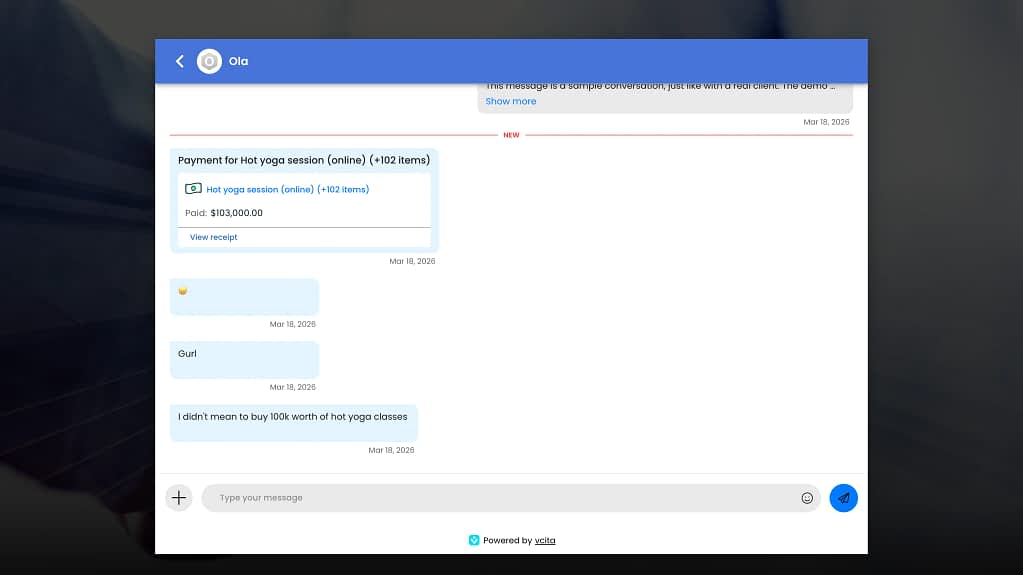
But there are many moments where vcita gets things right. The chat widget, for example, is actually pretty solid—clean, familiar, very Intercom-like. And surprisingly, the error messaging is better than expected. Instead of vague “something went wrong” popups, you get specific guidance like:
“The total invoice amount must equal or exceed the deposit amount to create an invoice”
Which, credit where it’s due, is genuinely helpful. But then… every single message also hits your actual email inbox, so managing conversations quickly turns into inbox chaos. Fighting back-and-forth emails like this does not bring any results, quite the contrary actually.
And that’s kind of the theme with vcita: everything works… until it doesn’t or until you dig a little deeper. All the features are technically there, but almost always at a surface level. It does scheduling, invoicing, client management, messaging—but none of these feel deep, polished, or particularly reliable.
That’s not just a subjective take either, it’s exactly what shows up in G2 user reviews, so let’s take a peek at those.
What vcita does well?
There’s a reason people initially like it:
✅ Easy to get started
“It’s easy and simple to use.” Sean J. (3/5 rating)
“Vcita does not require a learning curve” Gaylotta M. (4/5 rating)
✅ All-in-one convenience
“scheduling, client management, billing, and marketing tools all in one place.” Verified User (4.5/5 rating)
✅ Decent integrations
“integrates with my website and my personal google calendar” Beki W. (3.5/5 rating)
✅ Efficiency for simple use cases
“saving our team time and reducing admin costs massively.” Verified User (5/5 rating)
Where does it fall apart?
Once you go beyond the basics, the cracks start to show:
❌ Bugs, downtime, and broken core functionality show up repeatedly:
“TONS of bugs and a lot of downtime.” Chris H. (0/5 rating)
“unable to process payments via Stripe or Paypal… for an entire month.” Verified User (0/5 rating)
“many times the links did not work” Steve J. (4/5 rating)
❌ Support is inconsistent: some love it, but many clearly don’t:
“Their support is VERY UNHELPFUL” Chris H. (0/5 rating)
“Customer service have still failed to correct the fault.” Verified User (0/5 rating)
“It’s difficult to speak with somebody.” Verified User (3/5 rating)
❌ Features are shallow (the jack of all trades kinda problem):
“all in one features are nice but are all very basic.” Sean J. (3/5 rating)
“does not really replace stand alone solutions.” Sean J. (3/5 rating)
❌ Integrations not working as expected:
“Does not work well with Gcal anymore” Alexandra P. (1.5/5 rating)
“using Zapier … did not work” Don F. (2.5/5 rating)
❌ You don’t really get “full value” out of the box, aka, pricing issues:
“you have to pay even more” Don F. (2.5/5 rating)
“To get the platform’s full capabilities, business owners must upgrade their service plans. Although I understand this requirement, pricing could be adjusted for the type of business and how many actual users. Also I think if you are paying for the platform regardless of the plan, you should be able to remove the powered by Vcita.” DeAnna B. (4/5 rating)
And then… the client portal 😬
This is honestly the breaking point.
For a tool that positions itself as a client-facing platform, the portal is:
➖ inconsistent (services/packages don’t show properly),
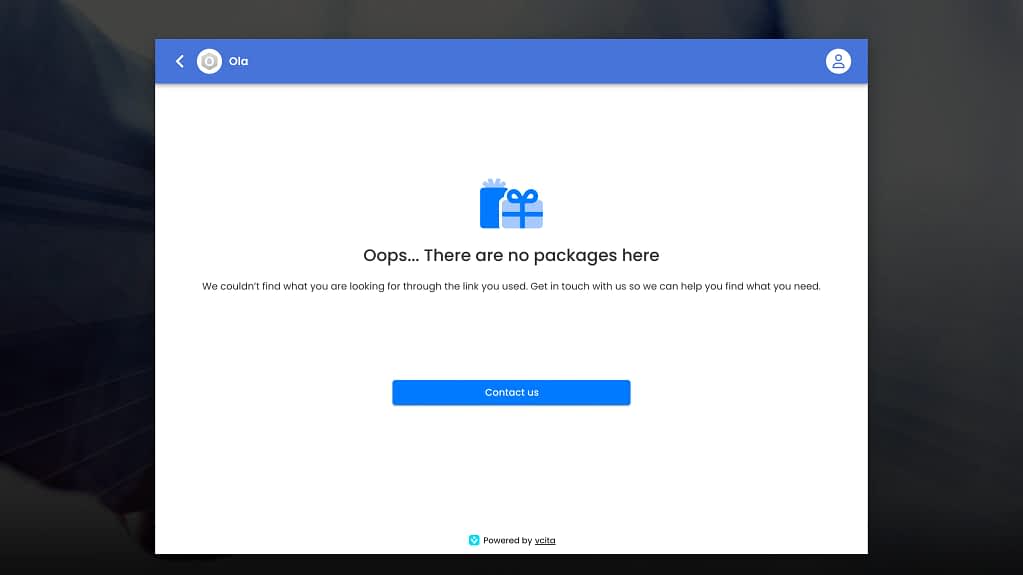
➖ visually outdated,
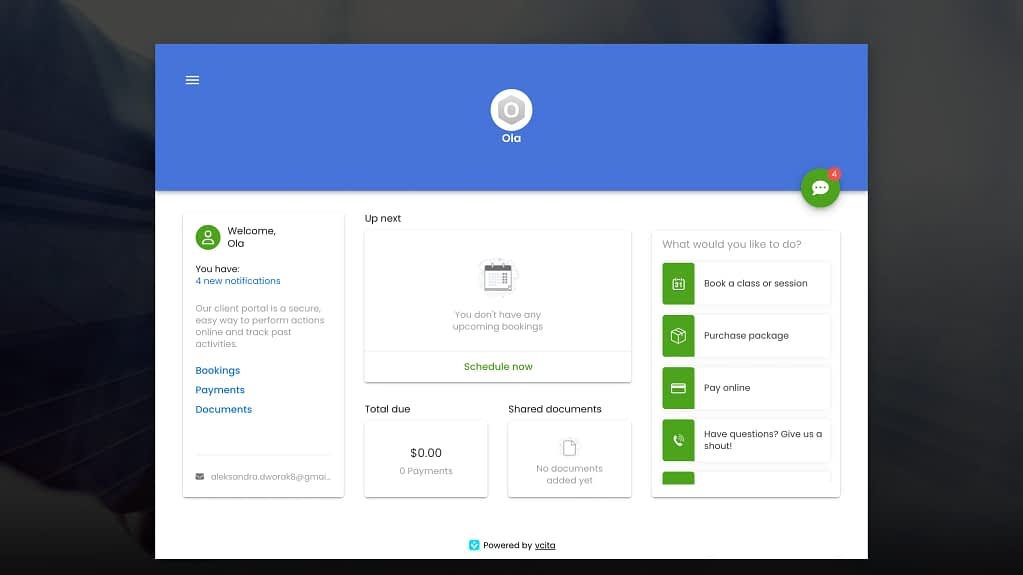
➖ something you’d confidently show clients.
This is a huge problem because the portal is supposed to be the core of the product.
Top 3 vcita alternatives: the ideal, the project-based, and the most similar
If vcita leaves you with the feeling that everything is technically there but nothing is fully thought through, the next question is: what to choose instead?
And boy oh boy do we have good news for ya. We have found three best-fitting vcita alternatives for different use cases.
So follow along.
| Tool | What it really is? |
|---|---|
| Zendo | Modern, structured service-selling & client portal platform (productized services focus, one-offs and subscriptions) |
| HoneyBook | Polished clientflow + project-based workflow tool |
| 17hats | Old-school all-in-one SMB system with everything stuffed in (especially suitable for onsite creatives, like photographers or wedding planners) |
1. Zendo: the ideal vcita alternative
Zendo stands out immediately because it does not try to be everything at once in a vague, catch-all sense.
Instead, it is built around a very specific and modern idea: services should be sold and managed with the same clarity and structure as products. That focus is most visible in the way the entire platform is organized around the client experience, rather than internal tooling.
The client portal, in particular, is where the difference becomes obvious.
Fully customizable client portal
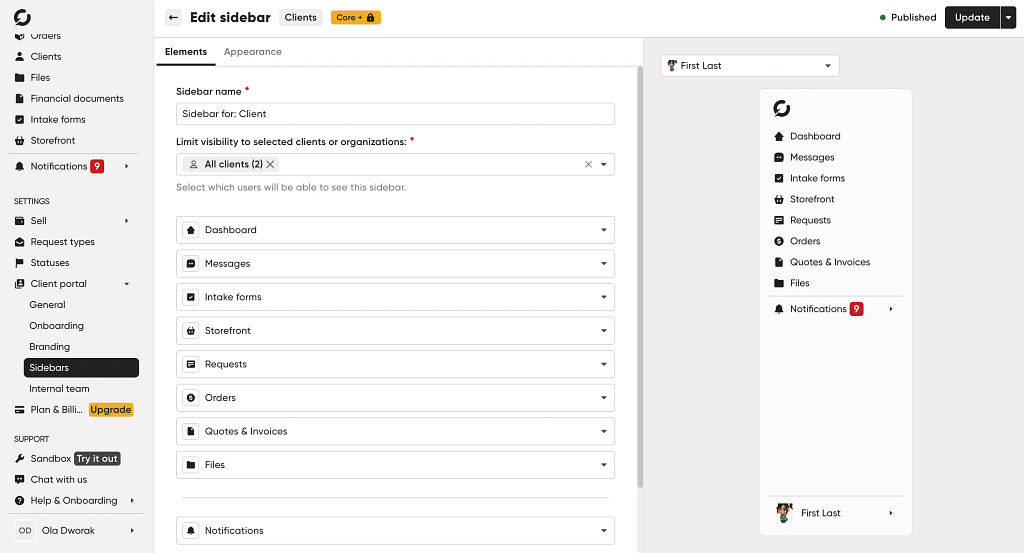
Unlike vcita, where the portal feels like a loosely connected extension of the backend (and often an inconsistent one), Zendo treats it as the core of the product.
Clients are not just passively receiving invoices or messages; they are actively interacting with a structured environment where they can browse services, purchase packages, manage subscriptions, and track their engagement in one place.
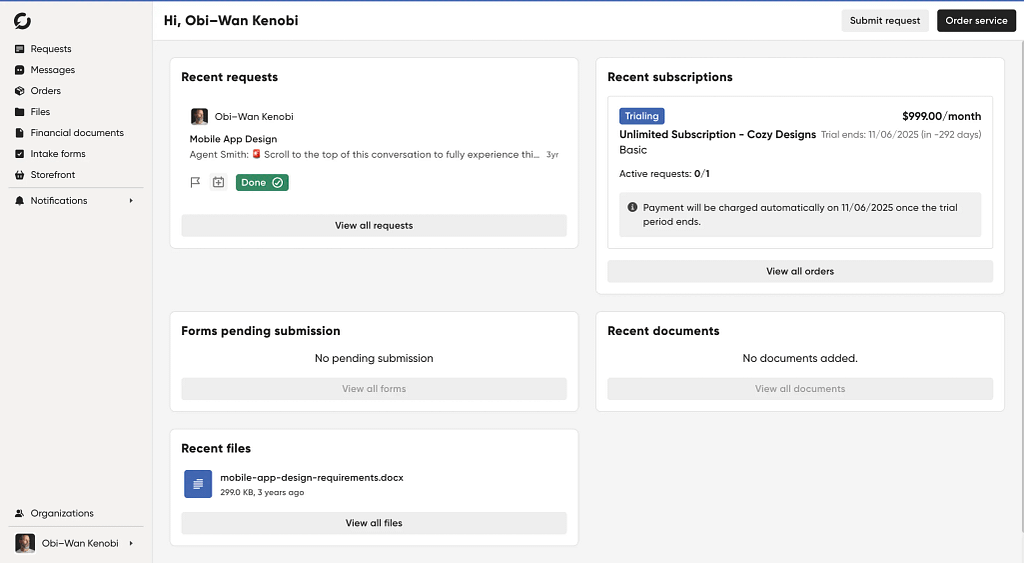
The result feels closer to a storefront combined with a workspace than a traditional “client dashboard.”
This directly addresses one of vcita’s (and other alternatives in this article) most critical weaknesses: the fact that its client-facing layer does not live up to the expectations set by its all-in-one positioning.
To make the client truly fit each and every customer journey, you get to personalize the platform for every individual client or client group. So that everyone sees exactly what they need to see. Nothing more, nothing less.
Add your own client portal tabs, name them how you want, remove, re-organize, add branded colors, logos, connect the client portal with external apps, embed videos, documents, and MORE.
In-depth services possibilities
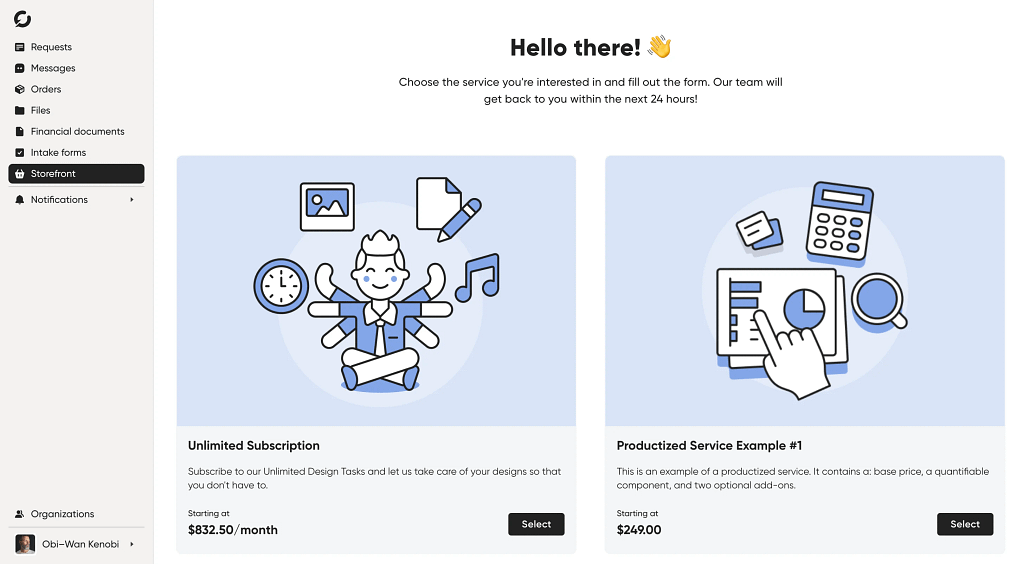
This philosophy also extends into how services are sold through the platform.
While vcita offers the necessary components—services, payments, scheduling—they remain relatively shallow and loosely integrated.
Zendo is designed for productized services from the ground up.
Packages, subscriptions, and recurring offerings are not edge cases; they are the default. The purchasing experience reflects this, resembling a SaaS checkout flow rather than a patched-together invoice or booking sequence.
And with Zendo, you can truly go as deep as you want with your offering.
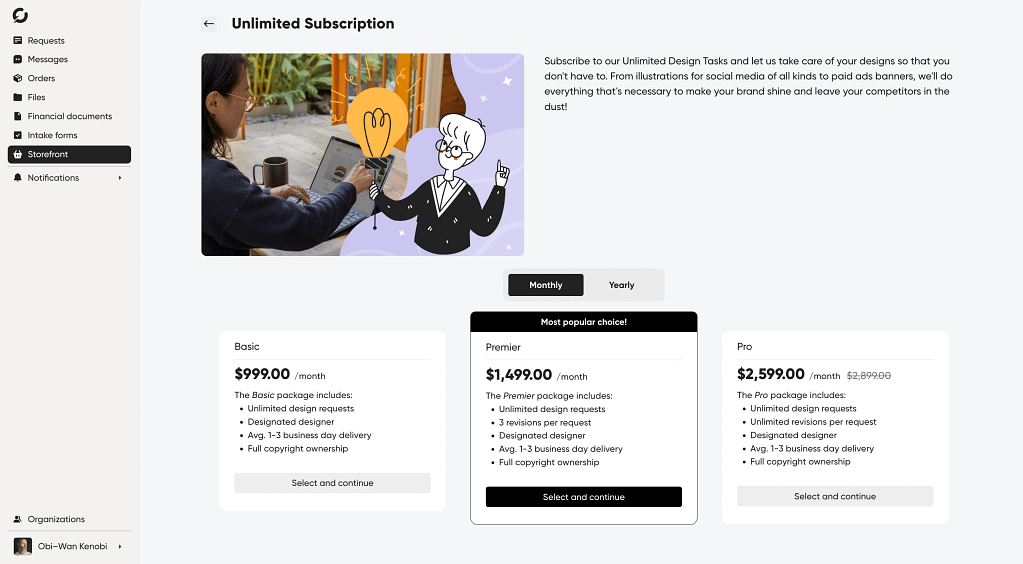
One-off productized service for a fixed price with quantifiable add-ons of your choice? Gotcha! Subscription-based service with three packages, best option highlighted, free trial and subscription pausing available for clients, and the whole thing automatically renewing? Not a problem! Custom offer with a quote you can easily build based on previously created or completely new services? Got it!
Tie it all together in a branded storefront with a custom checkout process for each service that your customers can use to fully self-serve.
Service delivery management & messaging
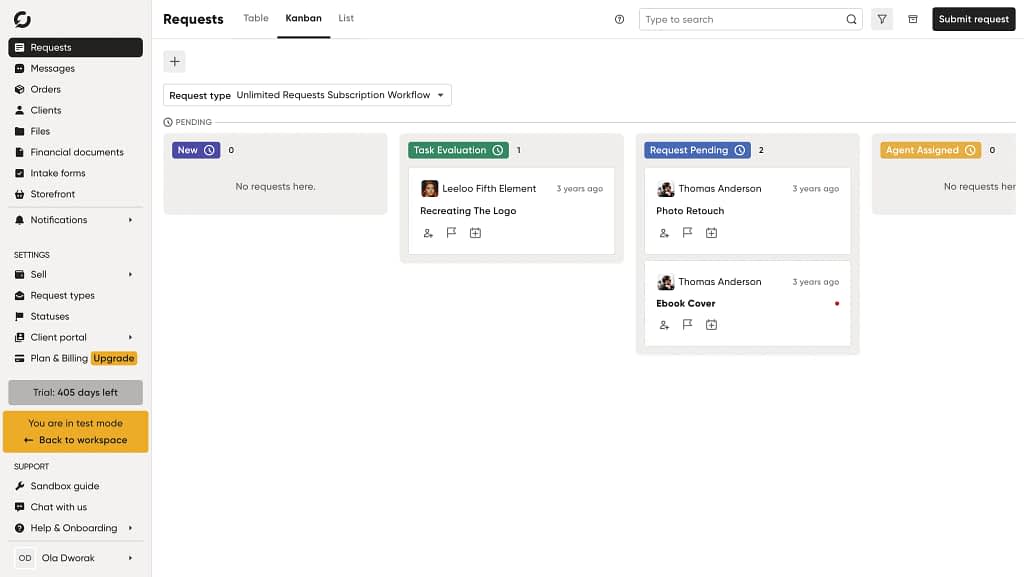
Finally, the fourth crucial part of Zendo is the one that helps you orchestrate whatever work you now get to do because of the incoming self-serve orders.
With this vcita alternative, you get a bunch of different features to manage ongoing work. From automated workflows you get to customize to perfectly readable Kanban boards you can drag and drop orders in between statuses, to copious amounts of filters.
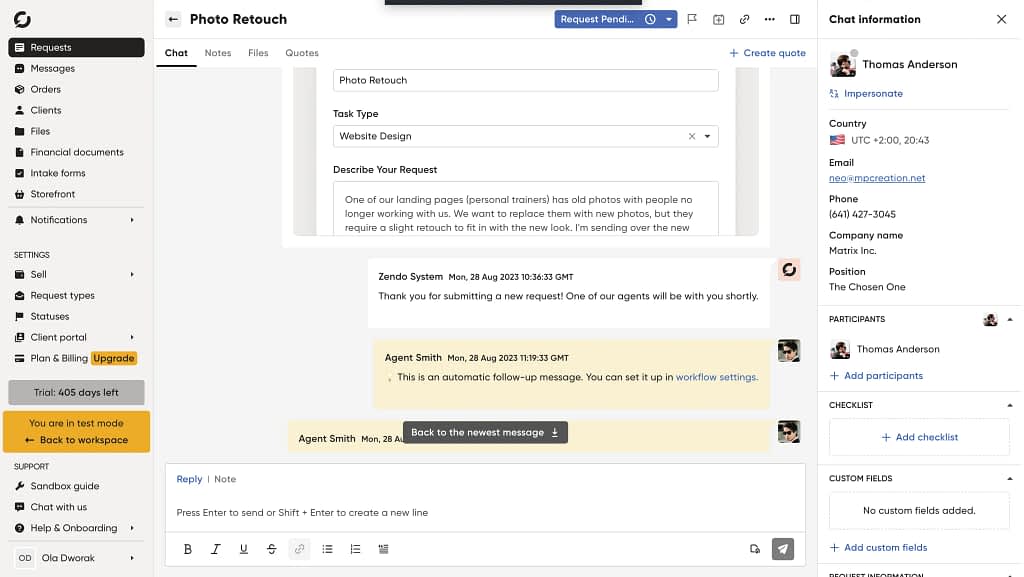
Every order you take in comes with a full-context chat window that not only gives you (and your clients) a way to chat away in real time (without unnecessary emails going to your inbox), but also a quick look at order details, notes, form completion responses, and more.
2. HoneyBook: the project-based solution
HoneyBook approaches the same problem from a different angle.
Rather than centering the experience around a service storefront, it is built around the lifecycle of a client relationship, particularly in project-based work.
The platform excels at guiding users through a structured flow: from initial inquiry to proposal, contract, payment, and ongoing project management (their iconic pipeline).
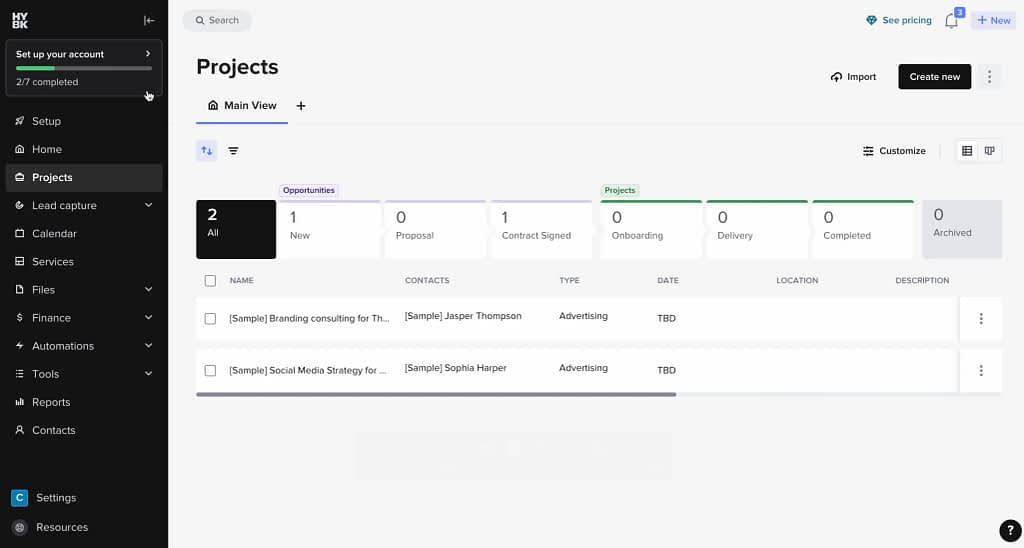
This is where HoneyBook is strongest.
Project-based work & automations
Its workflow and pipeline system is significantly more mature than what vcita offers, with clearly defined stages (that you can remove and customize), integrated tasks, and automation that actually supports day-to-day operations rather than sitting on the surface.
The pipeline, as well as the whole software platform got a total makeover, now looking even more modern and professional.
Despite the new look, we still run into a few issues.
Like having trouble testing the platform with dummy data. Technically it’s all there, but as soon as you try to actually run things, like test a workflow or send an email with dummy data, errors start popping in.
Hence we recommend spending a bit more time playing around HoneyBook, making sure to add in some of your own data, to fully test out its features.
Document flows & invoice-based services
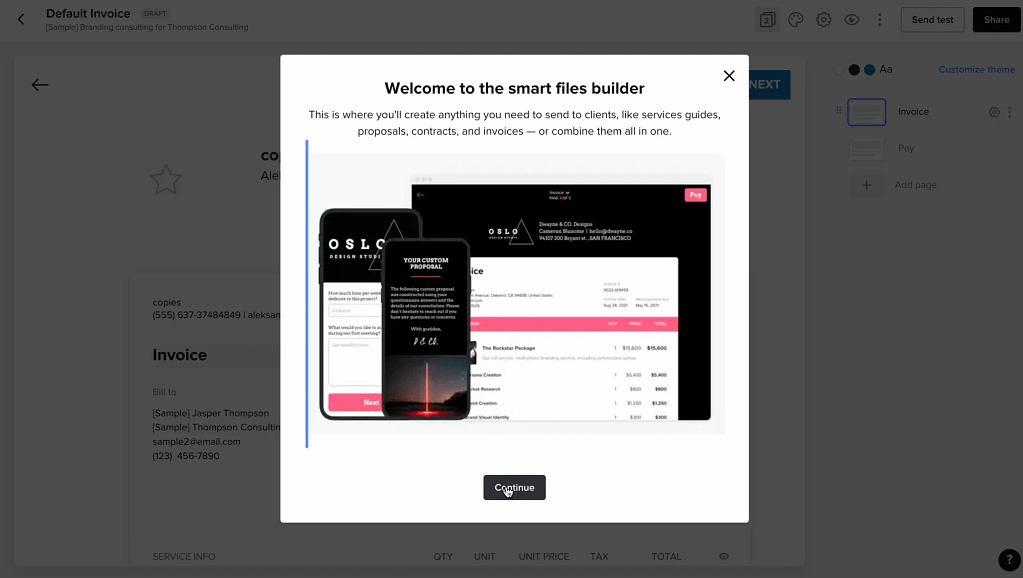
The beautifully templated document flows have been a central piece to HoneyBook since we started first testing and comparing it against other client portal solutions.
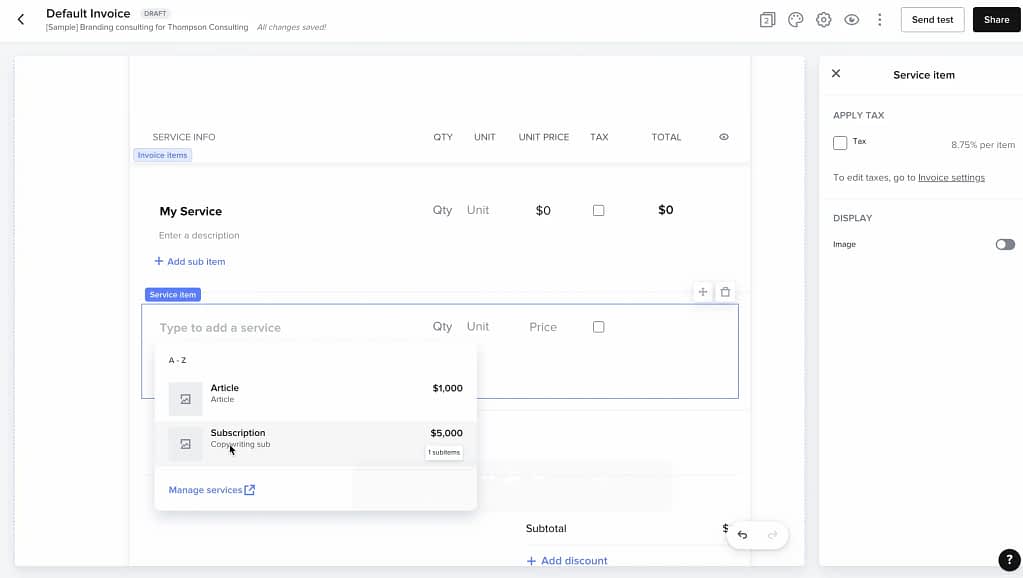
The way selling your services works there, is you get to add in your services (think rather one-off offers), and then create document flows around them.
Starting with proposals, going through contracts, and another example.
So, if you’re working based on proposals, need them to be pretty, love long-winded flows before getting to custom projects, HoneyBook will be the best choice for ya.
If you’re more into speed, productized, standardized offer (including automated subscriptions), Zendo is more what you should go for instead.
Client portal and communication
The client-facing experience, however, reflects this internal, and project-based focus.
The portal functions more as a project workspace than a central hub. Clients can access files, review documents, make payments, and communicate, but the experience is tied to individual projects rather than a broader, account-level environment.
Communication can also become fragmented, particularly as message threads extend into email, which can create a slightly disjointed experience over time.
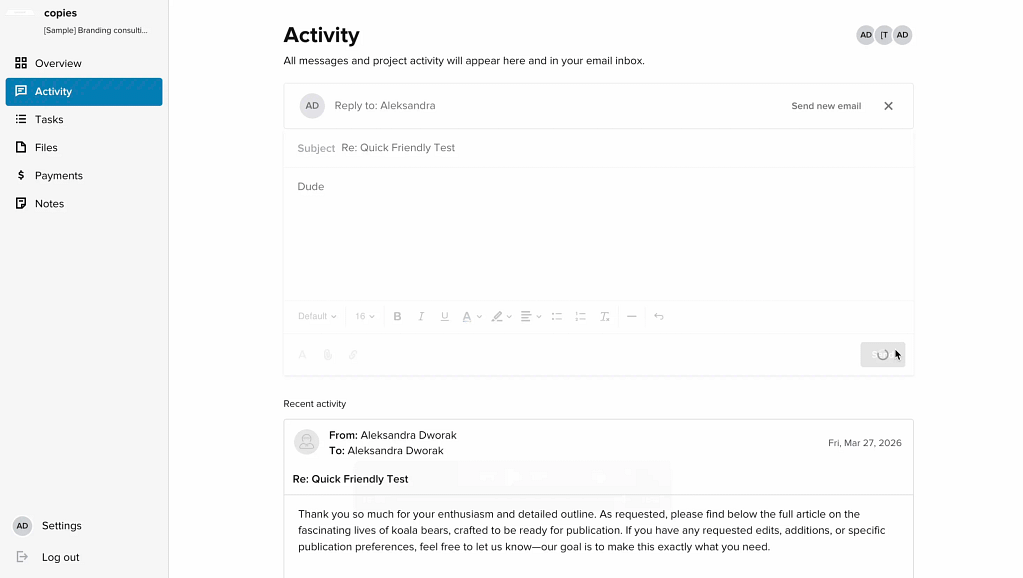
The issue of the never-ending email threads that HoneyBook creates in its portal has not disappeared unfortunately, despite the re-branding of the platform.
US and Canada citizens only
A crucial limitation to keep in mind when deciding to use HoneyBook is the fact that it’s currently still working only for businesses operating from either the United States or Canada.
However, the platform went a step further and now asks where you’re located, meaning they may be considering expanding the solution to other countries around the globe.
Will see.
For now, it’s just the US and Canada.
We went sneaky VPN-mode and tested it that way, but for obvious reasons, we absolutely do not recommend running your business through VPN. There may be additional limitations and specific service/credit card fees applicable when working through HoneyBook.
Deleting an account shenanigans
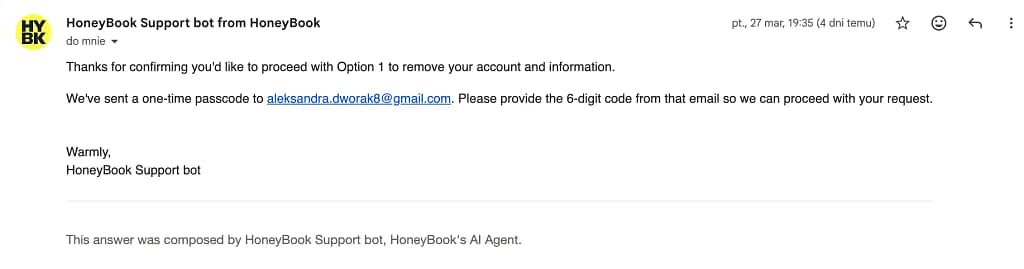
For the very first time, I also went ahead and tested the experience of deleting an account with HoneyBook and got an unpleasant surprise.
First, you can’t delete your account by yourself. You have to Google how to do it first. Figure out that you have to email HoneyBook with an account removal request. State how exactly you want the account deleted (they’ll propose two options).
Then, confirm the account removal with a code they sent to your email inbox (mind you, the removal request came from email, so no idea what’s the point of the code).
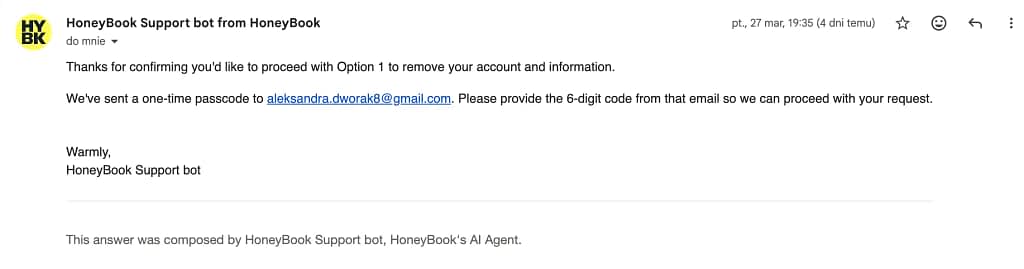
Keep an eye on your email inbox 24/7, because the code they share expires in quite literally 10 minutes, so if you don’t, you have to repeat the procedure. Only to then be informed that HoneyBook’s support team will take over now and get through with the removal process (who knows when).
It’s rare we describe the process of deleting an account, but this one was particularly annoying.
3. 17hats: nod to the creatives
17hats represents a more traditional interpretation of the all-in-one business platform.
In many ways, it is closer in spirit to vcita than the other tools discussed here, offering a wide range of features that cover CRM, invoicing, workflows, and client management within a single system.
All in one legacy
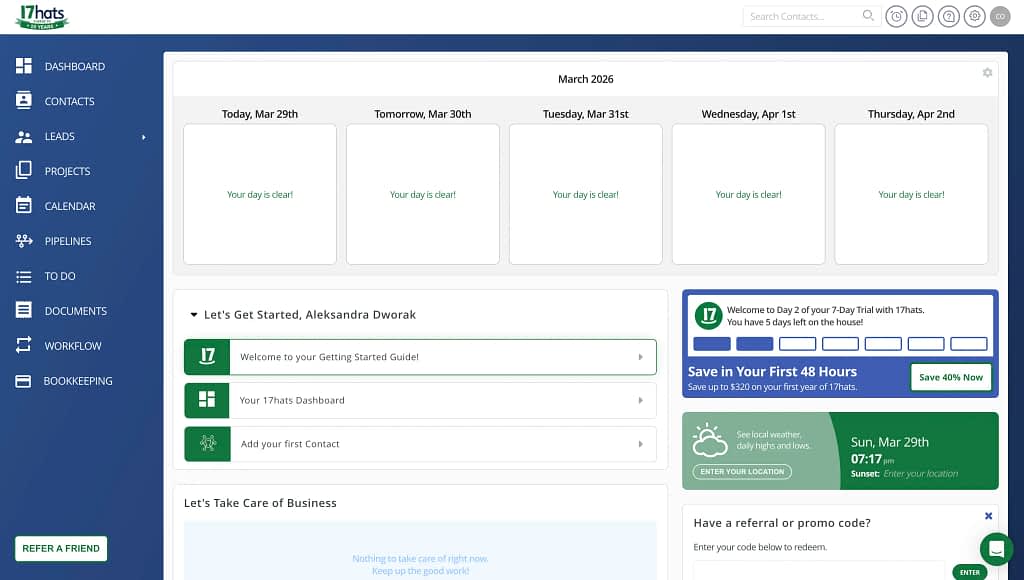
The difference is that 17hats leans heavily into operational depth, particularly in automation, rather than attempting to present a simplified, modern interface.
Its automation capabilities are one of its stronger aspects. Workflows, triggers, and email sequences (more on that later) allow users to automate large portions of their client interactions, which can be valuable for businesses with repetitive processes.
The underlying structure for handling proposals, projects, and invoices is also solid, following a familiar pattern that works well for freelancers and small teams.
However, this all comes at the cost of usability and overall product feel.
The interface is noticeably dated, and navigating the system, although not that unintuitive (despite the many layers and features hidden in the depths of 17hats settings), is costing you your look as a business. Especially so on the client portal side of things.
The most vcita client portal
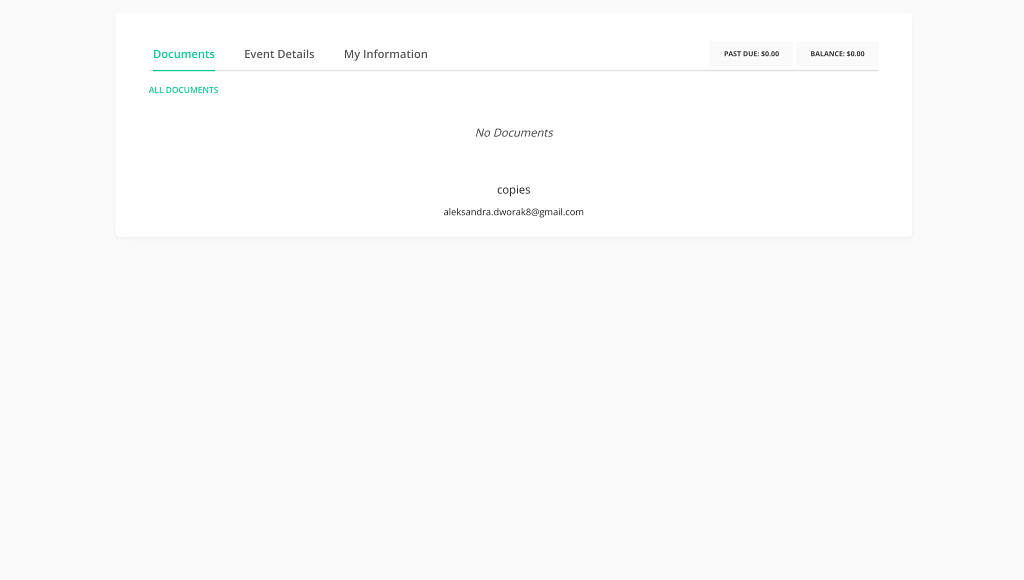
The client portal reflects these limitations the most.
While it exists and covers the necessary basics, it lacks the modern look it heavily needs. It kinda got stuck in 2009.
Plus, if you don’t add anything to the client portal for a given customer, it ends up looking awkwardly empty.
The tasks and automations
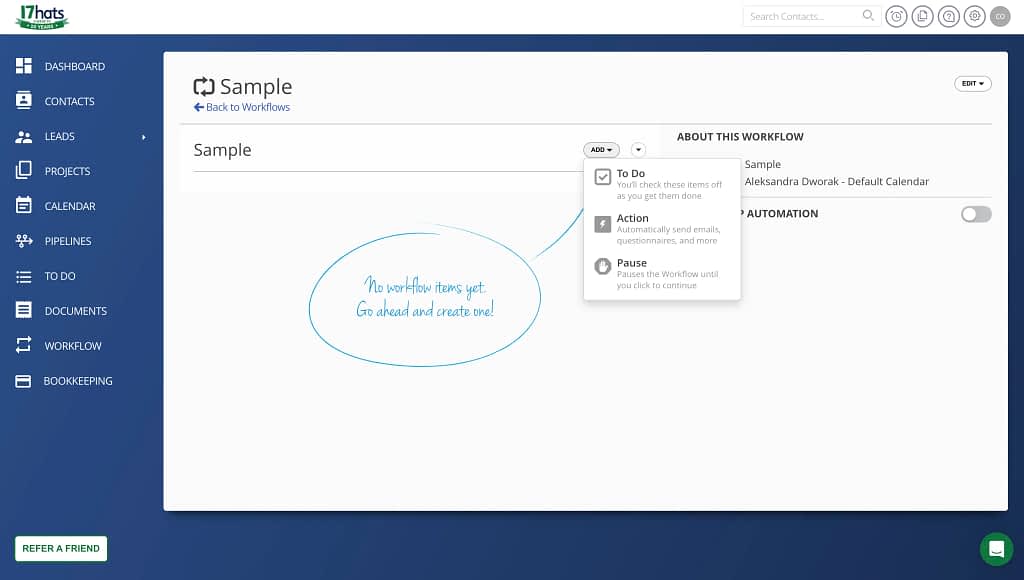
In comparison to vcita, 17hats is arguably more robust in certain backend capabilities, particularly automation.
But it does not solve the core issue of coherence.
Instead, it represents an older model of “everything in one place,” where functionality is prioritized over clarity and experience. For users who value control and are willing to tolerate a steeper learning curve, it can still be effective.
You can add tasks creating your to-do lists and create simple automations with 3 options (to-do, action, and pause), as well as a set of follow-up actions, from sending an email to changing the calendar or sharing a contract with a client connected to the workflow.
The new pipeline & tag-management focus
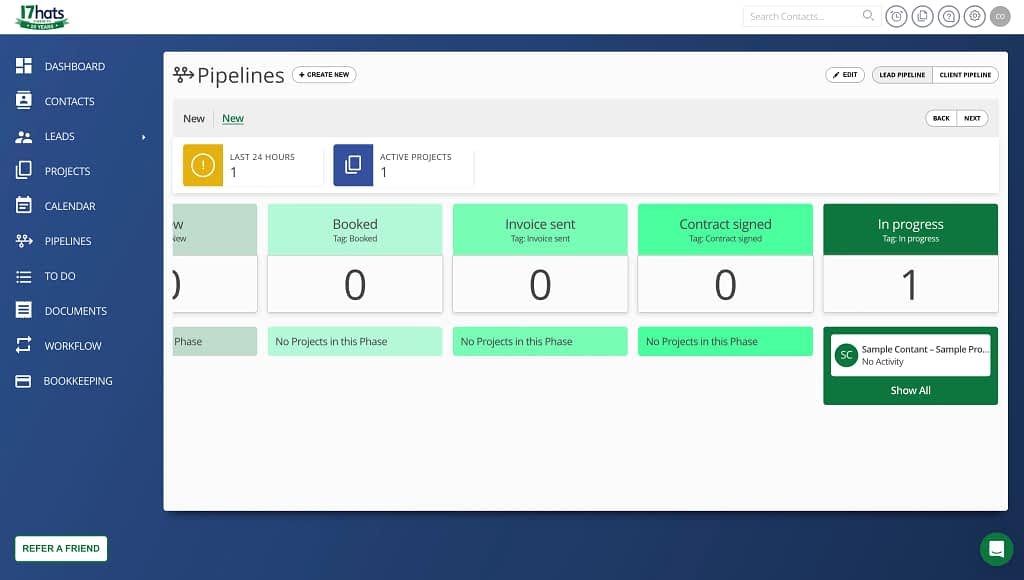
Now, let’s talk a bit more about the core of 17hats. It’s tags (and the new addition to the software).
The pipeline feature in 17hats is a relatively new addition that brings a more structured way to track leads and clients as they move through your workflow.
You can create up to 10 pipelines with five stages each (feel free to set a custom hex code for each to give it distinct colors), giving you a clear, visual overview of where every client stands in your process.
It’s heavily tag-based (told ya), which makes it flexible and powerful once set up, and in practice it works reliably for organizing and progressing deals.
That said, while the functionality is solid, the design feels a bit dated compared to more modern CRM tools, so the experience is more practical than visually polished.
The siding with creatives
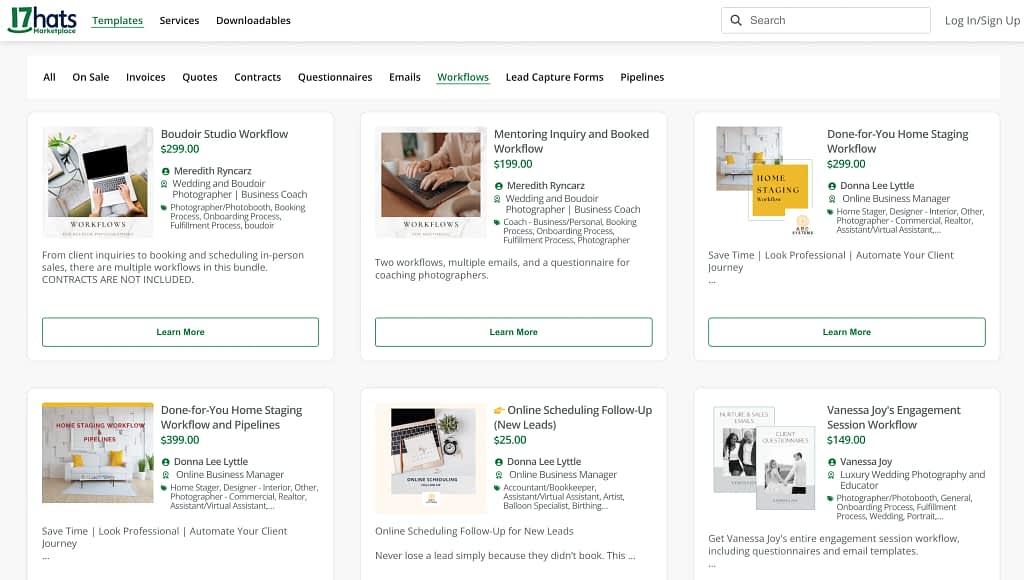
17hats is a business orchestration platform with a simple enough client portal. But it’s not just any generic software tool. Its biggest power may actually come from the niche they’ve placed themselves in: the all things creative gigs.
From wedding planners to photographers, DJs, and dog-walkers, for (usually) an additional charge, you get to access complete 17hats templates created by professionals in your niche. From just invoices and contracts to full on workflows and bundle packages.
All you have to do is visit 17hats marketplace and shop away.
The now simple pricing
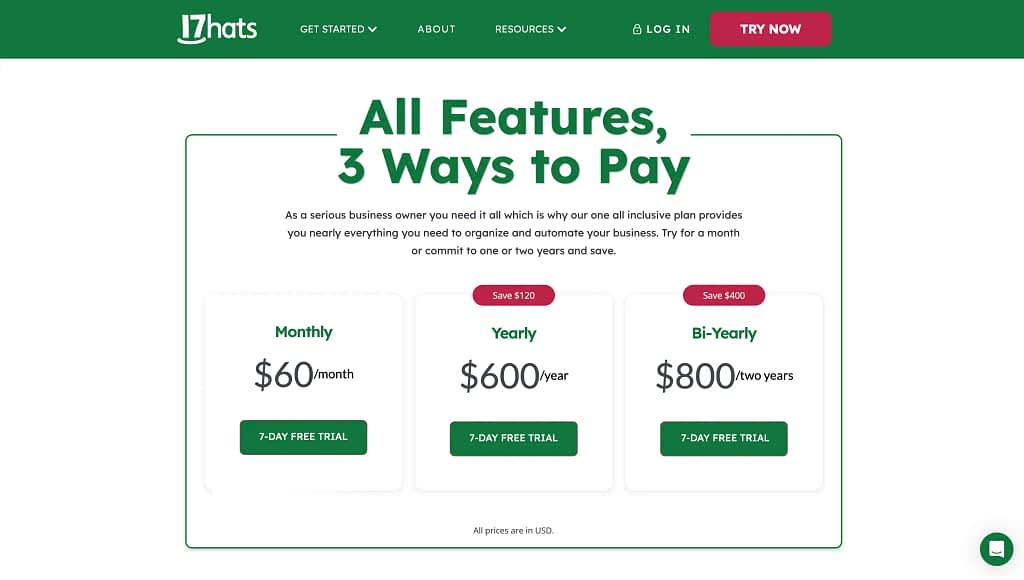
Now, the clear siding with creatives is a big win for 17hats’ users. However, an even bigger one may actually be its pricing.
Especially when compared with vcita.
From a pure ching ching, money perspective, 17hats is the smarter option because it offers a flat, all-inclusive model where you get full functionality from day one, instead of paying more to unlock essential features later.
At $60/month—or effectively $50/month annually and as low as ~$33/month on a two-year plan—you retain access to the same complete feature set regardless of how you pay.
In contrast, vcita uses a tiered pricing structure where meaningful integrations and “full power” capabilities are only available in higher plans like Platinum, which can cost around $93/month annually (or $126 monthly).
This means that while vcita looks cheaper upfront, the real cost of using everything is significantly higher, making 17hats a more predictable and cost-efficient choice over time—especially for businesses that know they’ll need advanced features anyway.
Final positioning
At the end of the day, choosing the best vcita alternative comes down to what you value most: clarity, depth, or familiarity, along with your company’s specific workflows and how you want to streamline your operations.
If you want a modern, user-friendly business management software that helps accept payments, manage a dedicated client experience through a clean dashboard, Zendo is the clear step forward. It’s built to nurture existing customer relationships with a structured, high-quality system designed for service selling.
If your work revolves around projects and you rely on strong pipelines, and cohesive payment processing, HoneyBook offers a more custom-work-based approach. It helps small business owners stay productive, manage important tasks, and ensure a smooth client journey—from inquiry to invoice—while benefiting from powerful integrations and real-time workflow visibility. As long as you’re based in the US or Canada that is.
And if you prefer a more traditional, comprehensive business management tool with strong backend logic, tag management, and calendar synching, 17hats remains a solid competitor. It allows you to collect contact information, automate workflows, and monitor your customer relationship management processes, even if its interface feels less modern.
vcita sits somewhere in between—but as your needs grow, that “in-between” often becomes the problem.
Many users start to discover limitations in reporting, analytics, and customization, making it harder to scale, generate insight, and stay truly efficient.
FAQ
What is the best alternative to vcita?
The best vcita alternative depends on your goals. Zendo stands out if you want modern business management software with a strong focus on productized services, along with a custom client portal that connects with external apps, including those for client booking or online scheduling, and a structured way to sell services. HoneyBook is ideal for project-based workflows, while 17hats is a closer match if you want a traditional all-in-one system with deeper automation and reporting capabilities.
Why do users switch away from vcita?
Many users switch after realizing vcita lacks depth. While it starts as a user-friendly tool, it can become limiting when you need better analytics, marketing automation, and customer support. Common issues include bugs, weak sync across tools, and limited real-time insights, making it harder to monitor performance, generate actionable reports, and scale efficiently.
Is vcita good for small business beginners?
Yes, vcita is accessible and easy to start with, especially for a small business testing online scheduling, calendar syncing, and client booking. However, as your needs grow, you may need more comprehensive tools to handle email marketing, automated appointment reminders, and deeper customer relationship management.
What is vcita best at?
vcita works well for simple use cases, let’s say to schedule appointments, basic payment processing, and managing contact details. Its client onboarding and chat features help businesses quickly engage clients, but it lacks the depth needed for more advanced marketing campaigns, landing pages, and long-term growth.
Why is vcita’s client portal a problem?
The client portal of vcita feels outdated and inconsistent. This impacts your ability to present a high-quality, professional experience to clients. Issues with service display and the overall design can reduce trust and make it harder to convert leads or maintain smooth interactions.
Is 17hats cheaper than vcita?
Yes. 17hats offers a more predictable pricing model, while vcita requires upgrades to unlock key features like automation, analytics, and advanced business management tools, making it more expensive over time.
How does 17hats compare to vcita?
17hats is more robust in terms of workflows, accounting software integrations, and backend automation. It helps businesses collect data, send contracts, and manage processes more efficiently. However, vcita is easier to use initially, though less powerful as your needs expand.
Is HoneyBook better than vcita?
For project-based businesses—yes. HoneyBook offers a more cohesive system with better calendar syncing, payment processing, and workflow tracking. It also supports third-party platforms, helping you sync tools and maintain productivity, though it’s less suited for subscriptions or productized services.
What’s the most modern software like vcita?
Zendo is currently the most modern software like vcita. It combines a clean dashboard, an easy way to sell all kinds of services, a fully customizable, white label client portal, and an easy way to manage all incoming work in one place. Its focus on structure and usability makes it easier to scale, engage prospects, and act on actionable insights.
Which vcita alternative should I choose?
Choose Zendo if you want a modern system to streamline operations, accept payments, and generate self-serve orders to your productized business. Choose HoneyBook if you need strong project workflows and want to ensure smooth client journeys. Choose 17hats if you prefer a traditional, comprehensive tool with strong automation and backend structure based on tagging.