
If you’re comparing Clinked and Zendesk, you’ve probably noticed something odd – these two platforms barely overlap. Clinked is a security-first collaboration portal built for industries where data protection isn’t optional. Zendesk is a customer support powerhouse that happens to include a self-service portal as part of its suite.
And neither was designed for the way most service businesses actually work with clients.
That’s where a third option enters the picture. Zendo is a white-label client portal built specifically for agencies, consultants, and freelancers who need to manage client requests, sell services, and handle billing – all from one branded workspace. It’s not adapted from a helpdesk or a file-sharing tool. It was built for service delivery from day one.
This guide breaks down all three across the dimensions that matter most: portal experience, communication, service selling, pricing, workflows, and branding. By the end, you’ll know exactly which one fits your business – and which ones don’t.
Quick Verdict
If your industry demands ISO 27001 and HIPAA compliance, Clinked is the safest bet. It’s essentially a vault with collaboration features on top – and for regulated industries, that’s exactly what’s needed.
Zendesk? It’s the right call if you’re running a customer support operation at scale. Tickets, SLAs, omnichannel communication, AI-powered routing – that’s where it dominates. But its “portal” is really a self-service help center for support inquiries, not a workspace where ongoing client work happens.
For service businesses that need a branded portal where clients submit work, track progress, communicate with your team, and pay invoices, Zendo is the only tool here purpose-built for that exact workflow. And it starts free.
At a Glance
| Clinked | Zendesk | Zendo | |
|---|---|---|---|
| Best For | Secure document collaboration | Customer support ticketing | Service delivery & client management |
| Portal Type | File-sharing & collaboration portal | Self-service support portal | Client work & service delivery portal |
| White Label | Full (domain, logo, colors, app) | Limited (help center branding) | Full (domain, logo, colors, emails, CSS) |
| Service Selling | ❌ Not available | ❌ Not available | ✅ Productized, custom, subscription, free |
| Built-In Billing | ❌ No | ❌ No | ✅ Quotes, invoices, Stripe, bank transfers |
| Communication | Group chat, discussions, @mentions | Ticketing, live chat, omnichannel | Real-time chat within requests |
| Security Certs | ISO 27001, HIPAA, GDPR | SOC 2, GDPR | GDPR, AWS encryption |
| Starting Price | $77/mo (2-year lock-in) | $55/agent/mo | Free forever |
| Free Plan | ❌ Trial only | ❌ 14-day trial only | ✅ Yes – Essential plan |
| Learning Curve | Moderate | Steep | Small |
Client Portal: Three Very Different Approaches
The phrase “client portal” means something completely different in each of these platforms. Understanding that distinction is probably the most important takeaway from this entire comparison.
Clinked: The Secure Vault
Clinked‘s portal is a branded, secure workspace built around files. You and your clients share documents, manage tasks, and communicate through discussions and group chat. Think of it as a private cloud drive with collaboration features layered on top.
Each client gets their own workspace – Clinked calls them “Groups” – with access to documents, calendars, and assigned tasks. For an accounting firm, this might look like a dedicated Group per client where tax documents, financial reports, and signed agreements all live in one secure, organized space. The client uploads their documents, the accountant reviews and responds, and everything stays tracked with an audit trail.
Where Clinked truly stands out is security:
✅ ISO 27001 and ISO 9001 certified
✅ HIPAA compliance for healthcare-related data
✅ 256-bit SSL encryption in transit + AES encryption at rest
✅ Audit trails and document watermarking
✅ Granular access permissions per user and per Group
For law firms exchanging confidential case files, financial advisors sharing portfolio reports, or healthcare consultants handling patient-adjacent data – these certifications aren’t nice-to-haves. They’re non-negotiable requirements that many other portal tools simply can’t meet.
The trade-off? Clinked is built around files and tasks, not service delivery. There’s no way to package your online services, let clients place orders, send invoices, or collect payments through the portal. If you’re a marketing agency and a client wants to order a new batch of social media creatives, that conversation and transaction happen outside Clinked – probably across email, a separate invoicing tool, and maybe a payment link. That’s the gap.
Zendesk: The Support Desk
Zendesk‘s portal is part of its broader Suite, and it’s fundamentally a self-service support tool. Clients can submit support tickets, browse a knowledge base, and check the status of their requests. It was built for customer support departments, not for businesses that deliver ongoing client work.
The full self-service portal experience requires the Suite Growth plan at $89/agent/month. On the entry-level Suite Team plan ($55/agent/month), you get a help center and knowledge base, but not the customer portal itself.
Where Zendesk shines is omnichannel support. A single customer conversation can span email, live chat, phone, social media, and messaging apps – all tracked in one unified agent workspace. For a SaaS company handling hundreds of support tickets daily, or an e-commerce brand managing returns and complaints across five channels, Zendesk is built to handle that volume without breaking a sweat.
But here’s the thing: this is a ticketing system at its core. No file collaboration beyond attachments. No project tracking. No service catalog. No billing. In other words, it’s not a full client portal like ones you know from, for example, IT or design industries.
If you’re a web design agency managing ongoing client projects, or a consulting firm delivering monthly strategy retainers, Zendesk’s portal will feel like trying to fit a square peg into a round hole. The portal answers “How do I check my support ticket?” – not “Where’s my project, and can I order another one?”
Zendo: The Service Delivery Hub
Zendo’s portal takes a fundamentally different approach. Instead of centering on files (Clinked) or tickets (Zendesk), it’s organized around client requests – the natural unit of work for service businesses.
A request might be a new logo design, a monthly content writing retainer task, a one-off SEO audit, or a website maintenance fix. Everything related to that request – communication, files, status updates, quotes, invoices, payments – lives in one thread.
Here’s what that looks like in practice. Say you run a web development agency. A client logs into your branded portal, browses your Service Catalog, and orders a “Landing Page Build” package for $2,500. They fill out your intake form with their requirements, brand guidelines, and reference links. The request lands in your team’s workspace with all that context attached. Your designer and developer collaborate on it, update the status from “In Progress” to “Review”, the client gets notified, leaves feedback in the same thread, you finalize and send an invoice – all without leaving Zendo. No emails lost in someone’s inbox. No “which Google Drive folder was that in?” moments.
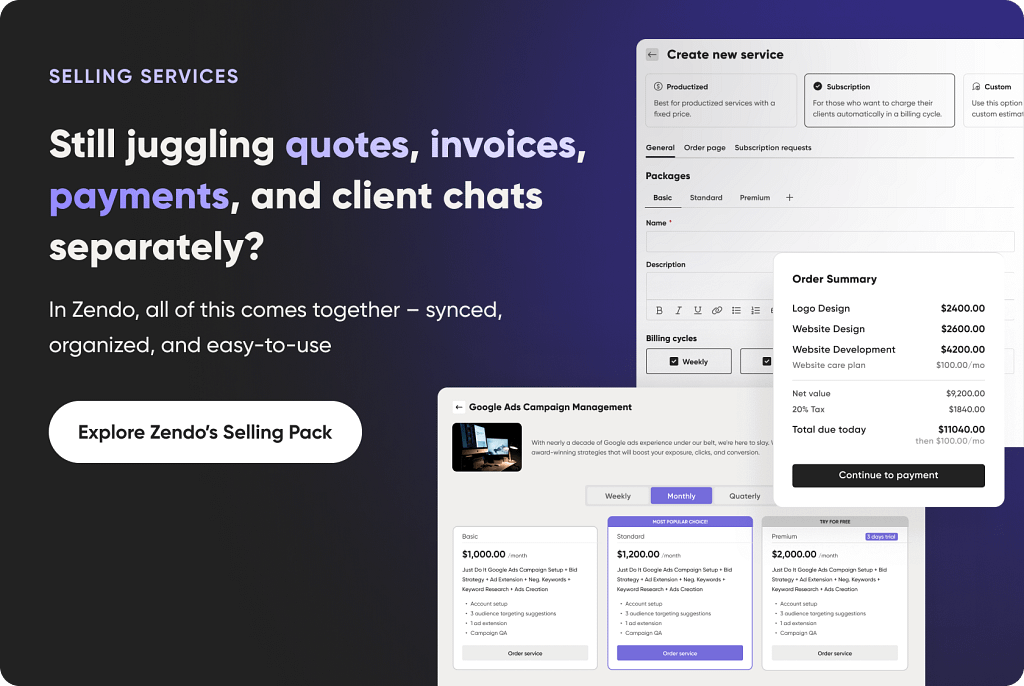
What makes Zendo unique in this comparison is that built-in service selling. You can create productized packages (fixed scope, fixed price), subscription services (monthly retainers with recurring billing), custom-quoted engagements, and even free inquiry forms for discovery calls. Clients browse and order directly, and the entire flow stays inside the platform.
The honest limitation: Zendo doesn’t carry ISO 27001 or HIPAA certifications. It’s GDPR-compliant and runs on AWS infrastructure with encryption in transit and at rest, but if your industry legally requires those specific compliance stamps – like handling protected health information or classified financial data – Clinked has the clear edge there.
Communication: Tickets, Threads, or Real-Time Chat?
How your team and clients actually talk to each other day-to-day matters more than most feature lists suggest. It shapes the client experience, affects response times, and determines whether important context gets lost.
Clinked
Clinked offers group chat, @mentions, and discussion forums organized by workspace. File commenting and approval workflows make it easy to gather feedback on documents – a lawyer can mark up a contract draft, tag the client, and the client responds in the same thread.
It’s solid for asynchronous collaboration. But communication isn’t tied to specific tasks or deliverables in a structured way. If you have five active projects with one client, conversations can blur together in the same Group chat.
Zendesk
Zendesk turns every interaction into a ticket with a unique ID, assigned to an agent, and tracked through resolution. For a support team handling 500 inquiries a day, this structure is essential – you need to know what’s open, what’s escalated, and what’s breaching SLA.
But it creates a transactional dynamic. Each conversation is a “case to resolve”, not a relationship to maintain. There’s no room for the kind of ongoing, project-based back-and-forth that service businesses need.
Worth noting: according to a 2026 Desk365 review, Zendesk’s own customer support quality has drawn criticism in recent years, with some long-time users reporting that the company’s post-acquisition support experience has deteriorated – slower response times and less personalized interactions.
Zendo
Zendo puts real-time chat at the center of every client interaction. Messages, files, quotes, invoices, and payment confirmations all flow through the same conversation thread, attached to the specific request they belong to.
Your team can leave internal notes that are invisible to clients – useful for briefing a colleague before they jump in, or flagging something for the project manager without the client seeing it.
Everything also lands in the client’s email inbox. So if a client prefers to reply from their phone at 11 PM without logging into the portal, they can. The response still shows up in the right place.
For a translation agency juggling 30 active projects across 15 clients, this means each project’s communication stays in its own lane. No more scrolling through a shared Slack channel trying to find what the client said about the German localization three days ago.
Service Selling and Billing: The Biggest Gap
This is where the three platforms diverge the most – and honestly, where two of them simply don’t compete.
Clinked has no billing, no invoicing, and no service selling capabilities. It’s a collaboration portal, full stop. If your accounting firm finishes preparing a client’s tax return and needs to bill them, you’re switching to QuickBooks or FreshBooks to create that invoice, then emailing the payment link separately. The work and the payment live in completely different systems.
Zendesk is the same story. Customer support is the mission – revenue operations isn’t part of the package. You might integrate with a billing tool through Zendesk’s marketplace, but there’s nothing native.
Zendo is the only platform here that covers the full service lifecycle. And this isn’t a bolted-on feature – it’s core to how the platform works:
✅ Create quotes and > invoices > directly inside client conversations
✅ Collect > payments > via Stripe or bank transfers, with multi-currency support
✅ Set up subscription billing for recurring services – a content > agency charging $3,000/month for a blog writing retainer can > automate the entire billing cycle
✅ Let clients browse and order from your Service > Catalog > – think of it as a storefront for your services
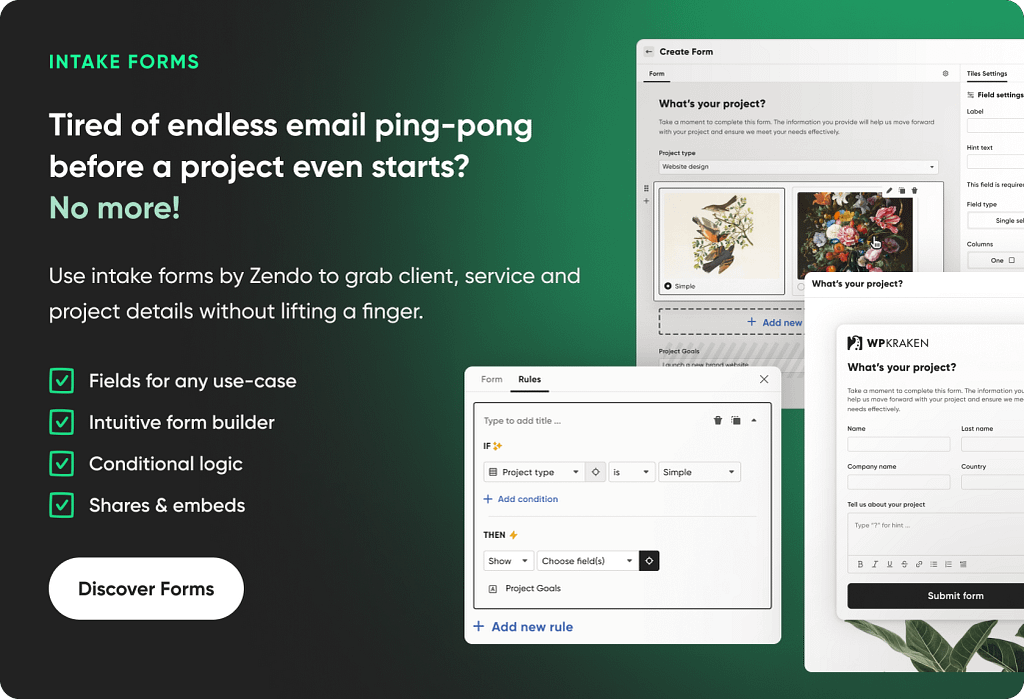
✅ Capture detailed requirements upfront with customizable intake > forms that ask > the right questions before work begins
Here’s a practical example. Imagine you’re a branding consultancy offering three packages: a $500 Brand Audit, a $2,500 Visual Identity Package, and a $5,000 Full Brand Strategy. In Zendo, you set these up as productized services in your catalog. A new client visits your portal, picks the Visual Identity Package, fills out the intake form with their brand values, target audience, and color preferences, pays upfront through Stripe, and the request lands in your team’s workspace ready to go. No proposal emails. No manual invoice creation. No “did they pay yet?” follow-ups.
For most service businesses, client work and billing are tightly connected. Keeping them in one tool eliminates an entire category of operational friction.
Workflows and Automation
Every service business has repeatable processes. The question is whether your tool helps you systematize them – or makes you reinvent the wheel with every new project.
Clinked handles task management with Kanban boards, subtasks, assignments, and checklists. You can create task templates for repeatable processes, which is helpful. But there’s no automation engine – no triggers, no conditional logic, no auto-assignment. Everything is manual, or you connect through Zapier for basic automation.
For a firm that runs the same 12-step onboarding process for every new client, this means someone on your team is manually creating those 12 tasks, assigning them, and updating statuses by hand. Every single time.
Zendesk has the most sophisticated automation of the three – but it’s purpose-built for support ticket workflows. Triggers fire based on ticket conditions: auto-assign by topic, escalate on SLA breach, send follow-up surveys after resolution. The AI Copilot add-on (an extra $50/agent/month) adds intelligent routing and response suggestions.
Powerful for support teams. But if your workflow is “client submits a design brief → designer creates first draft → project manager reviews → client approves → invoice sent”, Zendesk’s automation engine doesn’t map to that reality. It’s optimized for “ticket opens → agent responds → ticket closes”.
Zendo offers no-code workflow automation designed specifically for how service businesses deliver work:
- Create Request Types with custom statuses (e.g., “New → Briefing > → In Progress → Internal Review → Client Review → Done”)
- Set up auto-assignment rules so the right team member gets the > right type of work
- Configure triggers – for example, automatically send an intake > form when a request moves to “Active”, or notify the billing > team when it hits “Done”
- Attach checklists to statuses to ensure no steps get skipped
One detail that matters more than it sounds: Zendo’s statuses aren’t linear. You can jump between them freely – move a request back from “Client Review” to “In Progress” without breaking the workflow. For anyone who’s worked with clients, you know that revisions don’t follow a straight line. The tool shouldn’t pretend they do.
Zendo also integrates with Zapier for cross-platform automation (e.g., create a Zendo request automatically when a form is submitted on your website), with Make integration on the roadmap.
White-Label and Branding
If clients interact with your portal regularly, having it look like your platform – not someone else’s software – directly affects how professional your business appears. It’s the difference between “log into our client portal” and “log into this third-party tool we use”.
Clinked
Clinked takes white-labeling seriously, especially at higher tiers. You can set up a custom domain, fully brand the interface with your logo and colors, customize email notifications, and – on the Enterprise plan – even offer a white-labeled mobile app under your own brand in the App Store and Google Play.
They also offer custom portal design services:
- gap analysis,
- mockups,
- wireframes,
- a bespoke portal layout tailored to your requirements.
For a large professional services firm that wants a fully custom client experience, this level of service is hard to find elsewhere.
The catch? These premium branding features sit on the more expensive plans. Meaningful white-labeling starts at the Standard tier ($194/month on a 2-year commitment), and the mobile app requires Enterprise pricing.
Zendesk
Zendesk lets you brand the customer-facing help center:
- logo,
- colors,
- some layout customization using HTML and CSS.
But the agent-side interface, the ticketing views, and the overall platform experience remain unmistakably Zendesk.
You’re skinning the storefront. The back office still has someone else’s name on it. For businesses where clients primarily interact through the support portal (submitting tickets, reading knowledge base articles), this might be enough. For those who want a fully branded workspace, it falls short.
Zendo
Zendo’s white-labeling covers the full client-facing experience:
✅ Custom domain (clients visit portal.yourbrand.com, not app.getzendo.io)
✅ Your logo and brand colors throughout the interface
✅ Branded email notifications – clients receive emails from you, not from Zendo
✅ Remove all Zendo branding on Pro and Agency plans
✅ Custom CSS on the Agency plan for deeper visual control
No white-labeled mobile app like Clinked’s Enterprise tier – that’s a genuine gap. But the portal is fully responsive on mobile, so clients get a branded experience on any device without needing to download anything.
For a boutique creative agency, this means the portal feels like an extension of your website. Clients log in, see your logo, your colors, your domain – and never wonder what software you’re using behind the scenes.
Pricing: What You’ll Actually Pay
The cost structures here are fundamentally different, and the gap is wider than you might expect.
Clinked
Clinked charges per workspace, not per user – which sounds appealing until you see the price tiers.
The Lite plan costs $119/month (or $77/month if you commit to 2 years). It includes 100 members and 100 GB storage, which is generous – but it lacks tasks, calendars, and discussions. Those are arguably core features for any collaboration portal, yet they’re locked behind the next tier.
The Standard plan at $299/month ($194/month, 2-year) adds task management, discussions, and calendars. This is realistically the minimum viable plan for most teams.
Want white-label email notifications and document watermarking? You’ll need the Premium plan at $599/month ($389/month, 2-year), which includes 1 TB storage and a dedicated customer success manager.
Enterprise pricing is custom and includes the white-labeled mobile app, Active Directory integration, and unlimited storage.
No free plan. Free trial only.
Zendesk
Zendesk uses per-agent, per-month pricing. The math adds up fast – especially for growing teams.
- Suite Team: $55/agent/month (annual) – help center, basic > ticketing
- Suite Growth: $89/agent/month – adds self-service portal, > SLA management
- Suite Professional: $115/agent/month – advanced analytics, > skills-based routing
- AI Copilot add-on: $50/agent/month on top of any plan
Let’s do the math for a team of 5 agents on Suite Growth: that’s $445/month on annual billing. Add AI Copilot and you’re at $695/month. Scale to 10 agents on Professional with AI, and you’re looking at $1,650/month.
No free plan. 14-day trial on the Professional tier only.
Zendo
Zendo is the most accessible option by a wide margin.
It starts with a free-forever Essential plan – not a trial, a permanent free tier with core features for up to 3 clients and 1 published service. Enough for a freelancer testing the waters or a small consultancy just getting started.
Paid plans:
- Core: $25/month (or $300/year) – more clients, more > services, basic automation
- Pro: $59/month (or $588/year) – advanced white-label, > unlimited request types, productized services
- Agency: $99/month (or $948/year) – conditional logic > forms, full white-label, custom CSS, 5 TB storage
Here’s the number that puts it in perspective: Zendo’s top-tier Agency plan at $99/month costs less than a single Zendesk agent seat on Suite Growth ($89/month), and roughly half of Clinked’s entry-level Lite plan on a 2-year commitment ($77/month × generous interpretation). For a 5-person team, you’d pay $99/month total on Zendo vs $445/month on Zendesk vs $194/month minimum on Clinked – and Zendo includes billing, service selling, and white-labeling that the other two don’t offer at any price.
See full Zendo pricing details →
Pricing in Practice: Two Real-World Scenarios
Numbers on a pricing page are one thing. What you actually pay in a real business context is another. Here are two scenarios that show how these tools play out for different types of businesses.
Scenario 1: A 5-person marketing agency managing 20 active clients
This agency delivers content, SEO, and social media management. They need a branded portal where clients submit requests, review deliverables, and pay invoices.
- Clinked: The Standard plan at $194/month (2-year commitment) gets you tasks, discussions, and collaboration features – but no billing or service selling. You’d still need FreshBooks or similar for invoicing (add ~$30–60/month), plus a separate intake form tool. Total: roughly $230–260/month across tools.
- Zendesk: Suite Growth at $89/agent/month for 5 agents = $445/month. You get a support portal, but no project tracking, no service catalog, no invoicing. You’re paying for ticket management you don’t really need.
- Zendo: The Agency plan at $99/month covers everything – branded portal, service catalog, intake forms, quotes, invoices, Stripe payments, and workflow automation. No additional tools needed. Total: $99/month.
For this type of business, Zendo saves $130–350/month compared to the alternatives – and that’s before you factor in the operational friction of stitching multiple tools together.
Scenario 2: A 15-person financial advisory firm with compliance requirements
This firm shares confidential portfolio reports, tax documents, and compliance paperwork with high-net-worth clients. HIPAA and ISO 27001 compliance are non-negotiable.
- Clinked: The Premium plan at $389/month (2-year) delivers ISO 27001, HIPAA, document watermarking, and a dedicated success manager. For this use case, the price is justified – compliance failures cost far more than the subscription.
- Zendesk: Doesn’t fit this use case. No document collaboration, no file-centric workspace, no compliance certifications relevant to financial document handling.
- Zendo: Covers client communication and billing well, but lacks ISO 27001 and HIPAA certifications. For this firm, that’s a dealbreaker.
Here, Clinked wins clearly. The lesson: cost isn’t everything – fit matters. A cheaper tool that can’t meet your compliance obligations isn’t actually saving you anything.
Team Collaboration and Internal Roles
How your team works together behind the scenes – who sees what, who can assign work, who manages clients – matters as much as the client-facing features.
Clinked supports multiple users within each workspace, with permission controls determining who can view, edit, or manage content. The Enterprise plan includes Active Directory and SSO integration, which is important for larger organizations with existing identity management. However, Clinked is primarily designed for client-team collaboration – internal team management features (role hierarchies, assignment views, impersonation) are more limited.
Zendesk offers a well-defined agent role system. Super admins, admins, moderators, and basic agents each have different access levels. “Light agents” – view-only users included at no extra cost on some plans – are useful for managers who need visibility without handling tickets. The agent workspace is polished and optimized for high-volume ticket handling, with macros, views, and keyboard shortcuts that experienced support teams love.
Zendo provides five granular roles: Watcher, Agent, Manager, Admin, and Owner. Each has clear permissions – Managers see and assign all requests, Agents only interact with their assigned work, Watchers observe without acting. The impersonation feature lets authorized users act on behalf of clients or team members for troubleshooting or onboarding assistance.
Multiple workspace views – List, Table, and Kanban – with saveable filters help teams organize their work the way that suits them. A project manager might use the Table view filtered by “In Review” status to see everything waiting for client feedback, while a designer works from a Kanban board showing only their assigned requests. Small thing, but it means each team member sees the workspace the way that makes sense for their role.
Where Each Tool Shines
Clinked is the right pick when…
Security and compliance come first. If your clients are banks, law firms, or healthcare organizations that need ISO 27001 and HIPAA checked off before they’ll even consider your portal, Clinked delivers that with genuine depth – audit trails, watermarking, granular permissions, and the certifications to prove it.
The white-labeled mobile app on Enterprise is also a standout. Neither Zendesk nor Zendo offer this. For a large advisory firm whose partners want a branded app their clients can download from the App Store, Clinked is the only game in town among these three.
Zendesk makes sense when…
You’re running a support desk, not a service delivery business. Omnichannel ticket management, AI-powered routing, SLA enforcement, and deep analytics on agent performance – Zendesk handles high-volume customer support like nothing else. It serves 130,000+ brands globally, and for the use case it was built for, it’s best-in-class.
If your definition of “client portal” is “a place where customers submit support requests and find answers in a knowledge base”, Zendesk does that exceptionally well.
Zendo is built for teams that…
Deliver services to clients and need one place for the entire relationship – not just communication, not just files, but the full lifecycle from first inquiry to final payment. A graphic design agency managing 50 active client requests. A consulting firm running monthly strategy retainers. A development shop selling website maintenance packages. These are the businesses where Zendo’s combination of client portal, service catalog, workflows, and integrated billing clicks into place.
It’s not the most powerful support desk (that’s Zendesk). It’s not the most secure document vault (that’s Clinked). It’s the only tool here that connects selling services, doing the work, and getting paid into one seamless client experience.
What Real Users Are Saying
Review scores only tell part of the story. Here’s what actual users highlight when talking about these platforms – the good, the bad, and the surprisingly specific.
Clinked
Clinked holds a 4.8/5 rating on G2 and 4.9/5 on Capterra – impressive numbers, especially for a niche tool. Users consistently praise two things above all: security and customer support. For firms handling sensitive data, the compliance certifications aren’t just marketing – they’re a daily operational necessity.
According to Paul G., a CEO in the medical devices space, “The robust security and controlled access are perfect for sharing sensitive FDA submission documents” (Capterra). That’s the kind of use case where Clinked genuinely shines – regulated industries with strict document handling requirements.
On the flip side, some users flag the learning curve and limited integrations. As one G2 reviewer noted, “Customization options are lacking – we had to use workarounds for some processes” (G2). Others mention that scaling up brings unexpected cost jumps, making budgeting harder for smaller firms. The platform integrates with only about 8 third-party tools (Google Drive, Zapier, Jotform, and a few others), which can feel restrictive if your tech stack goes beyond the basics.
The recurring theme? Clinked is excellent at what it was built for – secure file sharing and document collaboration – but users looking for broader service delivery or billing features quickly hit its edges.
Zendesk
Zendesk reviews paint a consistent picture across G2 (4.3/5, 6,500+ reviews) and Capterra (4.4/5): it’s a powerful, feature-rich support platform – but that power comes at a cost, both financially and in terms of complexity.
Users love the omnichannel ticket management. According to one reviewer, “It consolidates all communications with customers in one place, whether through email, live chat, or phone” (G2). For large support teams juggling hundreds of daily inquiries, that centralization is the core value proposition.
But complaints cluster around three areas. First, pricing – especially for smaller teams. As one user put it bluntly, “It is ridiculously expensive to get things you could get elsewhere for less than half the price” (G2). Second, the learning curve: advanced automation and customization require genuine technical expertise, which multiple reviewers flag as a barrier for non-technical users. Third, the AI add-on – a recurring source of frustration, with users calling the pricing excessive for the value delivered.
The bottom line from users: Zendesk is built for support-heavy operations at scale. If that’s your world, the investment pays off. If you’re a service business that needs a client workspace rather than a ticket queue, Zendesk’s strengths simply don’t align with what you’re after.
Zendo
For Zendo, the word that keeps coming up is “centralized”.
Xavier D., a Managing Director of a small business, summed it up well: “Zendo has provided me with a complete back-office solution for my Productised Service business. I can now launch a service and onboard a customer within minutes” (G2). That’s the core appeal – everything from service listing to client communication to payment lives in one place.
Users also highlight the pricing as fair for what you get. Adrian D., an SEO professional, titled his review simply: “Affordable Client Portal for Small Businesses” (G2). For freelancers and small agencies comparing Zendo to tools costing 2–5x more, the value proposition is clear.
Online reviewers also consistently call out the depth of customization and service selling as standout strengths. The ability to set up a full Service Catalog with productized packages, subscriptions, and custom-quoted services – complete with tailored intake forms that capture exactly the right brief from clients – gets mentioned repeatedly as the feature that separates Zendo from simpler portal tools.
On the other side, several users note that getting the most out of Zendo takes some upfront investment. The platform isn’t complicated, but configuring your services, workflows, and intake forms properly takes time – especially if you’re migrating from a patchwork of existing tools.
Some reviewers also flag that while Zendo covers the core workflow natively, certain integrations require connecting through Zapier.
Who Should Choose What?
Clinked is the right call for regulated industries – legal, finance, healthcare – where specific security certifications are mandatory before a client will share a single document. Your work centers on document collaboration and approvals, your team is comfortable with $194–$599/month portal costs, and you already have separate tools for billing and service selling that work well enough.
Go with Zendesk if customer support ticketing is the primary job to be done. You need omnichannel communication, enterprise-grade helpdesk automation, and detailed analytics on response times and resolution rates. Your “portal” is a knowledge base and ticket submission form – not a workspace for ongoing project-based client work. And your budget can absorb per-agent pricing that scales linearly with your team.
Zendo makes the most sense for service businesses that need a branded client portal handling the full lifecycle – intake, communication, delivery, and payment. You want white-label branding without enterprise-level pricing, built-in service selling that lets clients order directly, and a platform your team can set up in hours rather than weeks. The free plan means you can test it with real clients before committing a dollar. Start free →
Clinked vs Zendesk vs Zendo: Questions to Ask
Is Clinked good for small businesses?
Clinked works for businesses of all sizes technically, but its pricing creates a practical barrier. The lowest plan with meaningful collaboration features – tasks, discussions, calendars – is the Standard tier at $194/month on a 2-year commitment. For small agencies, freelancers, or consultancies watching margins, platforms like Zendo offer similar portal functionality with a free starting point and paid plans from $25/month.
Does Zendesk have a client portal?
Yes, but it’s a self-service support portal, not a client work portal. Available from the Suite Growth plan at $89/agent/month, it lets customers submit tickets, check ticket status, and browse a knowledge base. It’s not designed for managing ongoing client relationships, collaborating on project deliverables, or handling service selling and billing.
Can I use Clinked or Zendesk to sell services and collect payments?
Neither platform includes built-in service selling or billing features. Both rely on integrations or separate tools for invoicing and payments. Zendo is the only option in this comparison with a native Service Catalog, integrated quoting and invoicing, and Stripe payment processing – all connected to the client portal experience.
Which is the cheapest: Clinked, Zendesk, or Zendo?
Zendo, by a wide margin. It offers a free-forever plan and paid tiers starting at $25/month. Zendesk begins at $55/agent/month (with portal features at $89/agent). Clinked’s functional plans start at $194/month on a 2-year contract. For a 5-person team, Zendo’s Agency plan costs $99/month total – less than what you’d pay for a single Zendesk Suite Growth agent seat.
Is Clinked more secure than Zendo?
Clinked holds more security certifications – ISO 27001, ISO 9001, and HIPAA compliance – which makes it the necessary choice for industries with strict regulatory requirements around data handling. Zendo is GDPR-compliant and runs on AWS with encryption in transit and at rest, which meets the security needs of most service businesses. The answer depends on your industry: if regulators require specific certifications, go with Clinked. If you need solid, standard security for everyday client work, Zendo covers you.
What’s the best client portal for agencies?
It depends entirely on what the agency does day-to-day. For managing client requests, selling service packages, and handling billing in one branded workspace, Zendo is purpose-built for that workflow. For agencies that primarily need secure document collaboration with enterprise compliance requirements, Clinked is the stronger fit. Zendesk serves a different use case – it’s best for agencies running a customer support desk alongside their creative or consulting work, not for managing the client work itself.