Basecamp is, in its own words, a “refreshingly straightforward project management system”. And its users couldn’t agree more, pointing out its “ease of use” most often in G2 reviews. But it’s a double-edged sword, as summed up by one reviewer in particular: “Basecamp’s biggest strength is also its biggest limitation: simplicity.”
So it comes as no surprise that some teams will outgrow the platform, requiring complex automation features, dashboards with real-time analytics, or workflow planning and resource management.
This doesn’t mean that Basecamp is bad software in itself. Rather, it’s a great solution for specific businesses — small and self-reliant, not wanting to be burdened with complex workflows — but will fall short in others.
If your team has also hit a wall with Basecamp, read on; we’ve prepared a list of alternatives designed to solve the challenges users commonly face with the platform.
SuiteDash: Introduction
SuiteDash is an all-in-one business platform for medium-sized businesses that want to keep a close eye on daily operations, from managing leads and monitoring deals to issuing invoices and automating project management. It comes with an overwhelming number of features that make the learning curve quite steep, but it can be rewarding for those willing to put in the work.
Those who don’t care much for organization may not get the most out of the platform, so it’s worth exploring its features beforehand to see whether you’ll actually make use of them.
Basecamp’s Missing Piece: CRM Features
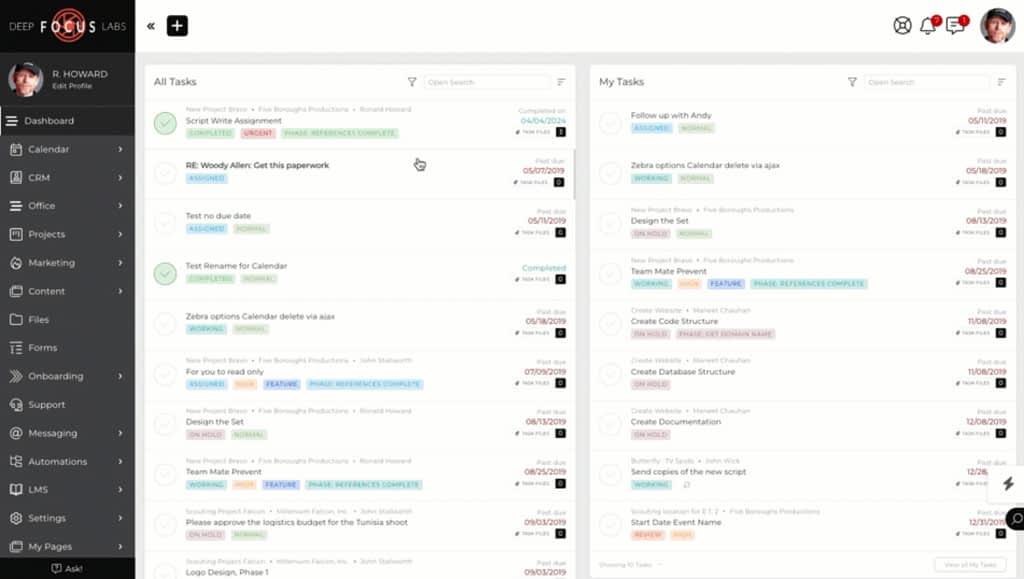
SuiteDash is worth a closer look if the lack of CRM features — lead generation, client onboarding workflows, sales pipelines — kept ruining your Basecamp experience.
In SuiteDash, you get all that and more.
First of all, it comes with a centralized workspace for managing client information, communication, and related resources. Teams can store contact details, assign clients to specific sales representatives or account coordinators, maintain private or shared notes, create internal tasks, and manage files associated with each client. This keeps client records and project-related information in a single location, accessible to everyone at all times.
For grouping contacts based on specific criteria — customer type, membership level, or service package — users can use the CRM Circles feature. Contacts can be assigned to one or multiple Circles manually, through forms, via the API, or through automated workflows. Circle membership can control what portal pages, file repositories, and resources clients can access, making it easier to standardize experiences for different customer groups while still supporting customized workflows. This is great news for businesses with huge client bases!
For those working with organizations more often than not, SuiteDash also supports company-level contact management; a single contact can belong to multiple companies and switch between profiles when needed. Businesses can also set up a primary contact who receives notifications when anything changes to ensure lightning-fast reactions.
And of course, there’s the sales pipeline, allowing teams to track opportunities through customizable deal stages. Opportunities can be viewed in several layouts, including a Kanban board with drag-and-drop functionality. The pipeline also provides visibility into sales progress, helping teams monitor opportunities, organize their sales process, and estimate future revenue.
Best Use Case
Based on the previous section, it’s clear that SuiteDash is best suited for bigger teams that work with multiple clients and want to combine CRM, client onboarding, project management, and client portals in a single system. This platform will work best in the hands of people who like to stay organized and gain visibility into all internal processes. Smaller, dynamic teams who are more interested in delivering projects quickly and efficiently will have to look elsewhere. Overall, compared to Basecamp, is a much robust software.
Pricing
SuiteDash offers three pricing plans with monthly, annual, and lifetime (“Century”) billing options:
- Start: costs $19 per month (or $180 per year) and includes the platform’s core features, such as CRM, client portals, white labeling, email marketing, and 100 GB of file storage.
- Thrive: starts at $49 per month (or $480 per year) and adds growth-focused tools, including deal stage pipelines, proposal management, client live chat, autoresponder campaigns, and 500 GB of storage.
- Pinnacle: at $99 per month (or $980 per year), this plan unlocks the platform’s most advanced capabilities, such as workflow automation, onboarding flows, task dependencies, learning management, support tickets, and customer journey tools, along with 2 TB of file storage.
All plans include a 14-day free trial, can be upgraded or downgraded at any time, and don’t require a long-term contract.
Bonsai: Introduction
Hello Bonsai is an all-in-one business management platform built with freelancers in mind, although small service-based businesses can also make use of it. Its biggest charm lies in its robust time-tracking, which we have praised several times already on our blog; it allows users to easily track their working sessions, generate invoices based on timesheets, and get real-time insights on how the business is doing financially.
Last year, Bonsai was acquired by Zoom. According to their press release, users can expect Bonsai’s capabilities to be incorporated into Zoom soon enough, so that everything stays on one platform.
Basecamp’s Missing Piece: Robust Billing
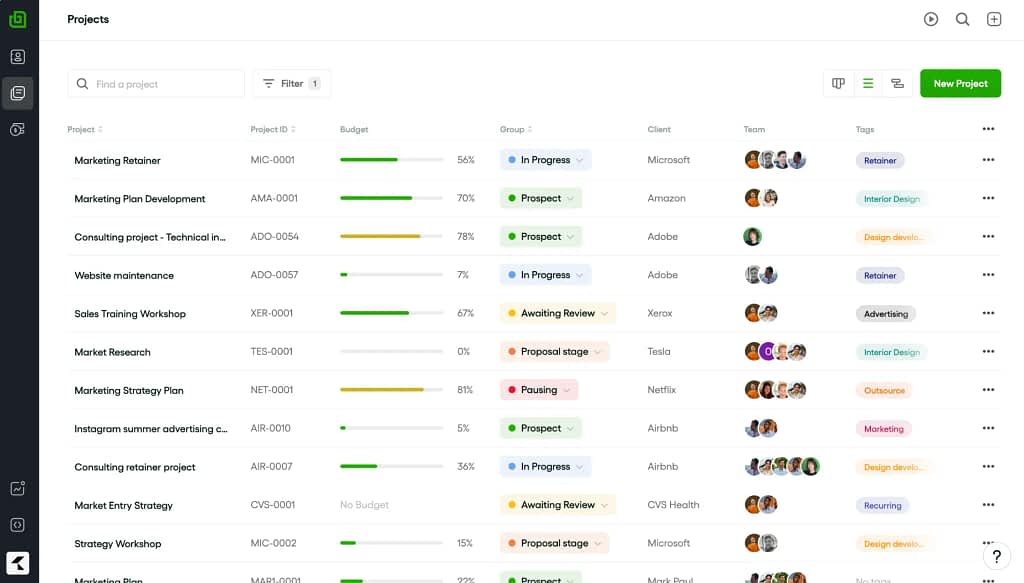
As previously mentioned, Bonsai’s stronger point — and a feature that’s currently missing from Basecamp — is its time-tracker, directly connected to other features on the platform. While time-tracking in itself isn’t a rare sight among business management platforms, the way it’s incorporated into the entire ecosystem makes it stand out.
Users can either track time using an in-app timer or log hours manually, linking the time directly to projects and tasks. This will prompt the platform to automatically generate timesheets, separating billable and non-billable hours, and converting the former into invoices that can be quickly sent out to clients.
But besides giving insights into the day-to-day operations, Bonsai also helps glean the future with its Weekly Billable Hours Calculator. Thanks to that, teams can calculate billable hours and earnings for the week. Users can select a start date and currency, enter their hourly rate, log hours worked each day, and instantly see the billable value per day and week. Besides eliminating manual calculations, this feature makes it easier to manage the future workload.
Which brings us to tracking utilization — after setting each team member’s capacity and tracking billable and non-billable time, users can access reports showing resource utilization and billable utilization for individuals or the entire team. Reports can be filtered by project, client, date range, or team member, making it easier to identify underutilized or overloaded employees and improve resource planning in general.
Best Use Case
As we can see, Bonsai is best suited for client-facing businesses that need to track billable hours, generate invoices, monitor team utilization, and forecast workloads from a single platform. Its analytics aren’t powerful enough to satisfy enterprise needs, but freelancers, small teams, and medium-sized businesses who really need to keep a close watch over each and every minute should be satisfied.
Pricing
Bonsai offers four pricing tiers with discounts available for annual billing and larger teams:
- Basic: starts at $15 per user per month (or $108 per year) and includes the following core project management features: time tracking, task management, CRM, unlimited projects and clients, and mobile apps.
- Essentials: at $25 per user per month (or $228 per year), this plan adds client management and financial tools: invoicing, online payments, proposals, contracts, scheduling, expense tracking, and a client portal.
- Premium: costs $39 per user per month (or $348 per year) and introduces more advanced project management capabilities: workload management, Gantt charts, project insights, sales pipelines, custom fields, productivity reports, client messaging, and third-party integrations.
- Elite: starts at $59 per user per month (or $588 per year) and adds enterprise-focused features like custom permissions, timesheet locking, expense markups, Xero integration, and custom data imports.
While these prices may seem appealing at first, keep in mind that the total cost scales with the size of your team. Larger businesses should consider whether switching to a more comprehensive solution with flat-rate pricing would be the more cost-effective option. In this case, Basecamp remains the more affordable option.
Zendo: Introduction
Zendo is a service-selling platform with strong Client Portal capabilities, making it an excellent choice for agencies and service providers that need a simple way to manage ongoing client relationships and support workflows without relying on scattered emails and chat apps.
What makes Zendo stand out is that it heavily revolves around the client experience. It allows businesses to create structured client communication channels, manage support requests, provide self-service resources, and maintain a clear record of client conversations and work history. Combined with automation features, customizable Storefront, and real-time chat, we end up with a holistic platform that makes any collaboration a breeze.
Zendo’s quote page
Basecamp’s Missing Piece: Client Independence
Zendo elevates the client experience more than its competitors; not only facilitating collaboration in general, but also by making the client part of the conversation. Literally.
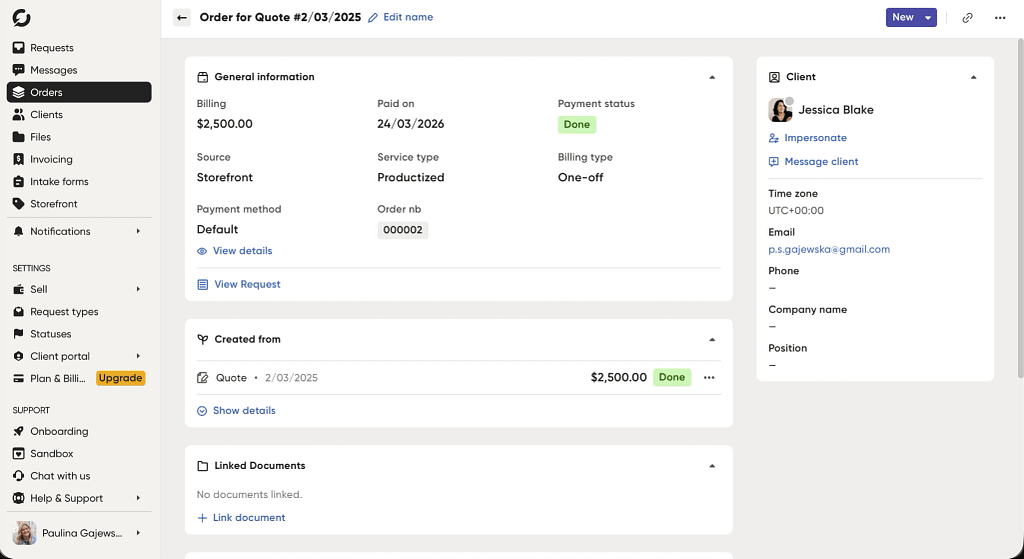
First of all, each created client Request creates its own conversation thread, removing the need to even bother with the endless stream of back-and-forth email messages. In that conversation, users can do the following actions:
- Issue invoices and generate quotes,
- On the client side — accept or reject quotes,
- Finalize payments via Stripe integration,
- Exchange notes visible only to the team,
- Send any other files.
But isn’t a conversation thread a bad idea, especially when entire groups of people talk regularly? Won’t important messages get lost in the flood? Not at all — Zendo saves all the information, which can be accessed from other spaces as well; for example, exchanged images and notes will show up in the Client Profile.
When it comes to client perspective, Zendo, more than any other platform, arms them with all the right tools to take action on their own behalf. Zendo makes it possible to:
- Purchase new services through the Storefront,
- Submit new requests (be it productized, custom, or subscription-based),
- In case of subscriptions, pause and resume them as needed,
- Rearrange requests on Kanban board if priority changes,
- Create their own internal team if there are more stakeholders present,
- Accept or reject quotes as well as finalize payments,
- Look up all the files, download them, and upload new ones.
If that’s not enough, you can customize your client’s space to ensure they have everything they need to make the partnership dreamy. You can, for example, prepare an onboarding sequence for them to follow through, enriched with images and checklists. But most importantly, you can customize their sidebar so as to not overwhelm them with too many tabs to count. Combined with the option to embed external apps, you can easily link to any YouTube videos, Figma projects, or Miro dashboards — making all the resources accessible.
In short, Zendo makes everyone part of the conversation, removing the need for a middleman and eliminating the chance of any misunderstandings taking place.
Best Use Case
Unlike traditional project management tools that primarily help internal teams stay organized, Zendo is built around client collaboration. It’s particularly well suited for businesses that manage ongoing client requests, approvals, and communication, such as marketing agencies, design studios, software development firms, or consultancies. Clients aren’t limited to just viewing project updates; they can submit requests, approve quotes, make payments, access files, prioritize work, and communicate directly with the team from a shared workspace.
By combining client communication, service management, billing, and self-service features in one portal, Zendo helps reduce reliance on email while giving both businesses and clients a single place to collaborate on work.
Pricing
Zendo will do its best to tempt you with four different pricing tiers:
- Essential: an entirely free plan that covers all the basics: Client Portal, Storefront, single productized service, request and Order Forms, manual payments.
- Core: starts at $29 per month (or $300 per year) and adds features such as customizable request types and statuses, quotes and invoices, Stripe integration, Storefronts with multi-step checkout, and basic white-labeling.
- Pro: for $59 per month (or $588 per year), you get automation, unlimited request types, subscription services, intake forms, client onboarding, external app integrations, and support for client organizations, making it better suited for growing teams.
- Agency: starts at $99 per month (or $948 per year)
Note that all the prices are for one internal user only; additional seats have to be paid for separately.
HoneyBook for Automated Workflows
Next Basecamp alternative, HoneyBook, is a client management platform built primarily for independent, creative professionals. It combines CRM, project management, proposals, contracts, invoicing, online payments, scheduling, and client communication in a single workspace, helping businesses manage the entire client lifecycle from inquiry to final payment. And it’s beloved particularly for its automated workflows — when set up properly, HoneyBook will take care of most of the work for you.
Sadly, HoneyBook’s charms can’t be enjoyed by everyone. At the moment, it’savailable only to users in the US and Canada, all because of its internal payment method.
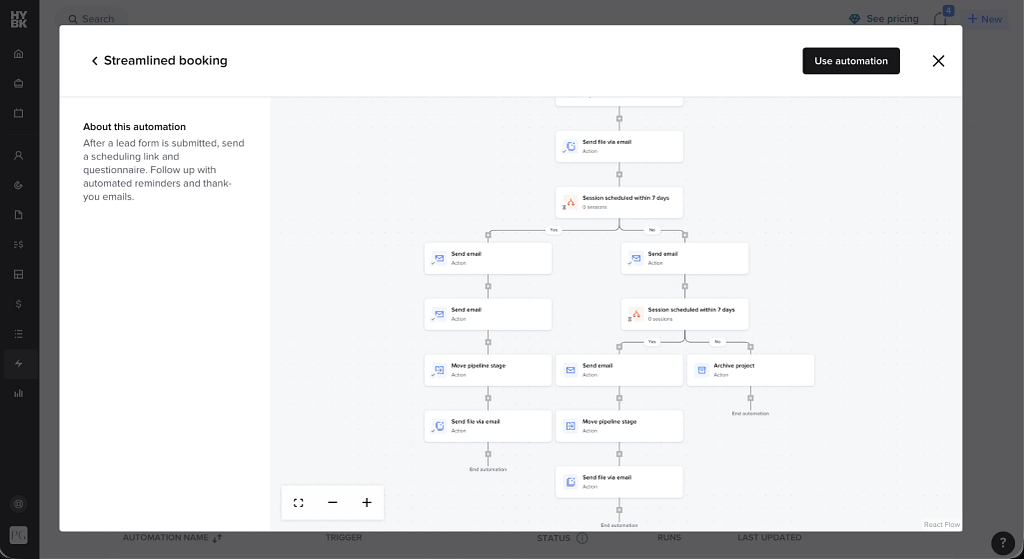
Example flow in HoneyBook
Basecamp’s Missing Piece: Project Management Flows
HoneyBook comes with its own automation builder to help you get rid of all the repetitive tasks across your projects. To make sure the process is as easy as possible — which is especially important once conditional logic takes the stage — the platform presents all the workflows in a visual way, reducing the risk of creating conflicting processes.
While automated workflows promise lots of benefits, they also require businesses to follow structured processes that aren’t always easy to adjust later on. Even a small change to one step may require updates throughout the entire workflow, creating a domino effect. And that’s something HoneyBook has taken notice of — and it offers a solution.
Instead of relying on a single workflow per project, users can create multiple automations that are triggered by specific events, such as an inquiry, booking, invoice payment, or project milestone. Each workflow is built from a series of triggers, actions, delays, and optional conditions, enabling businesses to automate repetitive processes while adapting them to different scenarios.
This allows teams to automate individual parts of the client journey without redesigning an entire workflow, making it easier to handle different project types, client behaviors, and business processes while reducing manual administrative work. Talk about flexibility!
Best Use Case
HoneyBook will shine the strongest in the hands of creative professionals based in the US and Canada that regularly handle a steady flow of client projects and want to automate administrative tasks — but not at the cost of flexibility.
Sadly, larger organizations with more complex collaboration, reporting, or operational needs may find themselves outgrowing the platform as they scale. Businesses expecting rapid growth should consider whether HoneyBook’s features will continue to meet their needs in the long term.
Pricing
There are three paid tiers on the HoneyBook table:
- Starter: starts at $36 per month (or $348 per year) and includes the platform’s core client management features, such as unlimited clients and projects, proposals, contracts, invoicing, online payments, scheduling, a client portal, basic reporting, and HoneyBook AI.
- Essentials: for $59 per month (or $588 per year), this plan adds productivity features, including workflow automations, QuickBooks integration, SMS reminders, support for up to two team members, additional lead forms, and the ability to remove HoneyBook branding.
- Premium: costs $129 per month (or $1308 per year) and is designed for growing businesses, offering unlimited team members, advanced reporting, priority support, multiple company management, and unlimited lead forms.
All plans include a free trial and can be changed or canceled at any time.
In comparison to other project management platforms, HoneyBook’s pricing doesn’t revolve around the number of users until the Premium tier. However, businesses that need more than two team members must upgrade to the highest-priced plan, making the jump in cost significant.
Agiled for Employee Management
Similarly to our other propositions, Agiled is an all-in-one business management. But what makes it stand out is how it places a strong emphasis on employee management alongside client and project management. Teams can maintain employee records, track attendance and leave, manage shifts and payroll-related information, assign tasks, and monitor time spent on projects, removing the need to invest in other tools.
Combined with its CRM and client management features, this allows businesses to oversee both their workforce and client relationships from the same platform.
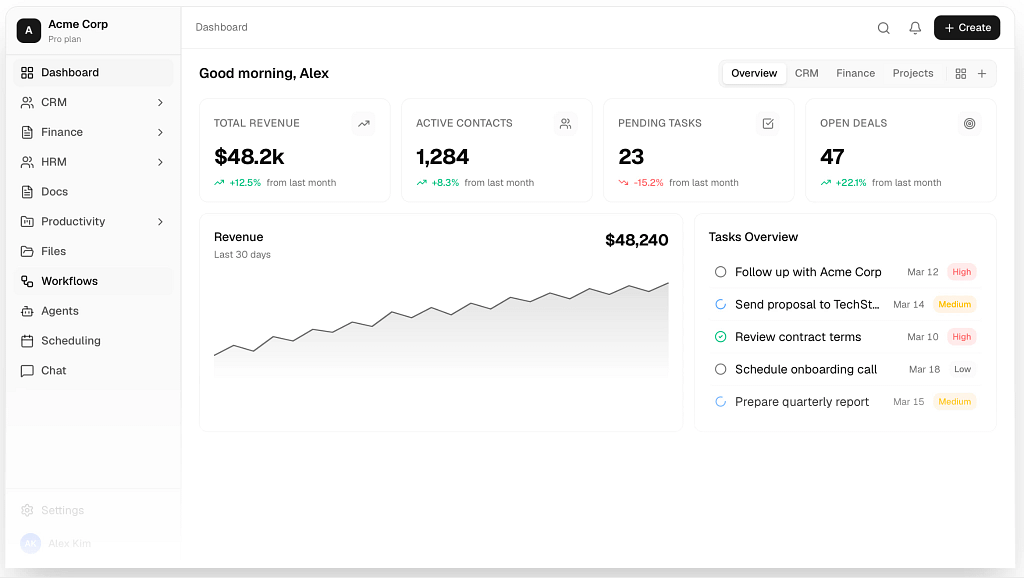
Basecamp’s Missing Piece: Overseeing Teams
Team and employee management is often overlooked in business management software — unless we’re talking about enterprise solutions. But for small and medium-sized companies, there’s no choice but to juggle several different apps to track time, manage attendance, track holidays, and compare workloads.
That’s where Agiled comes in with a range of HR features designed to keep everything under one roof. Employees can clock in and out directly from their portal, while managers get a centralized dashboard for monitoring attendance across the company. Besides recording working hours, the platform lets administrators manually adjust attendance records, mark late arrivals and half-days, and review detailed reports filtered by employee, date, month, or year.
Agiled also includes built-in time tracking, allowing employees to start timers or log hours manually for specific projects. Managers can monitor active timers in real time — to satisfy these micromanagement needs — review and filter time logs by employee, project, or date, and require administrative approval before tracked time is finalized. Settings can also be configured to automatically stop timers after office hours or limit time tracking to projects or individual tasks; this way, no one will have to face the still active timer after the whole weekend.
The employee management toolkit extends beyond attendance and time tracking into expense management. Team members can submit work-related expenses, attach receipts, assign them to projects, and record vendor information, while managers can review and organize all expenses from the platform’s finance module.
Best Use Case
All in all, for managers who like to run a tight ship, Agiled will be a godsend. Between attendance tracking, time logs, expenses, HR records, CRM, and project management, it gives you a bird’s-eye view of both your team and your clients. It’s the kind of platform where very little slips through the cracks; perfect for managers who sleep better knowing everything is exactly where it should be. You can replace Basecamp with Agiled if you’re part of a bigger team, where overview gains importance.
Pricing
If you’re still interested, look at these four subscription plans offered by Agiled:
- Starter: at $29 per month (or $288 per year), you get everything a freelancer or a solo professional needs: core CRM, project management, invoicing, payments, scheduling, and AI features with usage limits.
- Pro: for $69 per month (or $708 per year), this plan removes the aforementioned limits and introduces workflow automation, reporting, help desk tickets, API access, multiple sales pipelines, and additional calendars.
- Premium: for $129 per month (or $1188 per year), this plan focuses on businesses looking to create a branded client experience. It adds white-label Client Portals, custom domains, subscriptions, commerce features, custom SMTP, and expanded automation limits.
- Business: at $249 per month (or $2388 per year), this plan is ripe for larger organizations thanks to increased storage and platform limits while expanding the HR toolkit and automation capabilities.
- Enterprise: for custom pricing, businesses needing more than 15 seats can negotiate for a space tailored to their specific requirements.
This Basecamp competitor doesn’t have the most affordable pricing model on the market; on the other hand, bigger teams that could benefit from it the most should have proportionally big pockets.
Best Basecamp Alternatives and Competitors
Thankfully, the market is ripe with candidates for Basecamp replacement, all focusing on one chosen business management aspect:
- SuiteDash: this holistic work management tool is great for growing businesses that require rich CRM features to finally say goodbye to spreadsheet shenanigans.
- Bonsai: this management and time tracking software combines freelancer-friendly simplicity with truly useful features that help manage projects with efficiency.
- Zendo: this project management and collaboration tool is best for teams that like to complete client work in close collaboration with clients themselves. With its top-notch team communication, delivering a professional service has never been smoother (or easier).
- HoneyBook: this project management software is a good replacement for Basecamp, endearing its users with a nice template library and an intuitive flow creation.
- Agiled: this alternative to Basecamp doesn’t just tackle team collaboration; it also offers additional sets of eyes to track your team members movement across the platform, noting down holidays and tracking task progress from up close.
But don’t take our word for it — take advantage of the free trials these tools offer! In case of Zendo, you can sign up for the entirely free plan as well; with no time restrictions, you can get to learn the platform on your own rules.
FAQ: Best Basecamp Alternative and Competitors in 2026
Is Basecamp The Best Project Management Software?
Each software has its own strengths and weaknesses; and Basecamp is no different. While Basecamp offers solid project management features ideal for small teams, an average small to medium business and enterprise might find Basecamp limiting. Still, if you have outgrown tools like Trello with its simple to-do lists or Asana, using Basecamp is a good idea.
How to Choose The Best Basecamp Alternative?
When you look for basecamp alternatives, see if there’s a free version of the tool that gives you ample time to learn whether the chosen work management platform is a good alternative. Try to recreate specific business use cases that you face on a daily basis before committing to a paid plan.
What Are The Best Free Basecamp Alternatives?
Thankfully, there are many tools similar to Basecamp that offer elevated features for better work management. For example, if you’re looking for something more versatile than Basecamp, look up Zendo; it’s best for small teams that focus on selling productized and custom services while improving the customer experience by leaps and bounds.